Possibly you experience interference on your home network, causing overload on the remaining diminished bandwidth.
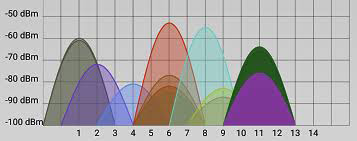
Restarting your router may automatically select new optimized Wi-Fi channels with less interference from neighboring networks, if set to automatically select the best channels (once at boot time). Or manually find channels for both bands in a relatively empty zone for your router configuration and for your area, where other routers (e.g. your neighbors’ routers) aren’t present or less present. Interference may be very localized, and can change from mild to severe between rooms.
Resolve Wi-Fi and Bluetooth issues caused by wireless interference - Apple Support
If your Apple TV can't connect to Wi-Fi - Apple Support
Recommended settings for Wi-Fi routers and access points - Apple Support

