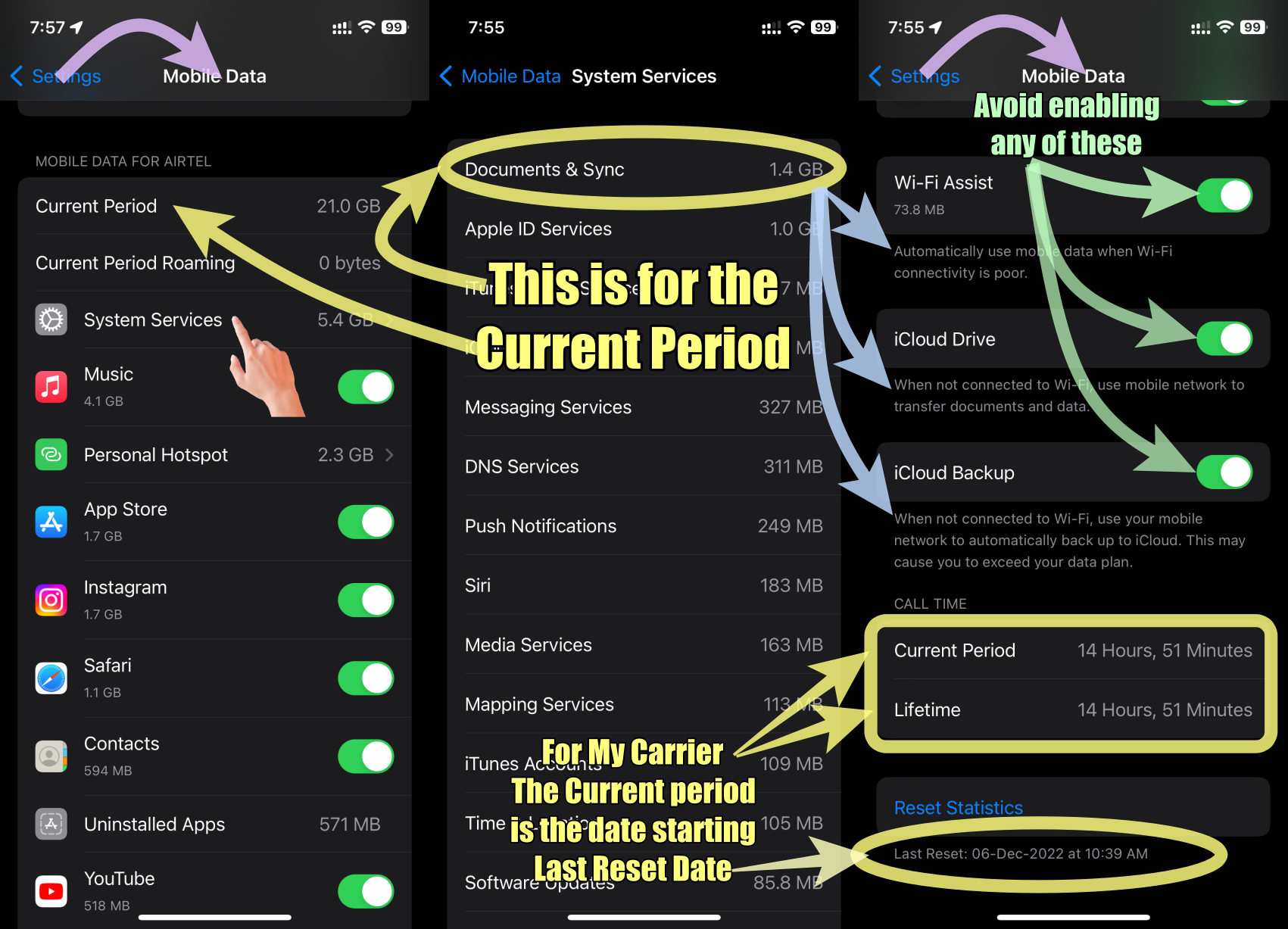
It's normal to see "Uninstalled Apps" listed as a data consumer on your iPhone, even if you've deleted those apps.
This happens because of the Data Tracking Period: Your iPhone tracks data usage for a specific period. If you uninstall an app during that period, its data usage will still be counted and categorized under "Uninstalled Apps."
In an iPhone's Mobile Data settings, the "Current Period" refers to the specific time frame during which your mobile data usage is being measured and tracked. It provides you with information about data usage within a defined period, allowing you to monitor and manage your data consumption.
- The duration of the Current Period depends on how it aligns with your monthly billing cycle or the period set by your cellular carrier.
- The Current Period under Mobile Data in an iPhone is the amount of cellular data you have used since the last time you reset your statistics. That is what my carrier indicated. In the pic below you will notice that the Current Period and "Life Time" remain the same. This supports my observation that the current period starts from the Last Reset Date.
See the pic below which is self-explanatory