How do I fix heating issue on my iPhone 16 Pro?

Hey there! I just got the iPhone 16 Pro 1TB, and it’s overheating like crazy. It’s kinda scary, feels like it might explode in my hand while I’m typing this. I bought it less than 24 hours ago. Any tips? Also, what’s the return policy? Thanks 


[Re-Titled by Moderator]

iPhone 16 Pro

Posted on Sep 26, 2024 12:28 PM

Reply
Question marked as Top-ranking reply

Posted on Sep 26, 2024 12:33 PM


Some activities such as charging or a lot of computational activity (e.g., video), generate heat. Some warmth is to be anticipated.* "Keep your iPhone, the power adapter, and any wireless charger in a well-ventilated area when in use or charging."** Read this article about keeping your iPhone, iPad, or iPod touch within acceptable operating temperatures - If your iPhone or iPad gets too hot or too cold - Apple Support


Changes in software such as upgrades may introduce new features which may add to power drain and heat generation. Check Settings > Battery to see if there are apps running that use a lot of power. If there are, decide if you can turn off a service such as Settings > General > Background app refresh when an app is in the background, or Settings > Privacy > Location Services. Read this support article to learn about the battery health feature —> iPhone Battery and Performance - Apple Support


For the iPhone 15 read posts about indexing in this thread: iPhone 15 overheating - Apple Community


If you think there is a problem with a device, have Apple inspect it. Go to this page to find your nearest Apple Authorized Service Provider (AASP) or Apple Authorized Distributor (AAD) --> Find Locations


How to make a Genius Bar appointment

1. Go to Genius Bar Reservation and Apple Support Options - Apple

2. Go to "Get hardware help".

3. Select your hardware and continue selecting options requiring replacing parts until you see "Bring in for Repair"

4. Sign in with your Apple ID


*"Your iPhone might get slightly warmer while it charges." - from: How to use your MagSafe Battery Pack - Apple Support

**Section about "Prolonged heat exposure" in this support article --> Important safety information for iPhone - Apple Support


It could also be if you first got it then it is doing some setting up, requiring a lot of computation. Give it a day or two and see if there's the same problem.

155 replies

Mar 26, 2025 4:52 AM in response to ramtin81

  • If your iPhone frequently overheats, start by checking your charger. A faulty or uncertified charger can contribute to overheating and even damage your device. Use only MFi-certified chargers to ensure safe charging.


  • Another common cause is excessive clutter. Unnecessary files, outdated backups, and unused apps can slow down your iPhone and generate heat. Free up storage by deleting old downloads, removing redundant backups, uninstalling unused apps, and clearing unnecessary photos and videos. If manual cleanup feels tedious, consider using a storage management app.


  • Restarting your iPhone regularly can help clear system glitches and prevent overheating. If a simple restart doesn’t work, try a full reboot. Additionally, enabling Low Power Mode reduces power consumption by disabling background processes, helping to keep your device cool.


  • Too many background apps can also contribute to overheating. Close unused apps by swiping up from the bottom and dragging app cards up. Similarly, Location Services can drain your battery and cause excessive heat. To reduce strain, temporarily disable it under Settings → Privacy & Security → Location Services.


  • Monitoring battery health is essential in preventing overheating. If your Maximum Capacity drops below 90%, take steps to maintain it. Since iPhone batteries degrade after around 500 charge cycles, checking your battery cycle count can help determine if a replacement is needed.


  • Finally, turning off unused connectivity features like Wi-Fi, Bluetooth, Cellular Data, Personal Hotspot, and AirDrop when not in use can reduce background activity and help regulate temperature. If overheating persists, consider reaching out to Apple Support for further assistance.

Jan 22, 2025 8:32 AM in response to akhtarali_ds

akhtarali_ds wrote:

Whenever I am on call, it gets hotter and I feel like it will peel my skin off.

and when it is on charge, it sticks on 80% mentioning that the the charging will resume after the temperature is cool down.

iPhone 16 pro max
location: Australia

Neither is an indication of overheating. Phone calls can generate heat, especially if you don't have a strong connection to a cellular tower, the phone has to work much harder. And when an iPhone works much harder, it generates heat. Your other situation is normal, completely. I'm going to assume you are using Fast Charging (at least a 20w charging brick)? We ALL get this notification now, which simply means the phone charged to 80% rapidly and will resume charging when the phone is cooler as fast charging heats up the battery naturally. This is NOT an indication your phone is overheating at all.


If an iPhone actually overheats, it will display a thermometer on the screen and notify you the phone cannot be used until it cools down. Since you aren't seeing this, your phone isn't overheating.

Feb 12, 2025 2:36 PM in response to Jeff Donald

Deleting the Apple TV app, then reinstalling it from the App Store seems to have solved the overheating issue on this iPhone 16 Pro (running iOS 18.3) when playing back downloaded films (when not connected to the internet).


P.S. Am sure movie playback is a processor and data intensive task… But whether playing back a movie in Disney+, Netflix, Apple TV, etc. one wouldn’t expect one app to cause overheating, while the others didn’t.


Anyway… Thanks for the suggestion. 👍🏻👏🏻

Jun 13, 2025 8:23 AM in response to patti from lake charles

patti from lake charles wrote:

Yeah, my bad seems like it was much longer ago than that, but I did purchase mine in November 2024. I do in fact I have a 16 pro max, regardless of when I bought it, this problem has not occurred until just recently.

The easiest thing to try is a Forced Restart, which usually fixes things quickly. Do this and keep the instructions as it's something recommended after every iOS update --> Force restart iPhone - Apple Support


Also, pay attention to 3rd party apps from Meta, like Facebook, Instagram, Messenger. They have a storied history of running in the background, which can generate heat even if one is not using them. For that reason, I always force close them after using them and I never have any heating issues on my 16 Pro or 16 Pro Max.


See how to Force Close an app here --> Close an app on your iPhone or iPod touch - Apple Support


Sep 28, 2024 9:48 AM in response to rt987

And the same set of suggestions. Pretty much every new iPhone release is accompanied here by a spate of "overheating" complaints. After week or two we don't see many posts about it anymore. Why? The iPhone has done its set of initialization procedures and is just running normally. Why don't you see it with your iPhone 14? Maybe because the iPhone 14 is likely 2 years old.

Apr 14, 2025 6:41 AM in response to ramtin81

So Ive had this phone now since March 3rd, it is April 14 at the moment. I too still have this same issue, and haven't really found a fix either. The only thing that helps to prevent my phone from getting super hot without using it is if you have it in "Low power mode".

I do absolutely nothing, and this phone heats up to a concerning level. With the mode on, I can use it and can keep it connected to car play for hours before it gets hot from over using.

Jun 12, 2025 1:22 PM in response to ramtin81

Hello all. I’ve had iPhones for generations starting from the 4s. My 15 Pro used to get very hot as well but never for any models before. My current 16 Pro Max has been getting super hot as well, but only doing certain tasks and games. I installed a system monitor and it showed that the cpu was running at over 80%. That’s what was overheating the device. When I shut down the app, it cooled quickly.


Hope this helps. Would be nice to have the ability to throttle cpu for certain apps. Don’t think that’ll happen though.

Jul 6, 2025 4:48 PM in response to brettcat

Are you charging with MagSafe or USB-C cable?


If MagSafe, are you charging with the case on, or case off?


If MagSafe charging with the case on, is your case a well-known brand, or a not-so-well-known brand?


The reason I ask: a lot of aftermarket MagSafe cases for the iPhone 16 are being sold with MagSafe coils that are NOT aligned/centred with the phone's internal MagSafe charging coil. MagSafe charging relies on accurate alignment of the case's coils with the phone's coils. When they're misaligned, not only is charging less efficient (i.e. slower), a lot more energy is given off as heat.


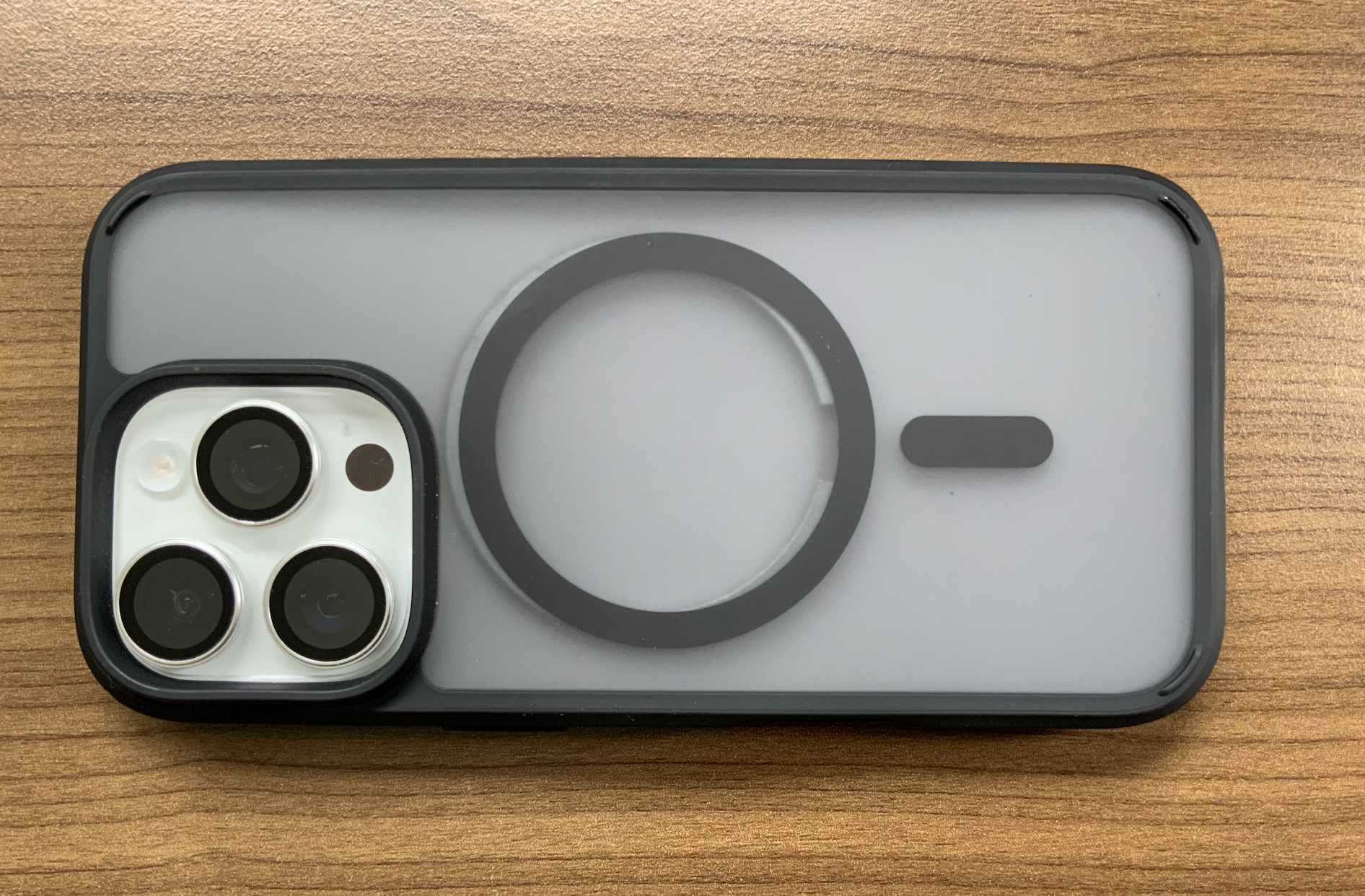
If your case has a transparent or semi-transparent back, you can roughly tell if it's misaligned by seeing if the Apple logo is centered in the case's MagSafe circle, or if the logo looks a bit higher than centre. Recently I bought and reviewed two aftermarket MagSafe cases for my iPhone 16 Pro, both of which had misaligned MagSafe rings. I was wondering why they were charging at kinda USB 1 amp speeds and found that as soon as I removed the case, the phone charged a lot faster.


In the photo below, I have taken a spare magnetic ring that fell out of a MagSafe battery pack, and I've let it snap into place on the back of the naked phone, as a visual indicator of the position of the phone's internal charging coils. I've then put the offending case onto the phone, and taken a photo from dead centre above.


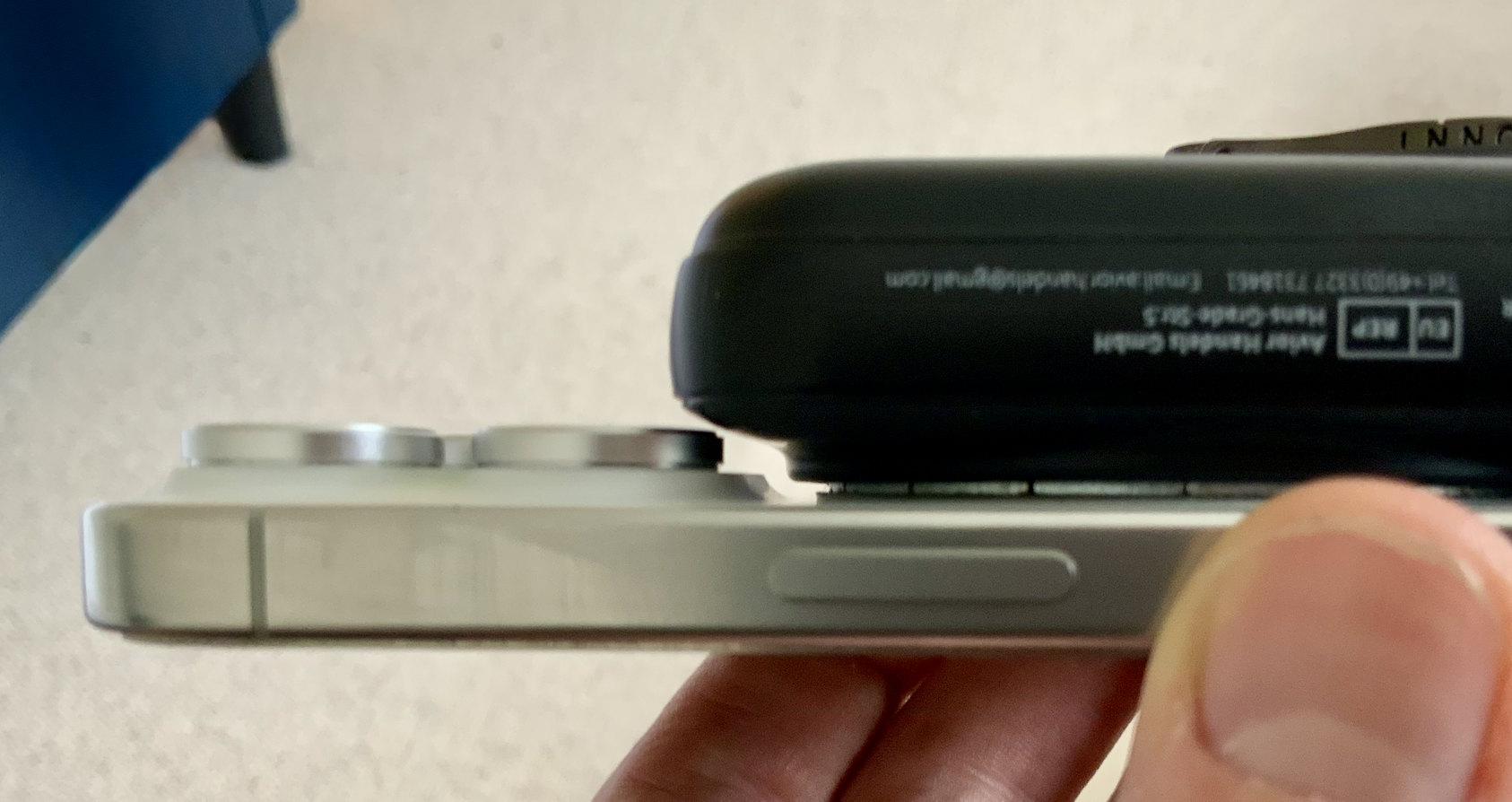
I also confirmed separately that the Apple MagSafe puck aligns itself to the case's coils, not the phone's coils. As you can see, the case's MagSafe ring is about 3-4mm (0.12" - 0.16") too low. I believe this is a design challenge for case manufacturers that have a rugged thick frame around the camera lenses - if they put their MagSafe ring any higher, a lot of MagSafe chargers and mounts would clash with that frame. The second photo shows an example of how close my MagSafe battery pack comes to the phone's own camera structure - and this is without the case and its thick camera frame. If the case's ring was properly aligned with the phone's MagSafe coils, I reckon my battery pack would not be able to attach properly because it would hit the case's thick frame around the cameras.

The third photo is me pushing the Apple MagSafe charger puck upwards by approximately 3-4mm just to illustrate how the bottom edge of the case's camera protection frame pretty much hits the top of the MagSafe coils.


I think cheaper case manufacturers are dealing with this by simply putting the case's MagSafe coils lower. Effectively this means that such a case does not officially support MagSafe, because Apple's specs would no doubt be very exact about coil alignment as they don't want to be blamed for slow charging.

[Edited by Moderator]

Feb 10, 2025 5:51 AM in response to karloscastaneda

I haven't had coffee yet, so my caffeine deprived mind, didn't think you were watching a downloaded movie!


Still the same answer. You are watching a movie. Do you not understand that playing videos makes your battery work harder, whether it was previously downloaded or is already stored on your device?


If your phone is showing a thermometer or shutting down, that's not normal and should be checked out at your Apple Store Genius Bar. If your phone isn't shutting down or showing a thermometer, it is NOT overheating.

This thread has been closed by the system or the community team. You may vote for any posts you find helpful, or search the Community for additional answers.

How do I fix heating issue on my iPhone 16 Pro?

Welcome to Apple Support Community
A forum where Apple customers help each other with their products. Get started with your Apple Account.



