I can’t toggle between Mastercard and eftpos savings in Apple wallet

Since setting up new iPhone 16pro I can no longer toggle between Mastercard and eftpos savings in Apple wallet. I’m using the same car I was on my 14pro, I’ve tried removing the card and adding again many times and still can’t seem to get this function back

Posted on Sep 28, 2024 9:55 PM

Reply
Question marked as Top-ranking reply

Posted on Oct 22, 2024 2:44 PM

It seems like Apple and RBA has actually removed this and is putting the controller in the hands of merchant and they can choose which network to use Visa/Mastercard or eftpos SAV. In my experience if you buy something lower than $20 it’s cheaper to use Visa/Mastercard as the surcharge is a percentage around 1.5% and with SAV it’s a fixed surcharge maybe 20-50 cents. Who know what the merchant will chose but RBA recommends to use the lowest cost to route network to do the payment. In conclusion this is now in the hands of the merchant who can pick what ever they want that benefits them.
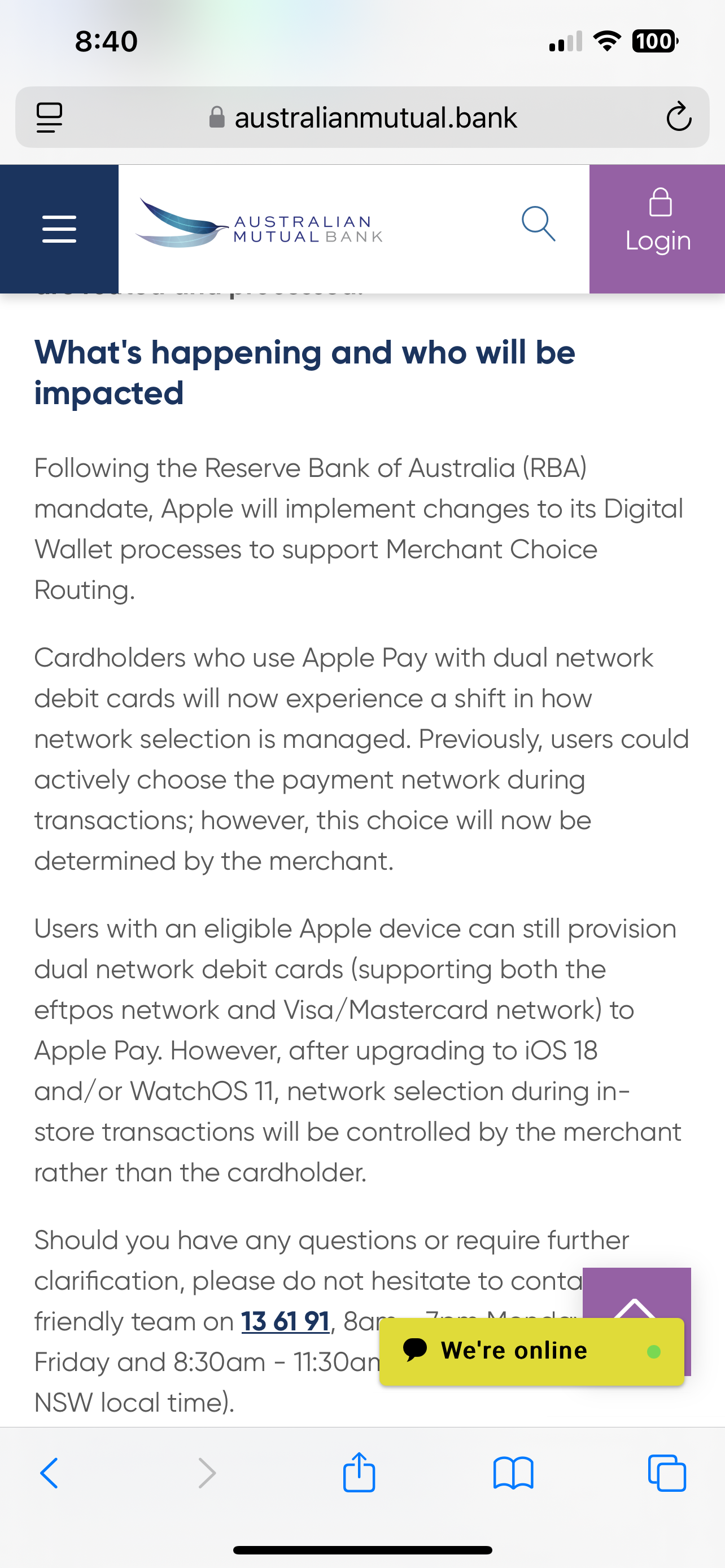

from Australia mutual bank

“What's happening and who will be impacted 

Following the Reserve Bank of Australia (RBA) mandate, Apple will implement changes to its Digital Wallet processes to support Merchant Choice Routing.

Cardholders who use Apple Pay with dual network debit cards will now experience a shift in how network selection is managed. Previously, users could actively choose the payment network during transactions; however, this choice will now be determined by the merchant.

Users with an eligible Apple device can still provision dual network debit cards (supporting both the eftpos network and Visa/Mastercard network) to Apple Pay. However, after upgrading to iOS 18 and/or WatchOS 11, network selection during in-store transactions will be controlled by the merchant rather than the cardholder.

Should you have any questions or require further clarification, please do not hesitate to contact our friendly team on 13 61 91, 8am - 7pm Monday to Friday and 8:30am - 11:30am on Saturday (Sydney NSW local time).

Frequently asked questions

My dual network debit card in Apple Pay has changed, I no longer have the option to select the payment network (Visa/Mastercard and Eftpos)? 

Yes, the user experience has changed, merchants will now select the network in which they wish to route transactions. You can still use Apple Pay the same way you always have by double clicking the side button and authenticating with Touch ID, Face ID or passcode.

How can I check if my dual network debit card in Apple Pay supports both Visa or Mastercard and eftpos payment networks?

You can determine whether your dual network debit card supports both networks by;

On iPhone 

  1. Open the Wallet app.
  2. Tap on your card.
  3. Tap the More button
  4. Tap Card Number.

Within the Card Number section, if you see Mastercard or Visa and eftpos network, then the card is a dual network debit card.

On Apple Watch

  1. Open the Wallet app.
  2. Select the dual network debit card
  3. Tap ‘Card Details’

After following the above steps, if you see eftpos and an international debit network (Mastercard or Visa), then the card is a dual network debit card.

What is the minimum system requirements for merchant choice routing via Apple Pay? 

Newly provisioned dual network debit cards on iPhone running iOS 18 or above and on Apple Watch running WatchOS 11 or above”


https://australianmutual.bank/news-blog/articles/changes-to-dual-network-debit-cards-for-apple-pay/


Use dual-network debit cards with Apple Pay in Australia - Apple Support


59 replies
Question marked as Top-ranking reply

Oct 22, 2024 2:44 PM in response to Zemson

It seems like Apple and RBA has actually removed this and is putting the controller in the hands of merchant and they can choose which network to use Visa/Mastercard or eftpos SAV. In my experience if you buy something lower than $20 it’s cheaper to use Visa/Mastercard as the surcharge is a percentage around 1.5% and with SAV it’s a fixed surcharge maybe 20-50 cents. Who know what the merchant will chose but RBA recommends to use the lowest cost to route network to do the payment. In conclusion this is now in the hands of the merchant who can pick what ever they want that benefits them.


from Australia mutual bank

“What's happening and who will be impacted 

Following the Reserve Bank of Australia (RBA) mandate, Apple will implement changes to its Digital Wallet processes to support Merchant Choice Routing.

Cardholders who use Apple Pay with dual network debit cards will now experience a shift in how network selection is managed. Previously, users could actively choose the payment network during transactions; however, this choice will now be determined by the merchant.

Users with an eligible Apple device can still provision dual network debit cards (supporting both the eftpos network and Visa/Mastercard network) to Apple Pay. However, after upgrading to iOS 18 and/or WatchOS 11, network selection during in-store transactions will be controlled by the merchant rather than the cardholder.

Should you have any questions or require further clarification, please do not hesitate to contact our friendly team on 13 61 91, 8am - 7pm Monday to Friday and 8:30am - 11:30am on Saturday (Sydney NSW local time).

Frequently asked questions

My dual network debit card in Apple Pay has changed, I no longer have the option to select the payment network (Visa/Mastercard and Eftpos)? 

Yes, the user experience has changed, merchants will now select the network in which they wish to route transactions. You can still use Apple Pay the same way you always have by double clicking the side button and authenticating with Touch ID, Face ID or passcode.

How can I check if my dual network debit card in Apple Pay supports both Visa or Mastercard and eftpos payment networks?

You can determine whether your dual network debit card supports both networks by;

On iPhone 

  1. Open the Wallet app.
  2. Tap on your card.
  3. Tap the More button
  4. Tap Card Number.

Within the Card Number section, if you see Mastercard or Visa and eftpos network, then the card is a dual network debit card.

On Apple Watch

  1. Open the Wallet app.
  2. Select the dual network debit card
  3. Tap ‘Card Details’

After following the above steps, if you see eftpos and an international debit network (Mastercard or Visa), then the card is a dual network debit card.

What is the minimum system requirements for merchant choice routing via Apple Pay? 

Newly provisioned dual network debit cards on iPhone running iOS 18 or above and on Apple Watch running WatchOS 11 or above”


https://australianmutual.bank/news-blog/articles/changes-to-dual-network-debit-cards-for-apple-pay/


Use dual-network debit cards with Apple Pay in Australia - Apple Support


Nov 18, 2024 1:48 AM in response to setmask

This is due to the RBA in Australia


After upgrading to iOS 18, users can no longer choose the payment network (Visa or eftpos) for in-store transactions with Apple Pay. Instead, the merchant will decide which network to use. This is due to recent changes from the RBA, and is known as Merchant Routing or least-cost routing. 


Here are some things to know about Merchant Routing:

  • The merchant may choose to use the network that costs them the least to accept. 

  • The account the funds are pulled from is not affected. 

  • The different networks offer similar protections to the cardholder. 

  • To reduce fees, users can insert their physical card at the terminal. 

Users can still provision dual-network debit cards to Apple Pay, which support both the eftpos network and Visa/Mastercard network. 


[Edited by Moderator]

Nov 11, 2024 4:33 PM in response to Zemson

It is a software change (not hardware) and unfortunately you can’t get it back once you lose it. The RBA mandated a change to digital wallets that removed the choice from the customer and gave it to the merchant. This applies from iOS18 for any one who adds a new card or deletes and re-adds a card. If you don’t do this you still have the network choice option.


Basically dual network cards seem to load correctly in the wallet but are not working as the merchant terminal can only see the default card (usually credit). It does not recognise the second network (eftpos). It is not clear whether the problem lies with Apple or the banks.


Please keep hassling your bank. Their front line staff are generally unaware of what is going on and you need to push for them to take it further. At the moment they are trying to blame the merchant but it affects them just as much as it affects us (the customer).


Apple are aware of the issue but the more people that can log the problem with them the better the chance of getting it fixed. You need to get past the first level call centre and through to a second level case manager. I have a document I can send to help them understand if you have any issues.


Just to reiterate the problem is Apple Pay. Don’t let anyone try and tell you it is the merchant (and their network choice) or their terminal. Apple Pay is not outputting both networks.

Oct 22, 2024 1:28 PM in response to faizan 011

There are multiple posts and threads on this topic. Many community members have posted on this. The following is from a recently updated Apple Support article on the subject that may help.


>>When you make a transaction in-store, the merchant chooses whether the transaction made by a dual-network debit card will be processed through the eftpos network or the international network.


Dual-network debit cards aren't available from all banks. Contact your bank for more information.<<


Use dual-network debit cards with Apple Pay in Australia - Apple Support


Contact Apple for support and service - Apple Support


Oct 11, 2024 5:05 PM in response to Zemson

This is the explanation I found from Easy Street Bank:


“From September 2024, in Apple Pay you will no longer have the choice to select the payment network when you transact in-store. The Network Selection will be performed by the merchant instead of you, the cardholder, meaning when you pay using your card, it’s up to the merchant to choose whether the transaction is an EFTPOS or a Visa transaction.  

You can still use Apple Pay the same way you always have by double clicking the side button and authenticating with Touch ID, Face ID or passcode.  

Depending on the type of transaction account you hold and which the card is linked to, this means you may also incur a transaction fee depending on how the merchant chooses to route the transaction”. 


From my understanding it’s legislation that the Reserve Bank Australia (RBA) has made to give control back to the merchants and out of the hands tech companies (Apple, Samsung, Google, etc).

Nov 8, 2024 2:35 AM in response to DANNII_G

I doubt a solution or work around will be possible. Multiple banks are reporting that banking regulations in Australia changed and now the merchant will select which network will be used for the transaction.


>>What's happening and who will be impacted

Following the Reserve Bank of Australia (RBA) mandate, Apple will implement changes to its Digital Wallet processes to support Merchant Choice Routing.


Cardholders who use Apple Pay with dual network debit cards will now experience a shift in how network selection is managed. Previously, users could actively choose the payment network during transactions; however, this choice will now be determined by the merchant.<<


From Australian Mutual Bank


Oct 12, 2024 5:19 AM in response to Gareth3200

Great detective work! After reading your post I started looking for an Apple Support article and what seems to back up your work.


>>When you make a transaction in-store, the merchant chooses whether the transaction made by a dual-network debit card will be processed through the eftpos network or the international network.<<


Use dual-network debit cards with Apple Pay in Australia - Apple Support


The article is dated September 19, 2024.


Nov 12, 2024 7:06 PM in response to Jeff Donald

If it was a merchant or terminal issue then the physical card would not function correctly. They are.


When presented with the NFC containing data from the digital wallet the merchant is not able to make a choice. They are only presented with one option instead of two.


Dual network card: card can be used to process transactions through either the eftpos or credit networks.


Physical card: terminal sees two networks available and uses either default or merchant’s choice.


Digital wallet: terminal is only seeing the one option so can’t make a choice. It processes based on the one option it sees.


Consider a case where the merchant has chosen to route contactless transactions through the eftpos network. If the customer has a dual network card the terminal should see that and process the transaction as “eftpos savings” (this happens if you use the physical card). Currently with Apple Pay all transactions are being routed through the credit network as “Visa/Mastercard Debit” as the eftpos option is not being presented to the merchant terminal.


The merchant’s choice is not being applied because dual network is not functioning correctly with Apple Pay. The merchant is affected in the same way as the customer.


The problem is related to the information being provided by the NFC chip but it is still unclear whether it is the way the card is being provisioned by the bank or the way iOS is presenting the data to the terminal.


No one has an issue with the merchant choice part. It is out of everybody’s hands. The issue is that the merchant cannot make that choice because Apple Pay is not functioning correctly.

Nov 12, 2024 7:41 PM in response to Jeff Donald

For a bit more background the changes that have been mandated only affect digital wallets. This is due to the way it was decided to originally implement the dual network functionality.


Apple, Google and the banks decided to give customers the ability to choose which network their transaction was processed through. The wallet recognised the card as dual network but when the NFC was presented to the terminal it only saw a single network card. This allowed you to avoid surcharges in store but still use the card for online transactions.


Due to other changes taking place it has been mandated that this choice be removed from customers and given to merchants. Dual network cards still function the same way they always have, but the way the digital wallet operates is now different.


It now has to function the same way as the physical card, presenting both choices to the terminal. Up until now it hasn’t functioned this way.


Dec 4, 2024 4:44 AM in response to Zemson

Having the same issue.


I have confirmed the following


  1. RBA have legislated to reduce merchant fees by using merchant low cost routing
  2. it’s on the RBA website
  3. the issue only occurs to cards added after 18.0.0 (new cards added). Users that don’t have the issue are using cards from an IOS17 cloud backup


Proposed resolution

  1. I haven’t tried yet to see if the configs are at the credit card issue but I’m wondering if anyone has tried changing the regional settings on there iPhone to outside Australia (adding the cards) and seeing if the option exists or have they configured it for Australian issued credit cards
  2. only other option would be to add cards on an iPhone using ios17 and restoring your newer device from that backup
  3. we can’t rollback to iOS 17 to add the cards as apple have removed the signed files for anything lower than iOS 18.1.1


F*** the RBA


Oct 11, 2024 2:13 AM in response to Zemson

Also having no EFTPOS choice via Apple wallet on a VISA/EFTPOST card - with a Brand new iphone 16 pro iOS 18 - after having the option to choose previously on iphone 13pro.

Had technical checks done with Australian bank and they have verified they are able to do it on earlier versions of iOS but not on newer iOS 18.


Have re- added card many times via banking direct & it appears this is 100% an iOS 18 restriction or bug.


would appreciate any official confirmation on if this is an intended software restriction or a bug in the code of apple wallet in iOS 18 ??!


Nov 12, 2024 7:19 PM in response to Jeff Donald

It is the update because the problem only affects cards added after updating to iOS 18. This is the first time that cards in the digital wallet have functioned as dual network cards in the same way as the physical card.


Cards that were in the wallet prior to updating (and haven’t been removed) are not yet affected. They still have the option of changing and locking the card to a particular network. This essentially makes them a single network card.


It is definitely not the merchant (they can only act on what is presented to them) but I agree it could be the card issuer not changing a setting when provisioning the card into the wallet. No one knows yet.

Nov 7, 2024 5:10 AM in response to CharlesFX1337

someone finally found the answer.


First day when Iphone 16 was released i got it and i set my apple wallet up, immediately i notice that options were gone. I spent like almost 3 hours calling apple tech support and my bank. They all sort of like shifting responsibility for each other, which made me so mad about wasting 3 hours for not getting answer! until today I finally decided to google again! now everything explained.


Even on apple FAQ it did show this as well, but they didn’t mention about options are missing, they only said how to know if we have dual network.

So from there I was sort of like, now the decision is entirely on merchant.


BUT most of the merchant they don’t use eftpos anymore, every single transaction always go through Master/Visa which incur extra fees which is annoying.


Like when i pay for my parking, before when i was able to choose eftpos there is no Fee, now i cant select the eftpos option anymore so when i tap it always go through Master card network and has additional fee.

This thread has been closed by the system or the community team. You may vote for any posts you find helpful, or search the Community for additional answers.

I can’t toggle between Mastercard and eftpos savings in Apple wallet

Welcome to Apple Support Community
A forum where Apple customers help each other with their products. Get started with your Apple Account.