“Recently deleted” photos file is missing.

After downloading ios software 18 in my iPhone 13, in “Photos” the “recently deleted” photos file has disappeared. Why is it? Earlier, the “Photos” App was good, easy and user friendly. Now it is very bad indeed in so many ways. Even downloading software 18.1.0 didn’t help !

iPhone 13

Posted on Oct 8, 2024 11:55 PM

Reply
Question marked as Top-ranking reply

Posted on Oct 9, 2024 8:03 AM

Recently Deleted is with Utilities at the bottom of the main window:


The Recently Deleted view only appears when there are recently deleted pictures that can be recovered--pictures that have not been permanently deleted or that have been there for 30 days.


12 replies

Nov 13, 2024 5:32 AM in response to Cabbet

Have you tapped the ">" disclosure triangle to the right of "Utilities"? By default only the first four items in this list will be shown. To reveal all entries, tap the ">" sign.


Your missing photos may be in a "Recovered" album instead of in Recently Deleted, if the Photos Library has become damaged due to frequent crashes. See the paragraph "Find recovered items on this manual page: Find receipts, QR codes, recently edited photos, and more on iPhone - Apple Support"


But could you tell us, if you are using iCloud Photos and if there is a problem with lack of Cloud Storage? If so, all bets are off and the lack of Cloud Storage need fixing, before Photos can work again properly, see Mark's post.


Oct 11, 2024 6:56 AM in response to narayana257

To be sure the we are talking about the same thing: I go to an album or the library view and I pick a picture:
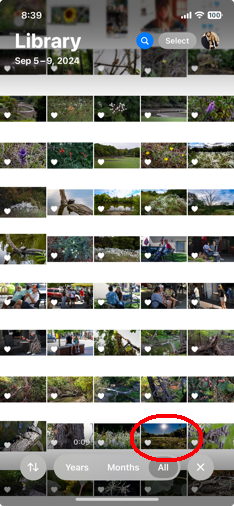
It opens, and I tap the trashcan:
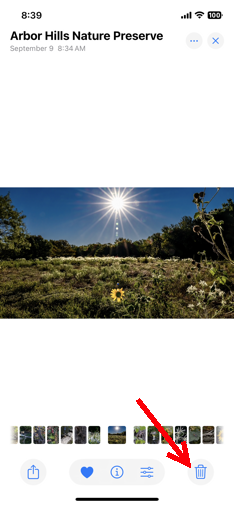
and I get the warning I showed before:
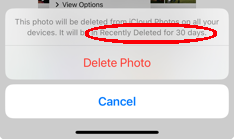
If I hit Delete Photo, then the picture is removed from my Library and can be seen for 30 Days in the Recently Deleted View. The Recently Deleted View appears at the bottom of the the main window
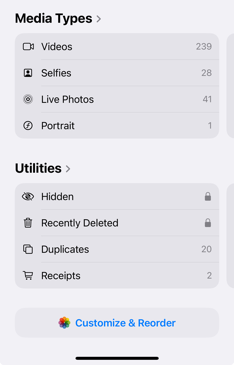
above the choice to "Customize & Reorder."


In "Customize & Reorder," by the way, I can choose to change the order of the sections or eliminate them from the list.
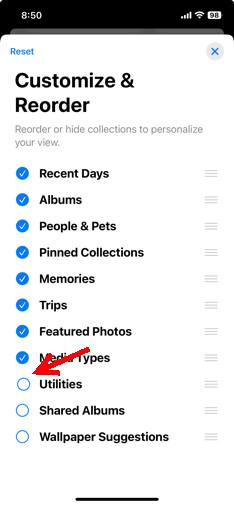
Here, I've removed Utilities, so that no longer appears below "Media Types," or anywhere in the main window.


So, again, exactly how do you delete a picture from Photos? What would you do differently? Perhaps you could include screenshots so that I can see what's different…





This thread has been closed by the system or the community team. You may vote for any posts you find helpful, or search the Community for additional answers.

“Recently deleted” photos file is missing.

Welcome to Apple Support Community
A forum where Apple customers help each other with their products. Get started with your Apple Account.