I cannot change language of Apple TV movies on iphone

I cannot use Apple TV on my iphone because the language of movies is always incorrect, and I cannot change it! The default language of the movies is English, my iphone general language is set to English, the audio settings in Apple TV is English, I even changed the phone region to the UK, but movies are always in russian??! And there is no “audio” or “cc” icon on the screen to change it. Every time I buy a movie and cannot watch it!

iPhone 13, iOS 17

Posted on Oct 27, 2024 10:33 AM

Reply
Question marked as Top-ranking reply

Posted on Oct 31, 2024 1:10 PM

The language(s) for Store movies are set by the (regional representation of the) supplying studio. For users with an Apple Account for Russia, or a neighboring country where Russian is a major language, those users would access their localized Store, where language support would be adjusted for that country or country-like region. Your device region or device language setting or app language setting does not override that. You can only choose from what is available in the stream. You can check what is available for languages before making in a purchase, by examining the Languages section on the Details page for a movie. Note that ‘Original Audio’ does not mean that that is included per se (some movies may be dubbed-only). Look what is listed under ‘Audio’ and ‘Subtitles’.


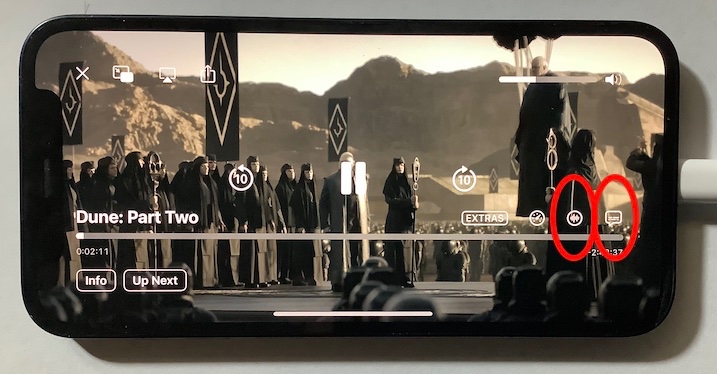
To change the language settings for subtitles or audio (if more is available), then rotate your iPhone to landscape orientation, and tap the screen once. Then extra control options become available. If your movie will not rotate with the device, then uncheck the Orientation Lock in Control Center.


See: Change subtitles or languages for videos in the Apple TV app - Apple Support

1 reply
Question marked as Top-ranking reply

Oct 31, 2024 1:10 PM in response to soadana

The language(s) for Store movies are set by the (regional representation of the) supplying studio. For users with an Apple Account for Russia, or a neighboring country where Russian is a major language, those users would access their localized Store, where language support would be adjusted for that country or country-like region. Your device region or device language setting or app language setting does not override that. You can only choose from what is available in the stream. You can check what is available for languages before making in a purchase, by examining the Languages section on the Details page for a movie. Note that ‘Original Audio’ does not mean that that is included per se (some movies may be dubbed-only). Look what is listed under ‘Audio’ and ‘Subtitles’.


To change the language settings for subtitles or audio (if more is available), then rotate your iPhone to landscape orientation, and tap the screen once. Then extra control options become available. If your movie will not rotate with the device, then uncheck the Orientation Lock in Control Center.


See: Change subtitles or languages for videos in the Apple TV app - Apple Support

This thread has been closed by the system or the community team. You may vote for any posts you find helpful, or search the Community for additional answers.

I cannot change language of Apple TV movies on iphone

Welcome to Apple Support Community
A forum where Apple customers help each other with their products. Get started with your Apple Account.