How to remove a photo from an album on my iPhone 14 without deleting it from iCloud?

How can I delete a photo from an album on my iPhone 14. I don't want to delete the photo from the iCloud or other devices, I just don't want that photo in that album


[Re-Titled by Moderator]

iPhone 14, iOS 18

Posted on Nov 13, 2024 12:49 PM

Reply
Question marked as Top-ranking reply

Posted on Nov 14, 2024 10:11 AM

Here's the thing:  In Photos, pictures aren't exactly "in" an album. When you "put a picture into an album," its name is added to a list of pictures from the Library that display together when the album is clicked, kind of like a music playlist, but for pictures. So two albums can both have the same picture name in their lists (like two playlists with the same song,)  and that picture will show up when you click either album, but there's only one picture file-- it's just on multiple lists.


So, when you remove a picture from an album, its name remains in the lists of other albums, and the file still remains in your Library. So, when asked, choose "Remove from Album," not "Delete from Library."
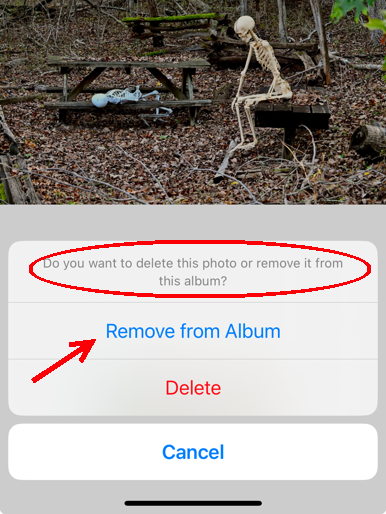


You don't get fewer pictures in your Library because you remove one from an album; you just get fewer names in the album list. And since albums are just lists of pictures from the Library, if you remove a picture from the Library, then they are removed everywhere.


3 replies
Question marked as Top-ranking reply

Nov 14, 2024 10:11 AM in response to jocelyne259

Here's the thing:  In Photos, pictures aren't exactly "in" an album. When you "put a picture into an album," its name is added to a list of pictures from the Library that display together when the album is clicked, kind of like a music playlist, but for pictures. So two albums can both have the same picture name in their lists (like two playlists with the same song,)  and that picture will show up when you click either album, but there's only one picture file-- it's just on multiple lists.


So, when you remove a picture from an album, its name remains in the lists of other albums, and the file still remains in your Library. So, when asked, choose "Remove from Album," not "Delete from Library."


You don't get fewer pictures in your Library because you remove one from an album; you just get fewer names in the album list. And since albums are just lists of pictures from the Library, if you remove a picture from the Library, then they are removed everywhere.


This thread has been closed by the system or the community team. You may vote for any posts you find helpful, or search the Community for additional answers.

How to remove a photo from an album on my iPhone 14 without deleting it from iCloud?

Welcome to Apple Support Community
A forum where Apple customers help each other with their products. Get started with your Apple Account.