Low earpiece volume and unexpected recording after iOS update on new iPhone

I have just got the iPhone and it updated to the latest version of IOS overnight on Friday.

i have made and received calls but the earpiece volume is extremely quiet and cannot be adjusted.

i have been through all the set up functions but nothing makes any difference.

HELLLP


[Re-Titled by Moderator]

Posted on Dec 18, 2024 3:37 PM

Reply
2 replies

Dec 19, 2024 10:11 PM in response to Jeffphillabaum

It's not always the iOS update's fault!  Many things can cause phone problems.  If you tell people you think it's an iOS update, it might make it harder to fix or find a solution for the real issue.


Remember, the right question often leads to the solution!


iOS updates aim to enhance user experience, boost security, and fix bugs rather than disrupt core features. The majority of the issues after updates might stem from underlying, unmentioned factors. Updates won't typically alter personal data but may refine settings or features. Backup before major updates for safety. Review Apple's update details and backup advice for a smooth process.


Kindly consider checking your settings and addressing any device issues before attributing the issue to external factors. This could be a pure coincidence that the iOS update affected the iPhone functions.


Before initiating a standard iOS update, it's advisable to create a backup. Have you completed this step? If yes, proceed with the restoration from the backup.


See what each update does: About iOS 18 Updates, About iOS 17 Updates, About iOS 16 Updates, About iOS 15 Updates, About iOS 14 Updates, About iOS 13 Updates, About iOS 12 Updates, and so on...


Dec 19, 2024 10:12 PM in response to Jeffphillabaum

Your iPhone and the country that you live in protect you with the safety norms. Due to regulations and safety standards, headphone notifications can't be turned off in certain countries or regions.



Reduce loud headphone sounds in Settings · Go to Settings, then tap Sounds & Haptics (iPhone 7 and later) or Sounds (earlier models). · Tap Headphone Safety.


Use headphone audio level features on iPhone - Apple Support


Headphone notifications on your iPhone, iPod touch, or Apple Watch

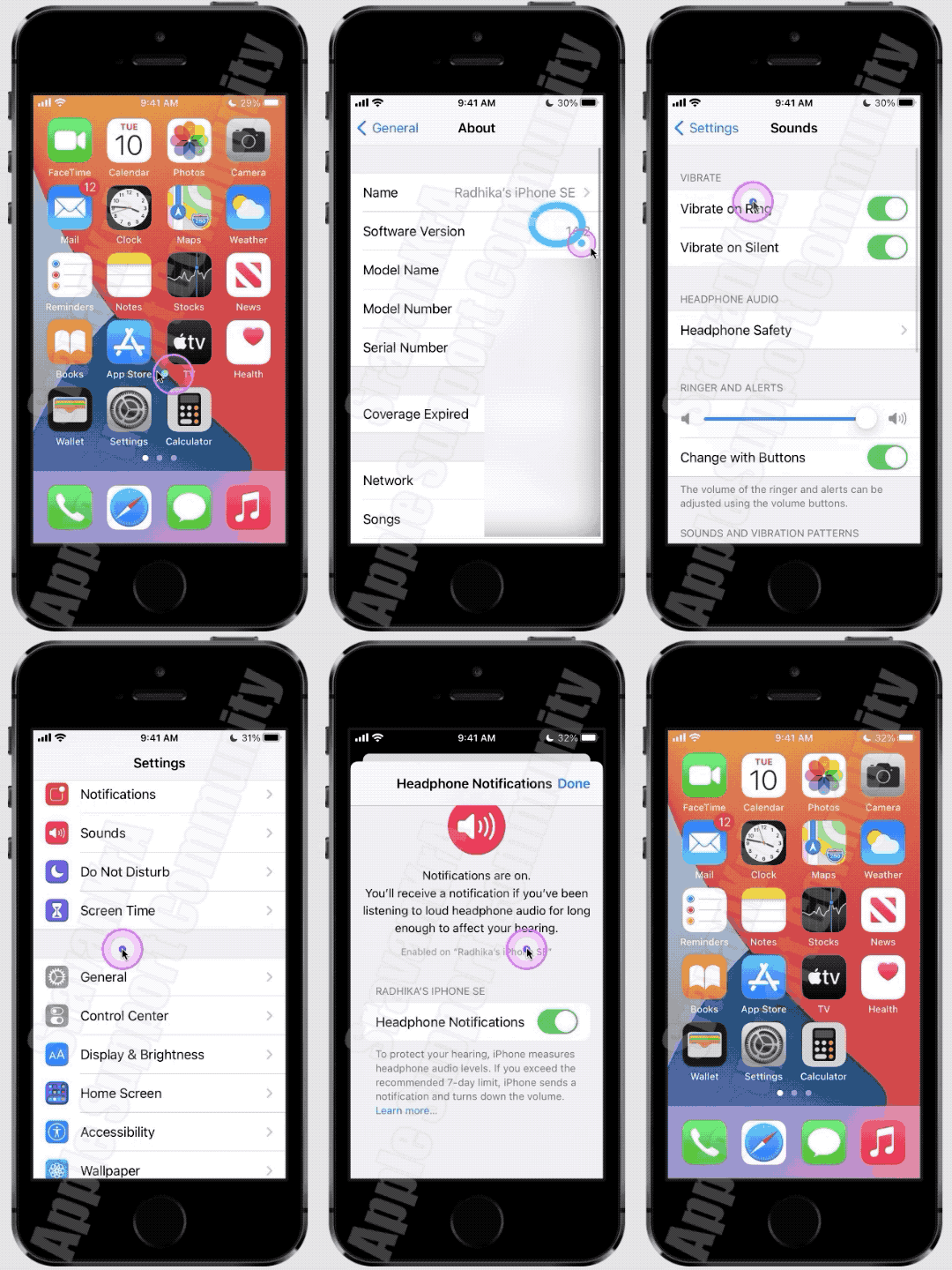
  1. Open the Settings app on your iPhone or iPod touch.
  2. Tap Sounds & Haptics, then tap Headphone Safety.
  3. Turn Headphone Notifications on or off.

Headphone notifications on your iPhone, iPod touch, or Apple ...


About headphone notifications and volume

Listening to audio on your headphones too loud for too long can damage your hearing. Headphone Notifications let you know if your audio exposure has been loud enough for long enough to affect your hearing—for example, over 80 decibels (dB) for 40 hours total within the last 7 days.

Your iPhone, iPod touch, or Apple Watch can now alert you when you’ve exceeded 100% of the 7-day exposure limit while wearing headphones.* These notifications give you more awareness of your listening habits to help you protect your hearing. When you receive a notification, you’ll hear a chime, and your volume will turn down automatically. You can dismiss the notification and turn your volume back up if you choose.

*The 7-day exposure limit applies only to media audio. Phone calls do not count towards your headphone audio exposure.


Check the Screen Time Restrictions, first, Settings > Screen Time > Content & Privacy Restrictions > Reduce Loud Sounds


Then watch this GIF made on iPhone SE (1st Gen) iOS 14.2. Watch till the end.

This thread has been closed by the system or the community team. You may vote for any posts you find helpful, or search the Community for additional answers.

Low earpiece volume and unexpected recording after iOS update on new iPhone

Welcome to Apple Support Community
A forum where Apple customers help each other with their products. Get started with your Apple Account.
