Disabling power off button and enabling PIN request on stolen iPhone 12 Pro

If some one (unauthorized person) try to switch

off my phone, how to disable power off Butten. Because recently my iPhone 12 pro

is stolen, suddenly they switched off. So I would like to know how to prevent and

how to enable PIN request while switch off the phone.


[Re-Titled By Moderator]

iPhone 15 Pro Max, iOS 18

Posted on Dec 26, 2024 11:38 PM

Reply
1 reply

Dec 27, 2024 1:24 AM in response to VictorNapoleon

Switched Off? Still traceable: Even if the iPhone is switched off it is findable, see the pic below.
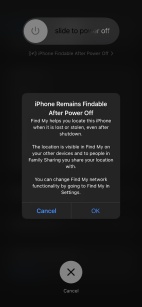


iPhone is findable even when powered off. (iOS 15 and above)


Did you enable Find My network? See the pic below
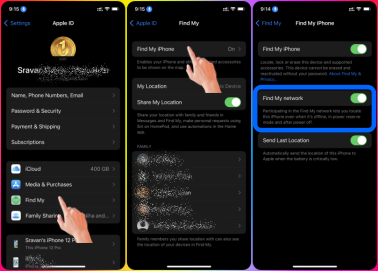

If yes, read below how it may get located.


The Find My network is an encrypted, anonymous network of hundreds of millions of Apple devices that can help you locate your device.


From the above, I infer that when another device comes in close proximity to your powered-off device the GPS/Bluetooth from both devices will form a network and your device's location info will be displayed to you on your device only. As long as both devices are/have...


  • Find My Network is enabled
  • iPhone 11, 12, 13, 14, and above
  • With iOS 15 and above versions


Set up Find My on your iPhone, iPad, iPod touch, or Mac

This thread has been closed by the system or the community team. You may vote for any posts you find helpful, or search the Community for additional answers.

Disabling power off button and enabling PIN request on stolen iPhone 12 Pro

Welcome to Apple Support Community
A forum where Apple customers help each other with their products. Get started with your Apple Account.
