Photos and scans of documents

Hi, I have iPhone16 pro and have a problem with the photos/scans of documents (I need it at my work). The photos/scans of the documents (printed text) are sharp only in the center of the photo/scan, the photographed text on the top and the bottom of the photo/scan is blurred and has shadows. I checked with other phone (iPhone 16 pro max) and there is the same problem. I checked with different settings, but it haven’t helped. There were no such a problems with my old iPhone12 pro. Any advice? :)


iPhone 16 Pro

Posted on Dec 27, 2024 11:34 AM

Reply
Question marked as Top-ranking reply

Posted on Jan 2, 2025 7:21 AM

Well, I notice that the top text slants upward, and the bottom text slants downward. This is because the left side of the camera was closer to the paper than the right side-- the camera was not held parallel to the paper. When I photograph documents, I use a tripod, and I use a bubble level to ensure that the camera and the document are each held exactly horizontal so that they are parallel.


Lighting is also always an issue. I see shadows across the paper, and that lighting difference makes it more difficult to fix. I sent that page to Photos, and I used the Black & White edit tools to clean it up a bit:
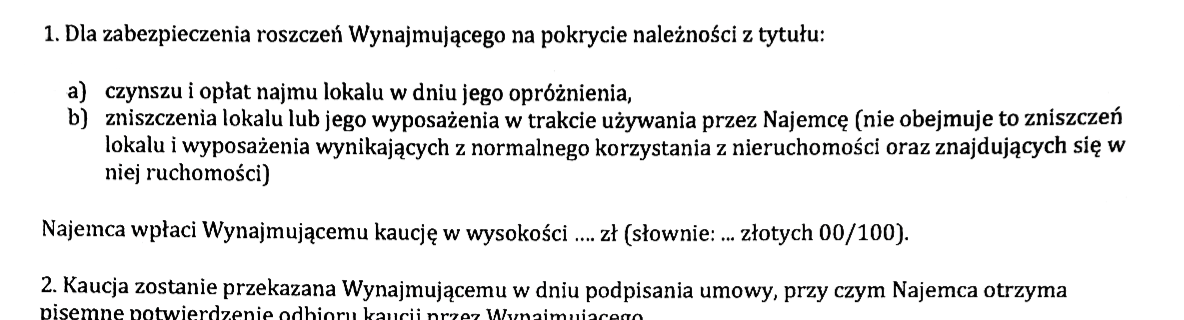

But the iPhone has built-in tools to take care of most of this-- scanning is in the Notes app. You can see this:

How to scan documents on your iPhone or iPad - Apple Support


I was confused in the above about finding the Camera icon. Apparently in iOS 18, the scanning is hidden in the clipboard, so you must choose the paper-clip icon:
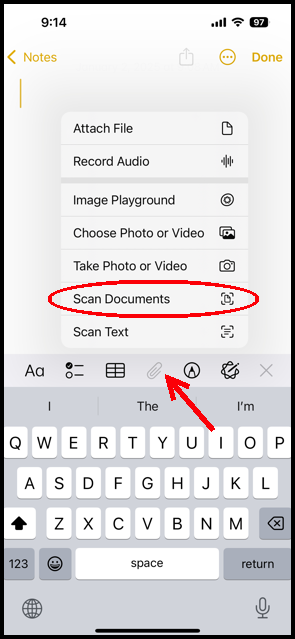
And for scanning, you don't choose camera, but you choose Scan Documents. This will straighten the scan and adjust the lighting for you- it turns out very well, I think.


Does this work better for you?


3 replies
Question marked as Top-ranking reply

Jan 2, 2025 7:21 AM in response to Gregsonn

Well, I notice that the top text slants upward, and the bottom text slants downward. This is because the left side of the camera was closer to the paper than the right side-- the camera was not held parallel to the paper. When I photograph documents, I use a tripod, and I use a bubble level to ensure that the camera and the document are each held exactly horizontal so that they are parallel.


Lighting is also always an issue. I see shadows across the paper, and that lighting difference makes it more difficult to fix. I sent that page to Photos, and I used the Black & White edit tools to clean it up a bit:


But the iPhone has built-in tools to take care of most of this-- scanning is in the Notes app. You can see this:

How to scan documents on your iPhone or iPad - Apple Support


I was confused in the above about finding the Camera icon. Apparently in iOS 18, the scanning is hidden in the clipboard, so you must choose the paper-clip icon:

And for scanning, you don't choose camera, but you choose Scan Documents. This will straighten the scan and adjust the lighting for you- it turns out very well, I think.


Does this work better for you?


Dec 29, 2024 10:36 AM in response to Gregsonn

Gregsonn wrote: … sharp only in the center of the photo/scan, the photographed text on the top and the bottom of the photo/scan is blurred and has shadows.

If the camera is pretty close to the document, I could be that the top and bottom are farther away than the center, so that they can't all be in focus at once. So you might try holding the camera farther away, and then cropping the image later.


Let us know if that works better…


This thread has been closed by the system or the community team. You may vote for any posts you find helpful, or search the Community for additional answers.

Photos and scans of documents

Welcome to Apple Support Community
A forum where Apple customers help each other with their products. Get started with your Apple Account.