Messages not syncing between iPhone and new Mac Mini

I just set up a new Mac Mini to replace my old iMac. For some reason, the Messages are not synching. In Messages, the full back and forth of our conversations before the switch carried over. Yesterday I received a text from her that appeared on my iPhone, but not on the Mini. I replied from my iPhone--my response shows up on the Mini, but her query still does not. But her response to me this morning has shown up. So only her initial query is missing.

How do I fix this?


[Re-Titled by Moderator]


Mac mini, macOS 15.2

Posted on Dec 31, 2024 9:16 AM

Reply
Question marked as Top-ranking reply

Posted on Jan 17, 2025 12:26 PM

Right now: you don't according to Apple unless you update all of your devices/computers to the latest OSs. I've found this to be a crock of BS and found another workaround, although Apple won't actually tell that to you for reasons that I do not understand. There are known issues with iCloud syncing that have been plaguing me (and countless others) since I upgraded to Ventura/Monterrey. To be clear: when I say "known issues", I mean that Apple has actually acknowledges them to me on multiple occasions during my chat/phone tech support sessions.


As we're on our own, here's what I did that <<seems>> to work for me, bi-directionally. There are still a few exceptions, but those seem to only include non-Apple devices.


  1. Confirm I'm logged into all devices with the same AppleID
  2. Confirm Messages.app is set to sync via iCloud on all devices
  3. Do a manual sync on all devices (Settings -> AppleID -> iCloud -> Messages -> Sync Now)
  4. Confirm # of messages in iCloud registers the same number of messages for all devices (mine did not)
  5. If not, log Messages.app out of and then back into iCloud on all affected devices
  6. Restart all devices


At that point, you may STILL not see your messages syncing. This is when I was told that I NEED to update all of my devices to the latest OS and that OS's release. This, of course, is a lie: Apple didn't suddenly stop supporting Message syncing in iCloud for older OSs.


So, what I did to solve was this: toggled on/off the "enable messages in iCloud" button on the Mac and all of my associated iOS devices. On the Mac you'll find that toggle here, located in the preferences of the Messages.app:

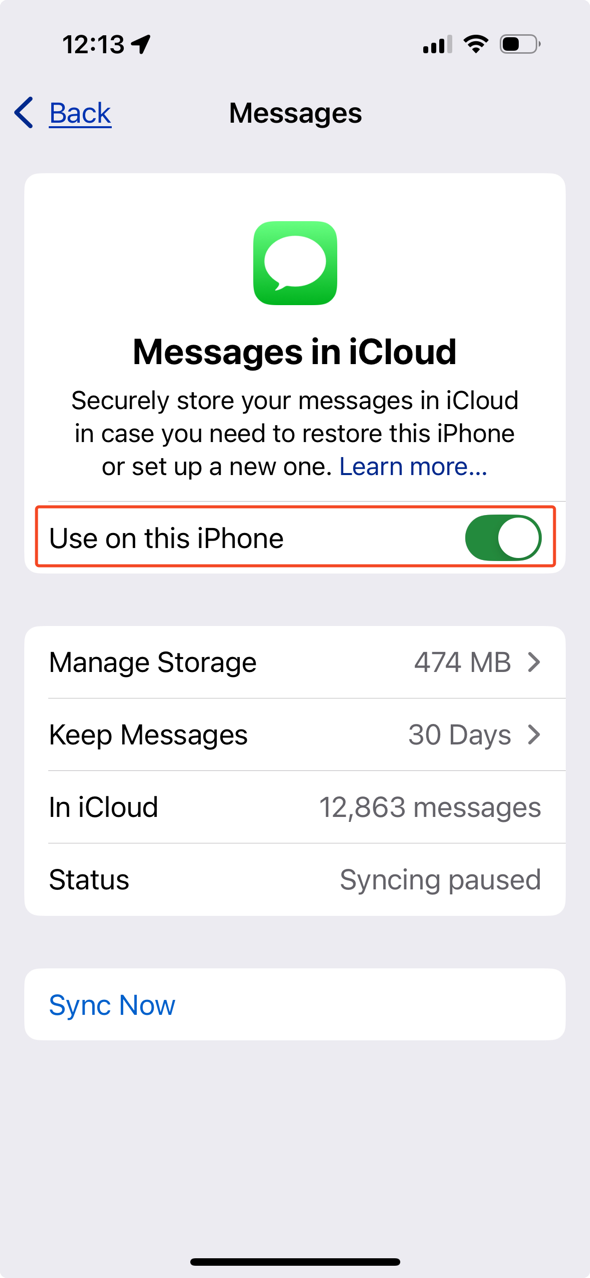
On your iPhone, you'll find the toggle in Settings -> AppleID -> iCloud -> Messages and it looks like this:


[Edited by Moderator]

1 reply
Question marked as Top-ranking reply

Jan 17, 2025 12:26 PM in response to Schwaben10

Right now: you don't according to Apple unless you update all of your devices/computers to the latest OSs. I've found this to be a crock of BS and found another workaround, although Apple won't actually tell that to you for reasons that I do not understand. There are known issues with iCloud syncing that have been plaguing me (and countless others) since I upgraded to Ventura/Monterrey. To be clear: when I say "known issues", I mean that Apple has actually acknowledges them to me on multiple occasions during my chat/phone tech support sessions.


As we're on our own, here's what I did that <<seems>> to work for me, bi-directionally. There are still a few exceptions, but those seem to only include non-Apple devices.


  1. Confirm I'm logged into all devices with the same AppleID
  2. Confirm Messages.app is set to sync via iCloud on all devices
  3. Do a manual sync on all devices (Settings -> AppleID -> iCloud -> Messages -> Sync Now)
  4. Confirm # of messages in iCloud registers the same number of messages for all devices (mine did not)
  5. If not, log Messages.app out of and then back into iCloud on all affected devices
  6. Restart all devices


At that point, you may STILL not see your messages syncing. This is when I was told that I NEED to update all of my devices to the latest OS and that OS's release. This, of course, is a lie: Apple didn't suddenly stop supporting Message syncing in iCloud for older OSs.


So, what I did to solve was this: toggled on/off the "enable messages in iCloud" button on the Mac and all of my associated iOS devices. On the Mac you'll find that toggle here, located in the preferences of the Messages.app:

On your iPhone, you'll find the toggle in Settings -> AppleID -> iCloud -> Messages and it looks like this:


[Edited by Moderator]

This thread has been closed by the system or the community team. You may vote for any posts you find helpful, or search the Community for additional answers.

Messages not syncing between iPhone and new Mac Mini

Welcome to Apple Support Community
A forum where Apple customers help each other with their products. Get started with your Apple Account.