How can I restore my iPhone from PC backup successfully?

Hi, mine is an iphone 11 128GB. When I try to restore it using backup on my PC, it keeps saying there isn't enough space to restore backup.


The size of the backup is only 58GB.


How can there be not enough space to restore??


[Re-Titled by Moderator]

Posted on Feb 9, 2025 10:51 PM

Reply
Question marked as Top-ranking reply

Posted on Feb 10, 2025 12:48 AM

iCloud and iTunes backups use compression to save storage space. This means the actual size of the data on your device is much larger than the backup file. In your case, the 58GB backup could expand to be significantly larger, potentially up to five times the compressed size.See the pic below
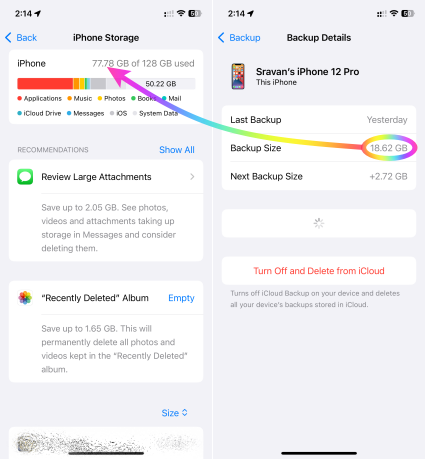


When restoring, you need enough space on the target device for the uncompressed data. If you're seeing an error about insufficient space, it's likely because you're trying to restore a backup that's actually much larger than the available space.


Here's how to troubleshoot:

  1. Check actual data size: Go to Settings > General > iPhone Storage to see how much space your apps and data are actually using. This is the minimum space you'll need to restore.
  2. Compare with available space: Ensure the device you're restoring to has at least that much free space, ideally more to allow for temporary files during the restore process.
  3. Consider alternatives: If the backup is too large, you may need to:
    • Restore to a device with more storage: If possible, use a device with sufficient space.
    • Reduce backup size: Go to Settings > [Your Name] > iCloud > Manage Storage > Backups and choose which data to include in the backup.
    • Start fresh: If necessary, set up the device as new and selectively restore data from the backup later.


Similar questions

3 replies
Question marked as Top-ranking reply

Feb 10, 2025 12:48 AM in response to Tsugaki20

iCloud and iTunes backups use compression to save storage space. This means the actual size of the data on your device is much larger than the backup file. In your case, the 58GB backup could expand to be significantly larger, potentially up to five times the compressed size.See the pic below


When restoring, you need enough space on the target device for the uncompressed data. If you're seeing an error about insufficient space, it's likely because you're trying to restore a backup that's actually much larger than the available space.


Here's how to troubleshoot:

  1. Check actual data size: Go to Settings > General > iPhone Storage to see how much space your apps and data are actually using. This is the minimum space you'll need to restore.
  2. Compare with available space: Ensure the device you're restoring to has at least that much free space, ideally more to allow for temporary files during the restore process.
  3. Consider alternatives: If the backup is too large, you may need to:
    • Restore to a device with more storage: If possible, use a device with sufficient space.
    • Reduce backup size: Go to Settings > [Your Name] > iCloud > Manage Storage > Backups and choose which data to include in the backup.
    • Start fresh: If necessary, set up the device as new and selectively restore data from the backup later.


Feb 11, 2025 11:34 PM in response to SravanKrA

Hi, I'm using PC backup.


So in my case, it shows that 111.4GB has been used and there is about 16GB left.


Does that mean I would have restore my phone to factory setting to have free space and then restore data from the PC backup?


Is it guaranteed that this method will work? Because if not, I will lose all my data or basically have to purchase a new phone .


[Edited by Moderator]

Feb 10, 2025 1:01 AM in response to Tsugaki20

Not enough space to restore backup!!!

Hi, mine is an iphone 11 128GB. When I try to restore it using backup on my PC, it keeps saying there isn't enough space to restore backup. The size of the backup is only 58GB. How can there be not enough space to restore??

———-


Caches may have intensely uploaded. So, clear them.


Troubleshooting iPhone Storage:

Internal storage cannot be upgraded. It is what it is. So, the maximum internal storage capacity never increases, even if you upgraded your iCloud plan. Learn More here: What's the Difference Between Device Storage and iCloud Storage? Apple Support


So, what to do...

Clear Space Using my User Tips:

This thread has been closed by the system or the community team. You may vote for any posts you find helpful, or search the Community for additional answers.

How can I restore my iPhone from PC backup successfully?

Welcome to Apple Support Community
A forum where Apple customers help each other with their products. Get started with your Apple Account.
