Why is Time Machine backing up the entire disk every time?

Time Machine is backing up entire disk every time. I tried setting it weekly, then daily, the hourly. Every backup is of the full disk. I have an 18 TB disk and it is full in less than a month for a hardrive that has 550GB.


I know that Time Machine is only supposed to be incremental, with each successive backup being smaller.


Help please!


[Re-Titled by Moderator]

MacBook Air (2018 – 2020)

Posted on Feb 12, 2025 11:57 AM

Reply
Question marked as Top-ranking reply

Posted on Feb 14, 2025 8:55 AM

Mount the Time Machine disk and check it in Disk Utility. It should state that the disk is formatted as APFS. If it's formatted with anything else. That is likely the culprit.


To fix, you either need another backup disk to start fresh or you erase and format the existing disk to be APFS then remount and make it a Time Machine drive. The Mac should start a full backup but subsequent backups should be taking APFS snapshots on the Mac and when the drive is attached, migrating the snapshots to the Time Machine disk and then 24 hours later removing the backed up snapshots.


7 replies
Question marked as Top-ranking reply

Feb 14, 2025 8:55 AM in response to rickppc

Mount the Time Machine disk and check it in Disk Utility. It should state that the disk is formatted as APFS. If it's formatted with anything else. That is likely the culprit.


To fix, you either need another backup disk to start fresh or you erase and format the existing disk to be APFS then remount and make it a Time Machine drive. The Mac should start a full backup but subsequent backups should be taking APFS snapshots on the Mac and when the drive is attached, migrating the snapshots to the Time Machine disk and then 24 hours later removing the backed up snapshots.


Mar 25, 2025 7:05 PM in response to rickppc

Exclude ~/Library/CloudStorage from Time Machine backup. OneDrive, Dropbox, etc. create folders in that location and then use symbolic links to point Documents & Desktop to that location.


Settings > General > Time Machine > click the Options button and add ~/Library/CloudStorage to exclude it. Notice, I do the same with Virtual Machine because they will trigger a massive backup as well.
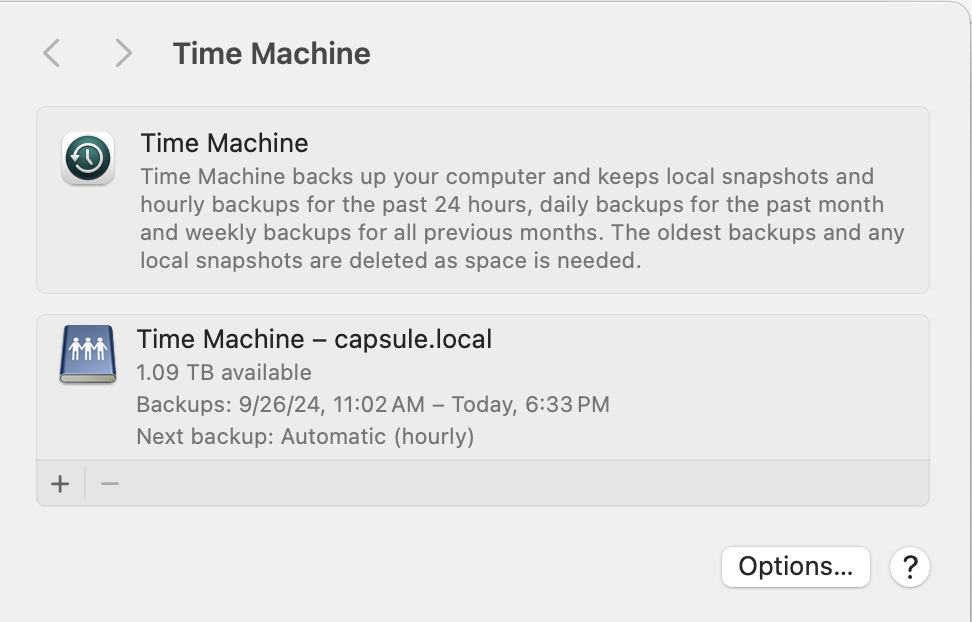
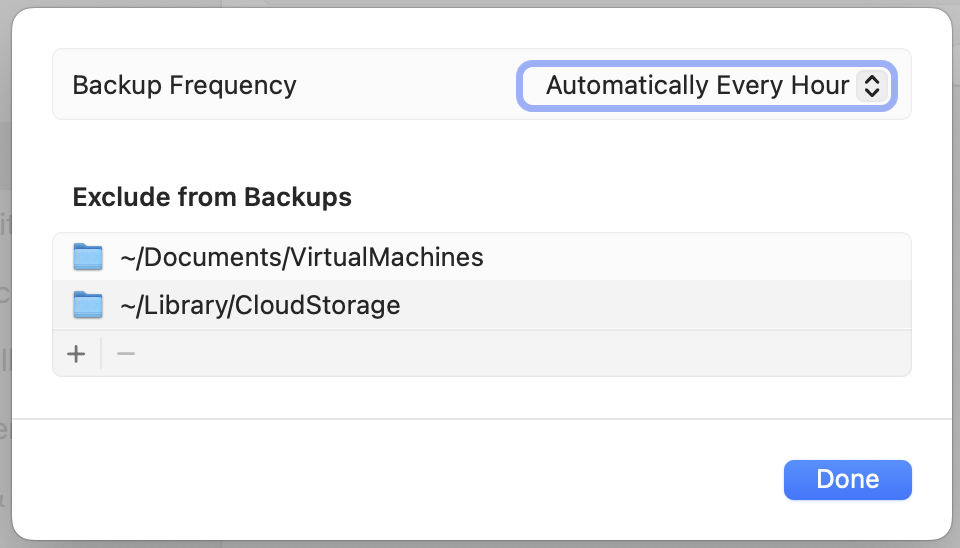


This should help with OneDrive touching files. Time Machine will ignore cloud drives like iCloud / OneDrive / Google Drive, etc.


Running multiple external USB HDDs can put undo stress on the Mac. If you need that many drives, I highly recommend that you consider a NAS instead. If you go with a NAS that uses the ZFS filesystem, even better. ZFS is superior to APFS, BTRFS, NTFS, etc. Once I setup a ZFS backed NAS and turned on the Time Capsule emulation. I stopped having failures with Time Machine backups. Time Machine creates an APFS sparse image which on the ZFS disk appears to be a folder with binary chunks called bands. ZFS ensures data integrity and as a result makes Time Machine backups more reliable.


Arq backup software has a very good reputation. Looks pricey but I haven't reviewed cloud backup pricing lately. https://www.arqbackup.com/


Mar 25, 2025 7:28 PM in response to rickppc

+1 for @Mac Jim ID's recommendation for Carbon Copy Cloner (CCC). CCC has been around for decades from a great respected developer.


SuperDuper is another option and has been around for over a decade, but I found it has a higher learning curve as I only tried to use it once when I didn't have a valid license for CCC and I was in a rush to transfer someones data to another drive...actually found it faster to get my supervisor to purchase a new CCC license. My supervisor tends to prefer SuperDuper these days. Both developers & apps are highly regarded in the Mac community.


@James Brickley also has great advice.


It always comes down to your specific setup, workloads, needs, and amount of data involved.

Mar 25, 2025 1:56 PM in response to Mac Jim ID

Ahhh that is it. I use OneDrive for realtime backups. "Touched" files must mean read files, though they are not backed up. Time Machine also has corrupted dedicated external drives. The volume rebuild Tech Tool program fixed the problem. I know it was Time Machine because I have 6 external drives working, two were dedicated to Time Machine. Only the Time Machine drives got corrupted.


I am switching to different backup software. I also don't like that I have to commit the entire disk to Time Machine.


Suggestions for backup software?


Thank you!

Rick

This thread has been closed by the system or the community team. You may vote for any posts you find helpful, or search the Community for additional answers.

Why is Time Machine backing up the entire disk every time?

Welcome to Apple Support Community
A forum where Apple customers help each other with their products. Get started with your Apple Account.

