Then it is suggested again from the handy link provided by @ Zurarczurx
Incase it was missed the first time, which can happen If Personal Hotspot is not working on your iPhone or iPad (Wi-Fi + Cellular)
" If you can't connect to Personal Hotspot with Wi-Fi
On the device that provides Personal Hotspot, go to Settings > Personal Hotspot, then:
- Make sure Allow Others to Join is on.
- Remember the device's Wi-Fi network name and password that appear on this screen. If you want to change the Wi-Fi network name, find out how to change your device name.
- If you’re using an iPhone 12 model or later, iPad Pro 11-inch (3rd generation or later), iPad Pro 12.9-inch (5th generation or later) or iPad mini (6th generation), turn on Maximise Compatibility.* Then try connecting your devices to your Personal Hotspot again.
- Stay on this screen until you connect your other device to the Wi-Fi network.
On the device that needs to connect to Personal Hotspot:
- Turn Wi-Fi off and back on.
- Make sure that you connect to the correct Wi-Fi network. The network name is the same as the iOS device that provides Personal Hotspot and the Personal Hotspot icon
 might appear next to it.
 - If you see a password error when you try to join Personal Hotspot, check the Wi-Fi password: on the device that provides the Personal Hotspot, go to Settings > Personal Hotspot to see the Wi-Fi password.
* When you turn on Maximise Compatibility, Internet performance and Wi-Fi security might be reduced for devices connected to the hotspot.
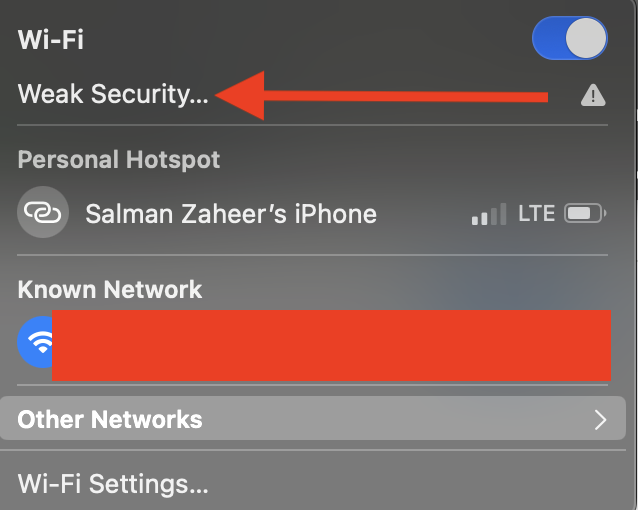
➡️. Then there is the Issue of " Weak Security " over Wifi ⬅️
Recommended settings for Wi-Fi routers and access points - Apple Support


