Unable to connect to mobile hotspot

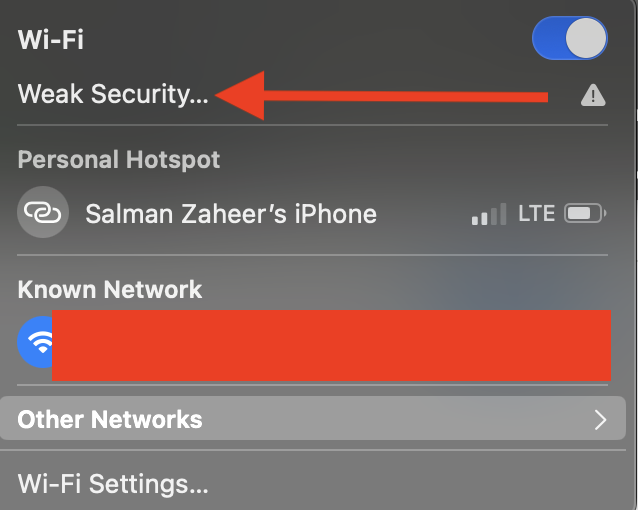
Hi there tech geeks, it's been almost a month since I'm unable to connect my MacBook to my iPhone's hotspot. See below the error message.


I've M1 2020 MacBook Air running MacOS Sequoia 15.3.1 and trying to connect to iPhone 16 pro max running iOS 18.3.1. It connects to other wifi's and hotspots without any issue. Please help.

MacBook Air 13″, macOS 15.3

Posted on Mar 3, 2025 3:43 AM

Reply
Question marked as Top-ranking reply

Posted on Mar 3, 2025 5:20 AM

Then it is suggested again from the handy link provided by @ Zurarczurx


Incase it was missed the first time, which can happen If Personal Hotspot is not working on your iPhone or iPad (Wi-Fi + Cellular)


" If you can't connect to Personal Hotspot with Wi-Fi


On the device that provides Personal Hotspot, go to Settings > Personal Hotspot, then:

  1. Make sure Allow Others to Join is on. 
  2. Remember the device's Wi-Fi network name and password that appear on this screen. If you want to change the Wi-Fi network name, find out how to change your device name.
  3. If you’re using an iPhone 12 model or later, iPad Pro 11-inch (3rd generation or later), iPad Pro 12.9-inch (5th generation or later) or iPad mini (6th generation), turn on Maximise Compatibility.* Then try connecting your devices to your Personal Hotspot again.
  4. Stay on this screen until you connect your other device to the Wi-Fi network. 

On the device that needs to connect to Personal Hotspot:

  1. Turn Wi-Fi off and back on.
  2. Make sure that you connect to the correct Wi-Fi network. The network name is the same as the iOS device that provides Personal Hotspot and the Personal Hotspot icon might appear next to it.

  3. If you see a password error when you try to join Personal Hotspot, check the Wi-Fi password: on the device that provides the Personal Hotspot, go to Settings > Personal Hotspot to see the Wi-Fi password.

* When you turn on Maximise Compatibility, Internet performance and Wi-Fi security might be reduced for devices connected to the hotspot.


➡️. Then there is the Issue of " Weak Security " over Wifi ⬅️


Recommended settings for Wi-Fi routers and access points - Apple Support


5 replies
Question marked as Top-ranking reply

Mar 3, 2025 5:20 AM in response to Salman-Zaheer

Then it is suggested again from the handy link provided by @ Zurarczurx


Incase it was missed the first time, which can happen If Personal Hotspot is not working on your iPhone or iPad (Wi-Fi + Cellular)


" If you can't connect to Personal Hotspot with Wi-Fi


On the device that provides Personal Hotspot, go to Settings > Personal Hotspot, then:

  1. Make sure Allow Others to Join is on. 
  2. Remember the device's Wi-Fi network name and password that appear on this screen. If you want to change the Wi-Fi network name, find out how to change your device name.
  3. If you’re using an iPhone 12 model or later, iPad Pro 11-inch (3rd generation or later), iPad Pro 12.9-inch (5th generation or later) or iPad mini (6th generation), turn on Maximise Compatibility.* Then try connecting your devices to your Personal Hotspot again.
  4. Stay on this screen until you connect your other device to the Wi-Fi network. 

On the device that needs to connect to Personal Hotspot:

  1. Turn Wi-Fi off and back on.
  2. Make sure that you connect to the correct Wi-Fi network. The network name is the same as the iOS device that provides Personal Hotspot and the Personal Hotspot icon might appear next to it.
  3. If you see a password error when you try to join Personal Hotspot, check the Wi-Fi password: on the device that provides the Personal Hotspot, go to Settings > Personal Hotspot to see the Wi-Fi password.

* When you turn on Maximise Compatibility, Internet performance and Wi-Fi security might be reduced for devices connected to the hotspot.


➡️. Then there is the Issue of " Weak Security " over Wifi ⬅️


Recommended settings for Wi-Fi routers and access points - Apple Support


This thread has been closed by the system or the community team. You may vote for any posts you find helpful, or search the Community for additional answers.

Unable to connect to mobile hotspot

Welcome to Apple Support Community
A forum where Apple customers help each other with their products. Get started with your Apple Account.
