My desktop files have disappeared from finder.

I can reach them by URL but not through the file manager. This started after the update to 15.4. Before, all my desktop folders appeared on the desktop and in the finder. Now, they don't show up in either. I can still access them on iCloud.

MacBook Air 15″, macOS 15.4

Posted on Apr 7, 2025 5:42 PM

Reply
Question marked as Top-ranking reply

Posted on Apr 7, 2025 5:54 PM

Granny Hacker wrote:

I can reach them by URL but not through the file manager. This started after the update to 15.4. Before, all my desktop folders appeared on the desktop and in the finder. Now, they don't show up in either. I can still access them on iCloud.


Sounds like iCloud Drive Desktop & Documents got turned on


HT204025

Add your Desktop and Documents files to iCloud Drive - Apple ...

Add your Desktop and Documents files to iCloud Drive - Apple Support


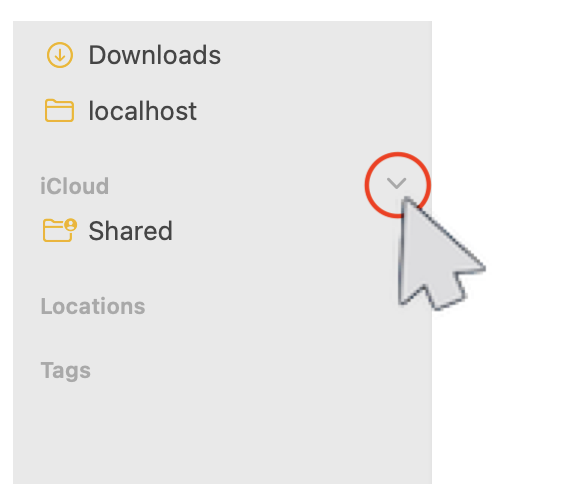
You maybe be able to See them here(?)— make changes to Finder Settings, move your mouse to the right side and spin the caret..

or

iCloud drive missing desktop and documents


What happens when you turn off iCloud Drive or sign out of iCloud

Add your Desktop and Documents files to iCloud Drive - Apple Support


Recover deleted files on iCloud.com

Recover deleted files on iCloud.com - Apple Support


How to Restore Your Desktop and Documents After Disabling ...

https://www.howtogeek.com/273629/how-to-restore-your-desktop-and-documents-after-disabling-icloud-sync-in-macos-sierra/


How to find your Documents and Desktop folder contents after disabling ...

https://www.macworld.com/article/3396119/how-to-find-your-documents-and-desktop-folder-contents-after-disabling-icloud-sync.html


Finder>Go>Go to Folder>copy & paste:

~/iCloud Drive (Archive)


iCloud Drive (Archive) - here you should find all your files


1 reply
Question marked as Top-ranking reply

Apr 7, 2025 5:54 PM in response to Granny Hacker

Granny Hacker wrote:

I can reach them by URL but not through the file manager. This started after the update to 15.4. Before, all my desktop folders appeared on the desktop and in the finder. Now, they don't show up in either. I can still access them on iCloud.


Sounds like iCloud Drive Desktop & Documents got turned on


HT204025

Add your Desktop and Documents files to iCloud Drive - Apple ...

Add your Desktop and Documents files to iCloud Drive - Apple Support


You maybe be able to See them here(?)— make changes to Finder Settings, move your mouse to the right side and spin the caret..


or

iCloud drive missing desktop and documents


What happens when you turn off iCloud Drive or sign out of iCloud

Add your Desktop and Documents files to iCloud Drive - Apple Support


Recover deleted files on iCloud.com

Recover deleted files on iCloud.com - Apple Support


How to Restore Your Desktop and Documents After Disabling ...

https://www.howtogeek.com/273629/how-to-restore-your-desktop-and-documents-after-disabling-icloud-sync-in-macos-sierra/


How to find your Documents and Desktop folder contents after disabling ...

https://www.macworld.com/article/3396119/how-to-find-your-documents-and-desktop-folder-contents-after-disabling-icloud-sync.html


Finder>Go>Go to Folder>copy & paste:

~/iCloud Drive (Archive)


iCloud Drive (Archive) - here you should find all your files


This thread has been closed by the system or the community team. You may vote for any posts you find helpful, or search the Community for additional answers.

My desktop files have disappeared from finder.

Welcome to Apple Support Community
A forum where Apple customers help each other with their products. Get started with your Apple Account.