How do I take a screenshot on iPhone 7 Plus?

Halo,I wan to know how do I screenshot in in iphone7 plus because I am using timebuck and the screenshot required in the business so that to them you have been completed with the task you must do sternshot of the page or history browser of the page you enter


[Re-Titled by Moderator]

Posted on Apr 16, 2025 10:57 PM

Reply
Question marked as Top-ranking reply

Posted on Apr 16, 2025 11:34 PM

Take a screenshot with an iPhone that has Touch ID

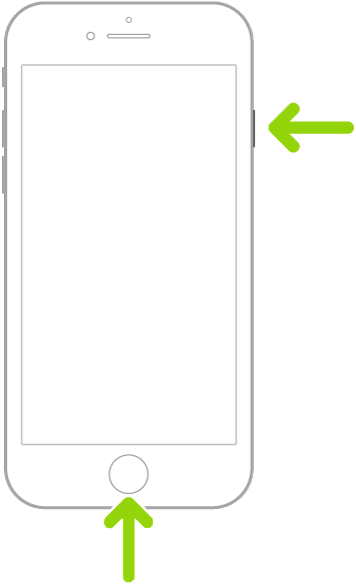
  1. Quickly press and release the side button and the Home button at the same time.
  2. A thumbnail of the screenshot temporarily appears in the lower-left corner of your screen.
  3. Tap the thumbnail to view the screenshot or swipe left to dismiss it.

Screenshots are automatically saved to your photo library in the Photos app. To see all of your screenshots in one place, open Photos, scroll down to Media Types, tap Media Types, then tap Screenshots.

1 reply
Question marked as Top-ranking reply

Apr 16, 2025 11:34 PM in response to iabdulhamid301

Take a screenshot with an iPhone that has Touch ID

  1. Quickly press and release the side button and the Home button at the same time.
  2. A thumbnail of the screenshot temporarily appears in the lower-left corner of your screen.
  3. Tap the thumbnail to view the screenshot or swipe left to dismiss it.

Screenshots are automatically saved to your photo library in the Photos app. To see all of your screenshots in one place, open Photos, scroll down to Media Types, tap Media Types, then tap Screenshots.

This thread has been closed by the system or the community team. You may vote for any posts you find helpful, or search the Community for additional answers.

How do I take a screenshot on iPhone 7 Plus?

Welcome to Apple Support Community
A forum where Apple customers help each other with their products. Get started with your Apple Account.