How can I fix my MacBook Air that won't charge?

I left my MacBook Air (2017) on the cold tile floor for 3 days. When I picked it up this morning, the battery was at 15%. However, when it dropped to 5%, I tried charging it, but the charger light didn't turn on, and the MacBook didn't charge. Now the battery is completely drained, and it's not charging at all. Can you please help me?


[Re-Titled by Moderator]

MacBook Air 13″, macOS 12.7

Posted on Apr 23, 2025 8:58 PM

Reply
Question marked as Top-ranking reply

Posted on Apr 24, 2025 11:30 AM

Make sure the AC adapter is connected to a working power outlet and leave the computer connecter to power for the day.


If the computer doesn't recharge, then you can try resetting the SMC. It controls the charging.

Follow the steps appropriate for your Mac model: How to Reset the SMC of your Mac - Apple Support


  1. Shut down your Mac.
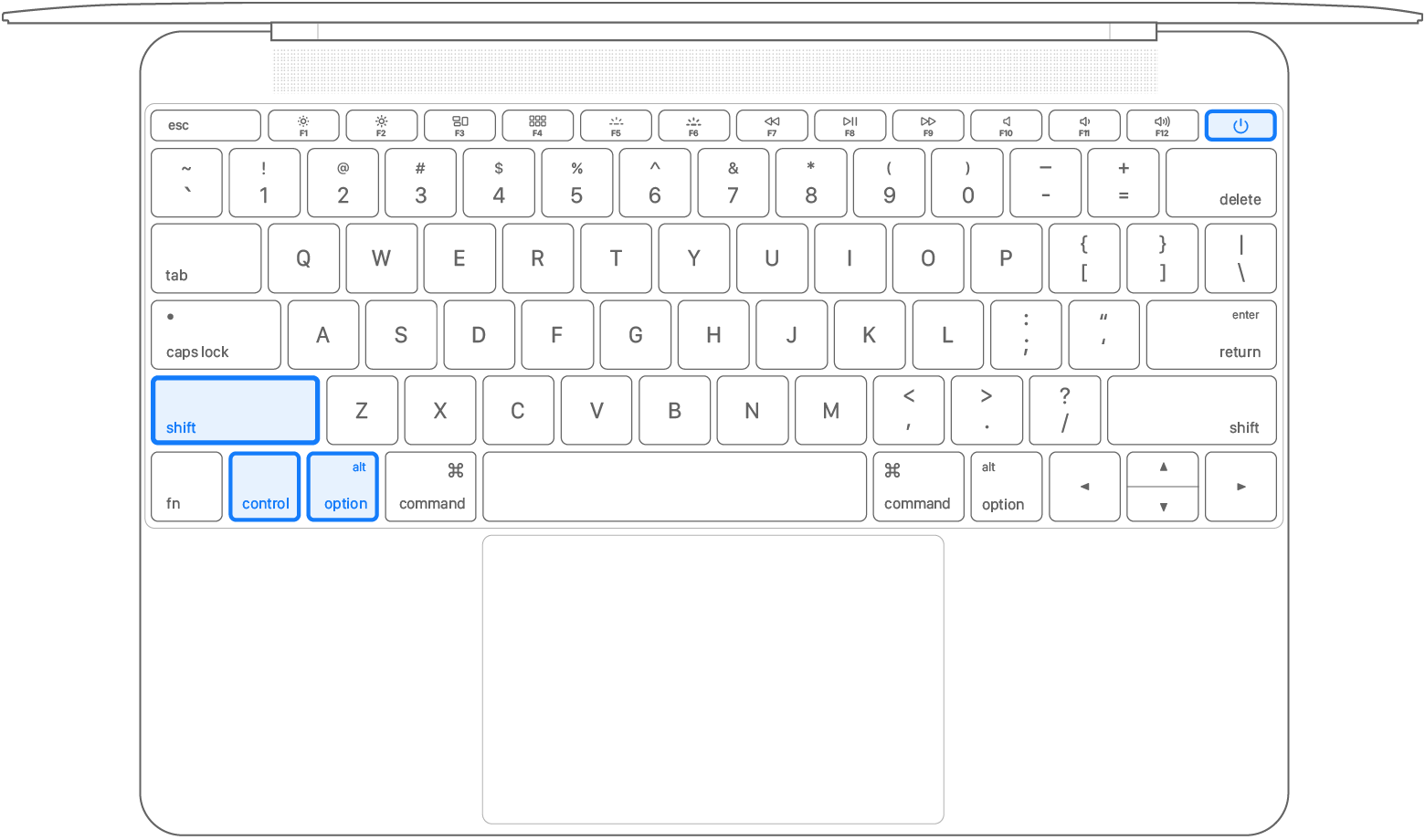
  2. On your built-in keyboard, press and hold all of these keys:
    • Shift on the left side
    • Control on the left side
    • Option (Alt) on the left side of the keyboard.

3. While holding all three keys, press and hold the power button as well.


4. Keep holding all four keys for 10 seconds.

5. Release all keys, then press the power button to turn on your Mac.


1 reply
Question marked as Top-ranking reply

Apr 24, 2025 11:30 AM in response to olofinsao

Make sure the AC adapter is connected to a working power outlet and leave the computer connecter to power for the day.


If the computer doesn't recharge, then you can try resetting the SMC. It controls the charging.

Follow the steps appropriate for your Mac model: How to Reset the SMC of your Mac - Apple Support


  1. Shut down your Mac.
  2. On your built-in keyboard, press and hold all of these keys:
    • Shift on the left side
    • Control on the left side
    • Option (Alt) on the left side of the keyboard.

3. While holding all three keys, press and hold the power button as well.


4. Keep holding all four keys for 10 seconds.

5. Release all keys, then press the power button to turn on your Mac.


This thread has been closed by the system or the community team. You may vote for any posts you find helpful, or search the Community for additional answers.

How can I fix my MacBook Air that won't charge?

Welcome to Apple Support Community
A forum where Apple customers help each other with their products. Get started with your Apple Account.