Unusual mode changes and missing notifications on iPhone

At the beginning I will write that I have a problem with some people who have been making my life difficult for a long time. I even had to move out because of that. Question: is it normal for my phone to switch to the modes: focus, sleep, work or map options change by itself. I don't receive messages from various applications as well as e-mail messages. I've already changed the ID code and password, but it doesn't help.


[Re-Titled by Moderator]

Original Title: Please help me

Posted on Jun 24, 2025 3:16 AM

Reply
Question marked as Top-ranking reply

Posted on Jun 27, 2025 12:27 AM

Findet5 wrote:

At the beginning I will write that I have a problem with some people who have been making my life difficult for a long time. I even had to move out because of that.

If you feel an unauthorized person/app is remotely using, controlling or monitoring your device, then that is possible only if you have done one or more of the following Don'ts...


  1. Don't hand over an iPhone to kids or to a stranger without Enabling Guided Access
  2. Don't share Apple IDs
  3. Don't Jailbreak
  4. Don't share sensitive information pertaining to your device
  5. Don't give in to Phishing
  6. Don't plug in your device in Airports and Public places through third-party cables and trust the device. Beware of Juice Jacking. (Especially in India)
  7. Don't leave your iPhone unlocked and unattended in public places like offices, schools, malls, etc.


If one of the above is true then quickly change the Apple ID Password and Return iPhone settings to their defaults.


Keep the iPhone updated to the latest iOS always and never Jailbreak. That's it.


iOS / iPadOS devices cannot be hacked or infected with Virus / Malware / Spyware *** unless you have intentionally downloaded spurious software or unauthorized apps directly from the internet and installed them on your device or/and have Jailbroken


It (Hacking) also depends on how careful you are in sharing sensitive and valuable information pertaining to your iPhone such as Passcode, Password, etc with your friends and family members.


Be judicious when sharing the device's sensitive and valuable information with friends and family members.


**The primary reason for this is Sandboxing. All third-party apps are “sandboxed”, so they are restricted from accessing files stored by other apps or from making changes to the device. Sandboxing is designed to prevent apps from gathering or modifying information stored by other apps.


Security of runtime process in iOS and iPadOS - Apple Support


The sandbox on an iPhone is a security feature that creates a restricted environment for each app to run in isolation from other apps and the operating system. It is a core component of iOS's security architecture and plays a crucial role in making iPhones more secure.


If you doubt the authenticity of the information provided earlier, you have two alternatives:

  1. Report the hacking incident to local law enforcement authorities and actively pursue the case.
  2. Accept the credibility of the information; it is impervious to hacking. Just as some individuals hold unconventional beliefs, such as a flat Earth or moon landing denial, one has the freedom to believe in anything. The choice ultimately rests with you in this open and free world.


2 replies
Question marked as Top-ranking reply

Jun 27, 2025 12:27 AM in response to Findet5

Findet5 wrote:

At the beginning I will write that I have a problem with some people who have been making my life difficult for a long time. I even had to move out because of that.

If you feel an unauthorized person/app is remotely using, controlling or monitoring your device, then that is possible only if you have done one or more of the following Don'ts...


  1. Don't hand over an iPhone to kids or to a stranger without Enabling Guided Access
  2. Don't share Apple IDs
  3. Don't Jailbreak
  4. Don't share sensitive information pertaining to your device
  5. Don't give in to Phishing
  6. Don't plug in your device in Airports and Public places through third-party cables and trust the device. Beware of Juice Jacking. (Especially in India)
  7. Don't leave your iPhone unlocked and unattended in public places like offices, schools, malls, etc.


If one of the above is true then quickly change the Apple ID Password and Return iPhone settings to their defaults.


Keep the iPhone updated to the latest iOS always and never Jailbreak. That's it.


iOS / iPadOS devices cannot be hacked or infected with Virus / Malware / Spyware *** unless you have intentionally downloaded spurious software or unauthorized apps directly from the internet and installed them on your device or/and have Jailbroken


It (Hacking) also depends on how careful you are in sharing sensitive and valuable information pertaining to your iPhone such as Passcode, Password, etc with your friends and family members.


Be judicious when sharing the device's sensitive and valuable information with friends and family members.


**The primary reason for this is Sandboxing. All third-party apps are “sandboxed”, so they are restricted from accessing files stored by other apps or from making changes to the device. Sandboxing is designed to prevent apps from gathering or modifying information stored by other apps.


Security of runtime process in iOS and iPadOS - Apple Support


The sandbox on an iPhone is a security feature that creates a restricted environment for each app to run in isolation from other apps and the operating system. It is a core component of iOS's security architecture and plays a crucial role in making iPhones more secure.


If you doubt the authenticity of the information provided earlier, you have two alternatives:

  1. Report the hacking incident to local law enforcement authorities and actively pursue the case.
  2. Accept the credibility of the information; it is impervious to hacking. Just as some individuals hold unconventional beliefs, such as a flat Earth or moon landing denial, one has the freedom to believe in anything. The choice ultimately rests with you in this open and free world.


Jun 27, 2025 12:26 AM in response to Findet5

Findet5 wrote:

Question: is it normal for my phone to switch to the modes: focus, sleep, work or map options change by itself.

There are three primary factors that trigger the automatic activation of the Focus modes. Users have the flexibility to deactivate each of these factors based on their individual preferences.


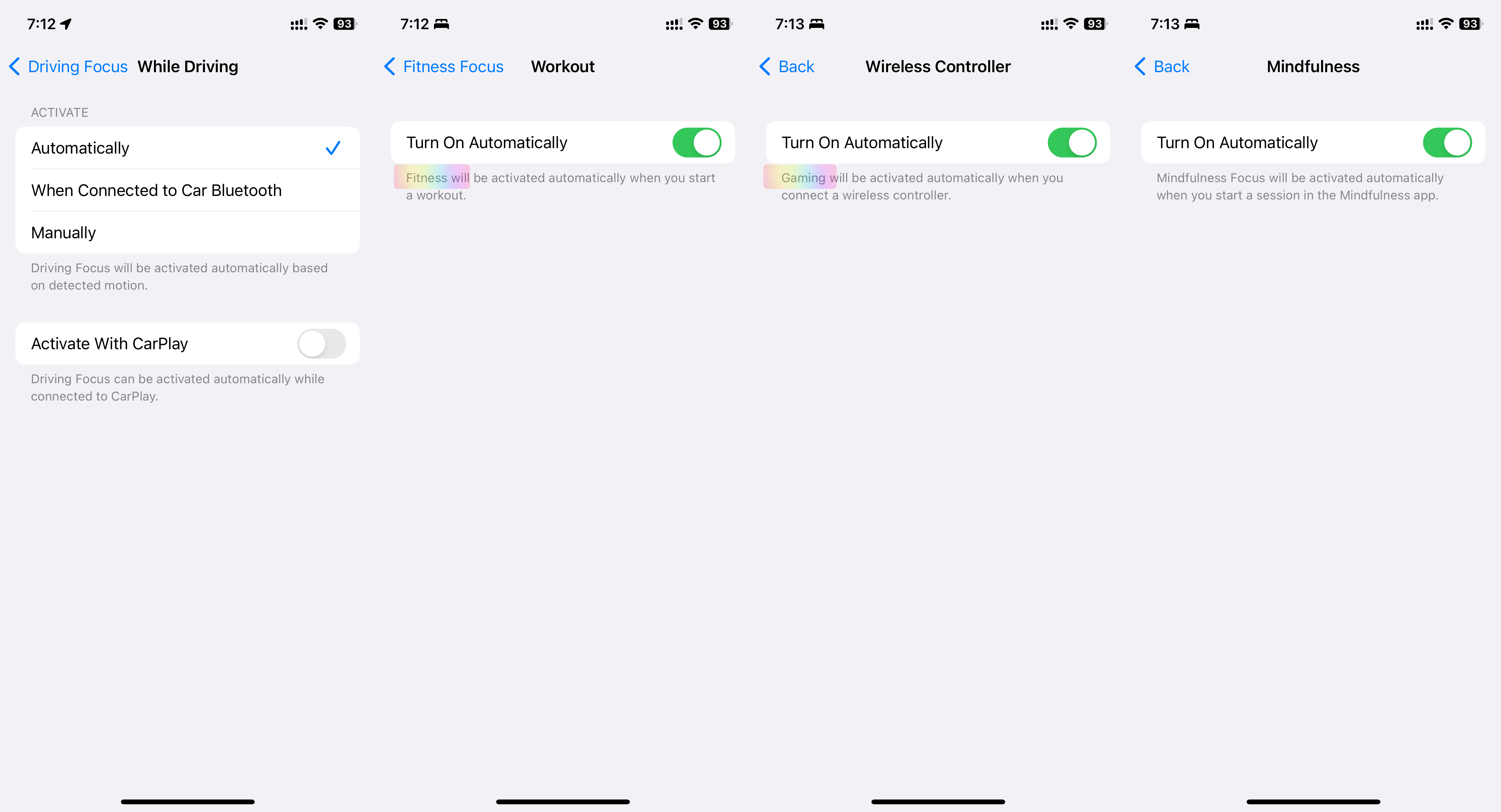
  1. Automatic Activation: Driving, Fitness, Gaming, Mindfulness
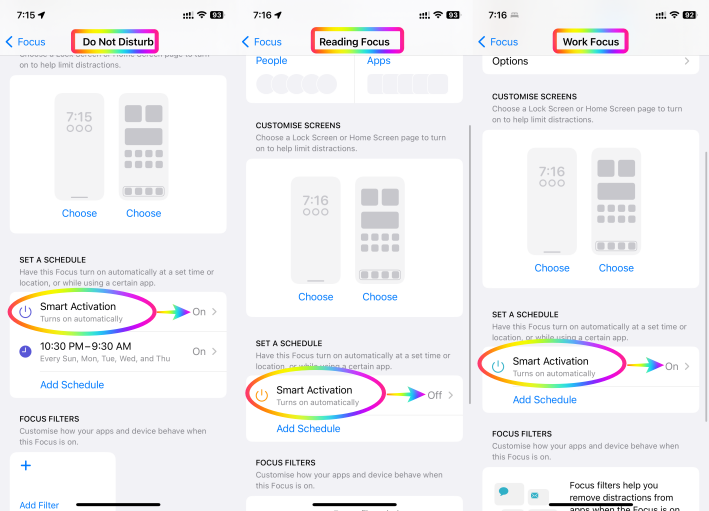
  2. Smart Activation: Work, Reading, DND
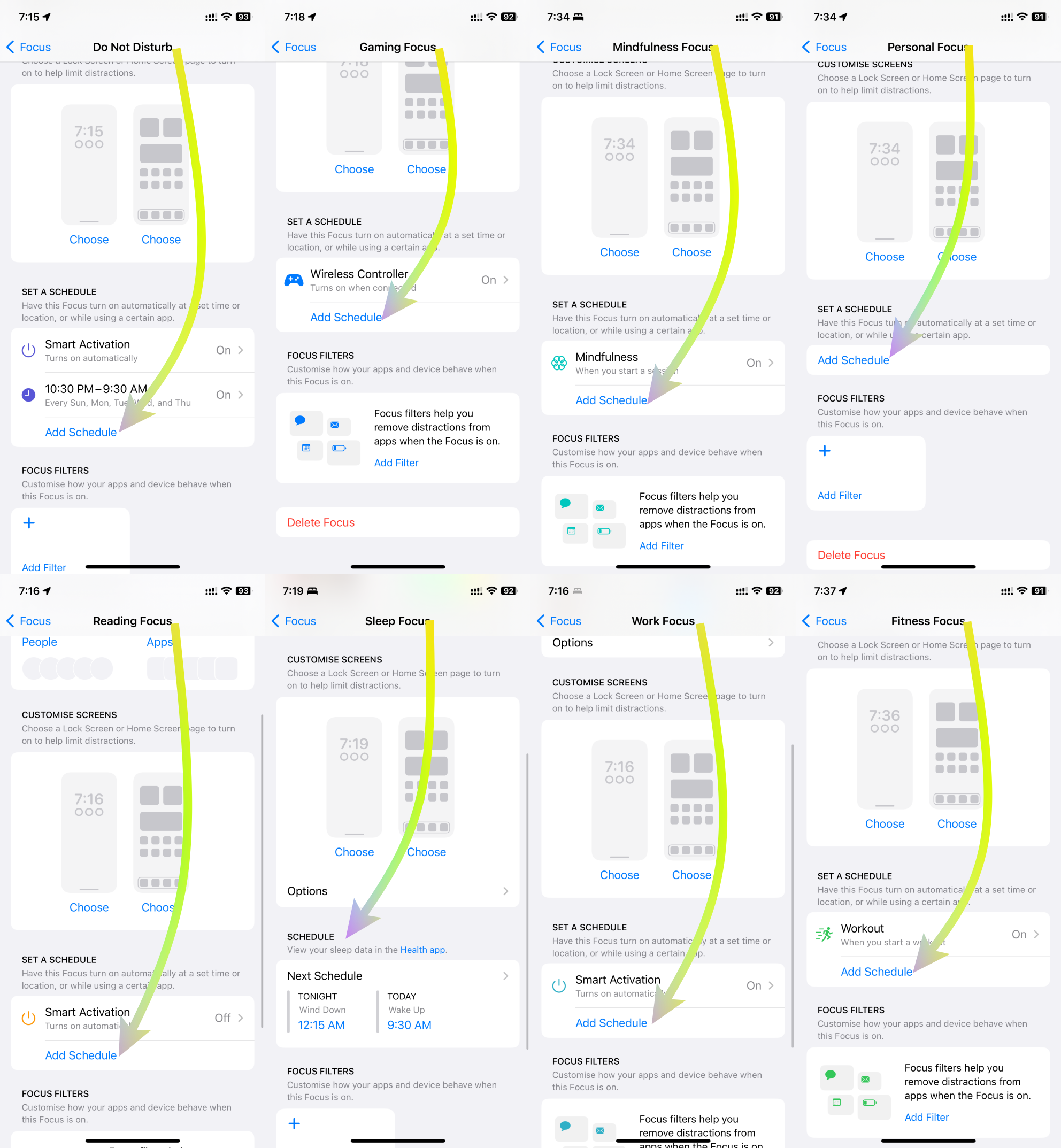
  3. Scheduled Activation: DND, Gaming, Mindfulness, Personal, Reading, Sleep, Work, Fitness


Elaborated below are comprehensive explanations for each of these three triggers.



1. Automatic Activation:

DND's Automatic Activation innovatively responds to specific contexts, improving user engagement and well-being. In driving scenarios, it identifies motion through GPS, accelerometers, and Bluetooth to ensure safer driving by silencing distractions. During fitness activities, it synchronizes with fitness trackers, ensuring uninterrupted workouts for optimal results. For gaming, it intuitively activates DND, heightening immersive experiences. In mindfulness practices, it triggers DND for focused meditation. Users can customize these triggers to suit their preferences, harmonizing technology with life.

See the pic below

2. Smart Activation:

Smart Activation introduces intelligent functionality by activating DND during tasks that require focus. When sharing screens, it suppresses notifications to aid presentations. During screen recording, it enables uninterrupted capturing. While streaming to TV, it elevates content consumption without disturbances. When mirroring screens, it ensures seamless interactions. This feature adeptly aligns technology with multitasking, streamlining interactions and fostering efficient engagements.


See the pic below

3. Scheduled Activation:

DND's Scheduled Activation empowers users with versatile control over privacy and focus. It accommodates contexts like work, exercise, reading, mindfulness, gaming, personal time, and sleep. By scheduling DND during work hours, users can enhance productivity. During fitness routines, DND preserves concentration. For leisure activities like reading and mindfulness, it creates tranquil settings. In gaming sessions, DND blocks distractions. This scheduling flexibility harmonizes technology usage with diverse lifestyle needs.


See the pic below

In essence, the integration of these activation triggers redefines DND's role beyond simple interruption management. It transforms the user experience across domains, from driving safety and focused fitness to immersive gaming and mindful introspection. With each trigger customizable to individual preferences, this innovation reflects technology's adaptability to enhance well-being and productivity in a digital age


This thread has been closed by the system or the community team. You may vote for any posts you find helpful, or search the Community for additional answers.

Unusual mode changes and missing notifications on iPhone

Welcome to Apple Support Community
A forum where Apple customers help each other with their products. Get started with your Apple Account.