
Blurry wallpaper issue on iPhone
All of a sudden my wallpaper is totally blurry. I hate this feature! I've found no matter which wallpaper I choose it is now blurry.
[Re-Titled by Moderator]
Original Title: Wallpaper blur
iPhone 13 mini, iOS 18
All of a sudden my wallpaper is totally blurry. I hate this feature! I've found no matter which wallpaper I choose it is now blurry.
[Re-Titled by Moderator]
Original Title: Wallpaper blur
iPhone 13 mini, iOS 18
If you want to make your home wallpaper clear again either go to settings and tap wallpaper or press and hold on your Lock Screen. after doing either one, then select the wallpaper you want to edit and select home screen. Tap on the water droplet and see if that helps. If your lock screen is the one that is blurry, restart your iPhone, and if the issue persists, contact apple and see what they say. I hope this helps.
If you want to make your home wallpaper clear again either go to settings and tap wallpaper or press and hold on your Lock Screen. after doing either one, then select the wallpaper you want to edit and select home screen. Tap on the water droplet and see if that helps. If your lock screen is the one that is blurry, restart your iPhone, and if the issue persists, contact apple and see what they say. I hope this helps.
On your iPhone, open the photo you want to use as your wallpaper.
Now, tap the edit slider on the bottom of the photo.
Now tap Crop.
See the box at the top, which is box within a box within a box and tap it.
Look at the bottom row and slide till you see Wallpaper and tap that then Save.
This will resize the photo to be the perfect size for a Wallpaper on your iPhone and when you select the edited version will no longer show blur.
Adjust the camera’s focus and exposure
Before you take a photo, the iPhone camera automatically sets the focus and exposure, and face detection balances the exposure across many faces. If you want to manually adjust the focus and exposure, do the following:
 up or down to adjust the exposure.
If your Photos and Videos are stored in iCloud and you share it before downloading the original then it may appear blurry but it is not.
Your photos and videos are stored on your device in their original, high-resolution version. This means that they use a lot of space on your iPhone, iPad, and iPod touch. With iCloud Photos, you can make more space available on your device and have your entire collection, everywhere you go.
Get started with iCloud Photos:
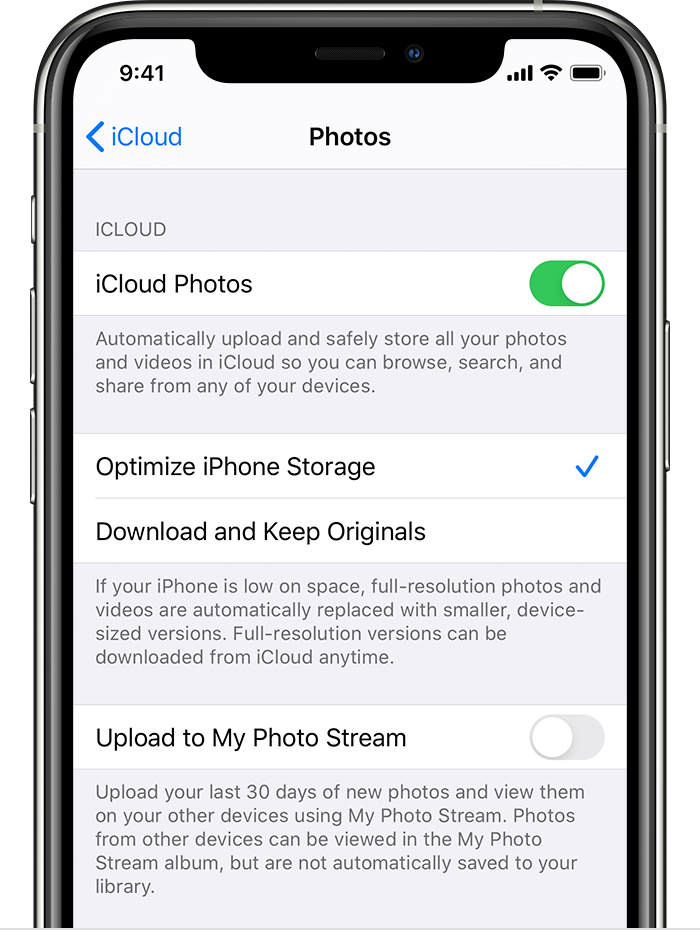
With Optimize Storage, smaller, space-saving photos and videos are kept on your device while all of your original, full-resolution versions are stored in iCloud. And as long as you have enough space in iCloud, you can store as many photos and videos as you want.
You may try some of these steps, please check after each step...
Blurry wallpaper issue on iPhone


