Excessive General data use over cellular network while in nightstand mode

iPhone 14 Pro on iOS 18.5


iPhone consumed at least 1gb of cellular data in three hours while charging in nightstand mode. iPhone was locked and not in active use. To my knowledge, no apps were in use. This is a problem because of data metering from my carrier t-mobile.


Is this a known issue? Is the only solution to use airplane mode or turn on Low Data Mode?

Posted on Aug 6, 2025 12:42 AM

Reply
Question marked as Top-ranking reply

Posted on Aug 6, 2025 9:40 AM

Yes, I can believe that 1Gb of cellular data was consumed in less than a day.


I'm using a prepaid MVNO in the Verizon family, so I actively monitor minutes, texts, and cellular data.

I have also experienced large amounts of cellular data consumed in a short period of time on my Apple-refurbished iPhone 15 Pro, activated in mid May 2025. I do iOS and App updates (18.5 and now 18.6) exclusively on WiFi.


I suspect Apple Intelligence is using large amounts of cellular data on my iPhone 15 Pro. My prior iPhone, a 12 Pro, did not have Apple Intelligence capability.


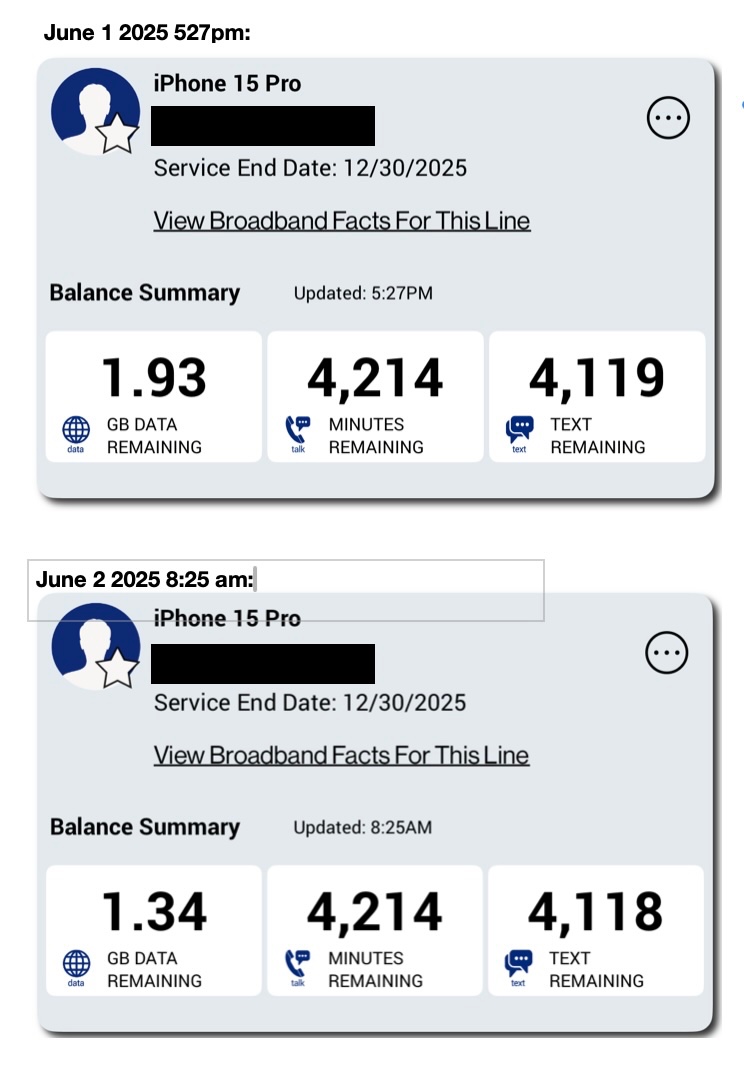
On several occasions, my iPhone 15 Pro used over 500MB (.59Gb as illustrated below) data within in a few hours when the phone was on, but not in use. I have cross-checked iPhone Cellular Data usage with screenshots of my mobile account statistics from the provider account page.
To view the amount of cellular data used, go to Settings, Cellular, then scroll down to the Cellular Data, Current Period, System Services.


In my case, under System Services, General displays more than 4Gb of data used over a period two months, when my typical cellular data usage prior to Apple Intelligence in the neighborhood of 150-250Mb per month.

There is no specific data category for Apple Intellligence, so I suspect that Apple Intelligence usage is included in General.


My temporary solution is to turn off turn off Apple Intelligence. I've also turned off Cellular Data when I have WiFi available. I can still make and receive cellular calls even when Cellular Data is turned off, but visual voicemail only displays transcripts when Cellular data is on.


Yes, I could be entirely wrong. There may indeed be other logical explanations.


I suspect that very few smartphone users even monitor call, text or cellular data usage because most smartphone users now have 'unlimited-everything' monthly plans, where it truly doesn't matter.



2 replies
Question marked as Top-ranking reply

Aug 6, 2025 9:40 AM in response to bendair

Yes, I can believe that 1Gb of cellular data was consumed in less than a day.


I'm using a prepaid MVNO in the Verizon family, so I actively monitor minutes, texts, and cellular data.

I have also experienced large amounts of cellular data consumed in a short period of time on my Apple-refurbished iPhone 15 Pro, activated in mid May 2025. I do iOS and App updates (18.5 and now 18.6) exclusively on WiFi.


I suspect Apple Intelligence is using large amounts of cellular data on my iPhone 15 Pro. My prior iPhone, a 12 Pro, did not have Apple Intelligence capability.


On several occasions, my iPhone 15 Pro used over 500MB (.59Gb as illustrated below) data within in a few hours when the phone was on, but not in use. I have cross-checked iPhone Cellular Data usage with screenshots of my mobile account statistics from the provider account page.

To view the amount of cellular data used, go to Settings, Cellular, then scroll down to the Cellular Data, Current Period, System Services.


In my case, under System Services, General displays more than 4Gb of data used over a period two months, when my typical cellular data usage prior to Apple Intelligence in the neighborhood of 150-250Mb per month.

There is no specific data category for Apple Intellligence, so I suspect that Apple Intelligence usage is included in General.


My temporary solution is to turn off turn off Apple Intelligence. I've also turned off Cellular Data when I have WiFi available. I can still make and receive cellular calls even when Cellular Data is turned off, but visual voicemail only displays transcripts when Cellular data is on.


Yes, I could be entirely wrong. There may indeed be other logical explanations.


I suspect that very few smartphone users even monitor call, text or cellular data usage because most smartphone users now have 'unlimited-everything' monthly plans, where it truly doesn't matter.


Aug 6, 2025 7:33 AM in response to bendair

I don't think the data shown is for a day or for a few hours. It is for the period. Ask your Carrier for the period-wise data usage. You are not charged for the data consumption based on what is displayed on your iPhone.


What is the Last Reset Date* on your device? [Scroll to the bottom]


Starting this Date* there are two sections which provide data for your analysis.


Under Cellular / Mobile Data Section

Current Period and Current Roaming Period cellular data usage.


[Scroll Down]

Call Time section

Current Period and Lifetime Calls.


How did you assess for which period the data usage belongs to?


Just to clarify, it's important to understand that a single SIM card can actually be used across multiple devices. This means that you can consume data from any device, including Android devices.


All the data consumption associated with that SIM card is consolidated in one central location: your trusted carrier. It's worth noting that your carrier will bill you based on this consolidated information. Therefore, if you need a comprehensive breakdown of your usage, I would recommend reaching out to your carrier and requesting a detailed itemized bill.


By doing so, you'll have a clear overview of your usage across all the devices you've used with that SIM card, ensuring transparency and accuracy in your billing.


If you're using an Exchange ActiveSync account, it may continue to use mobile data even if you've turned it off for Mail and Calendar. To see the mobile data usage of your Exchange ActiveSync account, go to Settings > Mobile Data > System Services.


This thread has been closed by the system or the community team. You may vote for any posts you find helpful, or search the Community for additional answers.

Excessive General data use over cellular network while in nightstand mode

Welcome to Apple Support Community
A forum where Apple customers help each other with their products. Get started with your Apple Account.