Wi-fi not working well after upgrade to MacOS Tahoe

MacBook Pro can’t connect to internet at this time or does so very slowly. All other devices are working fine on new OS. Is this because of the new OS? I have seen a lot of notifications about certificates not being trusted. I don’t understand whats going on or what to do about it.

MacBook Pro 14″, macOS 26.0

Posted on Sep 27, 2025 6:48 AM

Reply
3 replies

Sep 28, 2025 8:03 AM in response to colrehogan

Wi-Fi Radio Signals from your Router fall off as the cube of the distance. Provided you are close to your Router and have clear line of sight and no competition from neighbors' Routers or known interference producers like microwave ovens.


All others need to do a more careful analysis to find out what is happening.


Wireless diagnostics:


Hold down the Option key while you click on the Wi-Fi icon on the menubar to open up the tools for investigating and fixing Wi-Fi issues


First is "Open Wireless diagnostics", which opens the wireless diagnostics Assistant, but does not proceed. NB> Wireless Diagnostics puts up its own menubar.


Using its Window menu, there are about eight different things you can do from here, but the top-level is to choose Diagnostics off the Window menu, or simply click (Continue) to do a quick check for Gross misconfiguration or operating problems. Your Admin password will be required. If any recommendations are shown, you should consider then seriously.


Next is to hold down the Option key and click the Wi-Fi icon as before. The screen that opens shows operating parameters of your Wi-Fi network. Looks like this older one.
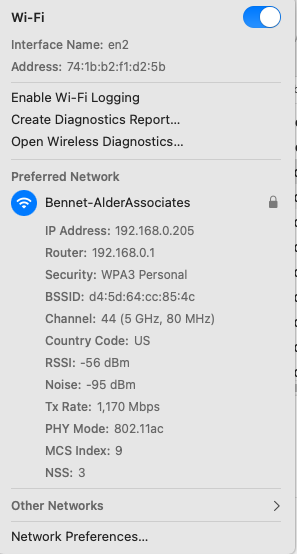


>> Please Screenshot, transcribe, or photograph the results and post back in a reply on the forums.



Sep 27, 2025 3:23 PM in response to colrehogan

colrehogan wrote:

MacBook Pro can’t connect to internet at this time or does so very slowly. All other devices are working fine on new OS. Is this because of the new OS? I have seen a lot of notifications about certificates not being trusted. I don’t understand whats going on or what to do about it.


Try adding a second user account and compare your results— I know it sound odd...but


To be proactive you can file a bug report / submit your Apple Feedback here: Product Feedback - Apple


This thread has been closed by the system or the community team. You may vote for any posts you find helpful, or search the Community for additional answers.

Wi-fi not working well after upgrade to MacOS Tahoe

Welcome to Apple Support Community
A forum where Apple customers help each other with their products. Get started with your Apple Account.