Cannot turn Off FileVault so that I can turn on autologin

I want to turn on AutoLogin for my XT Mac, (M2 Mac mini, macOS 26.1, single user/account).

FileVault is currently on. I want to turn it OFF so that I can enable auto login (post power failures and OS updates, etc). 

Attempts to turn off FileVault> response from Mac: FileVault can't be turned on because Automatic login is enabled (which it is not). 

This Mac is confused as to the true status of these two functions.

In my case auto login is NOT enabled, which is what I want to do, but it won't enable because FileVault is on.


I see a suggestion of a Terminal command (sudo fdesetup disable). I can try that but I'd prefer to find a less drastic approach. Perhaps I have missed something.

MacBook Pro 16″, macOS 26.1

Posted on Nov 17, 2025 11:13 AM

Reply
7 replies

Nov 17, 2025 11:33 AM in response to Brian Williams2

Brian Williams2 wrote:


I want to turn on AutoLogin for my XT Mac, (M2 Mac mini, macOS 26.1, single user/account).

FileVault is currently on. I want to turn it OFF so that I can enable auto login (post power failures and OS updates, etc). 

Attempts to turn off FileVault> response from Mac: FileVault can't be turned on because Automatic login is enabled (which it is not). 

This Mac is confused as to the true status of these two functions.

In my case auto login is NOT enabled, which is what I want to do, but it won't enable because FileVault is on.

I see a suggestion of a Terminal command (sudo fdesetup disable). I can try that but I'd prefer to find a less drastic approach. Perhaps I have missed something.


I would never recommend Automatic log-in in todays macOS environment.


macOS Tahoe install by default flipped on the FileVault— yes.


Are you saying from the >System Settings>FileVault this is where you get the kickback???
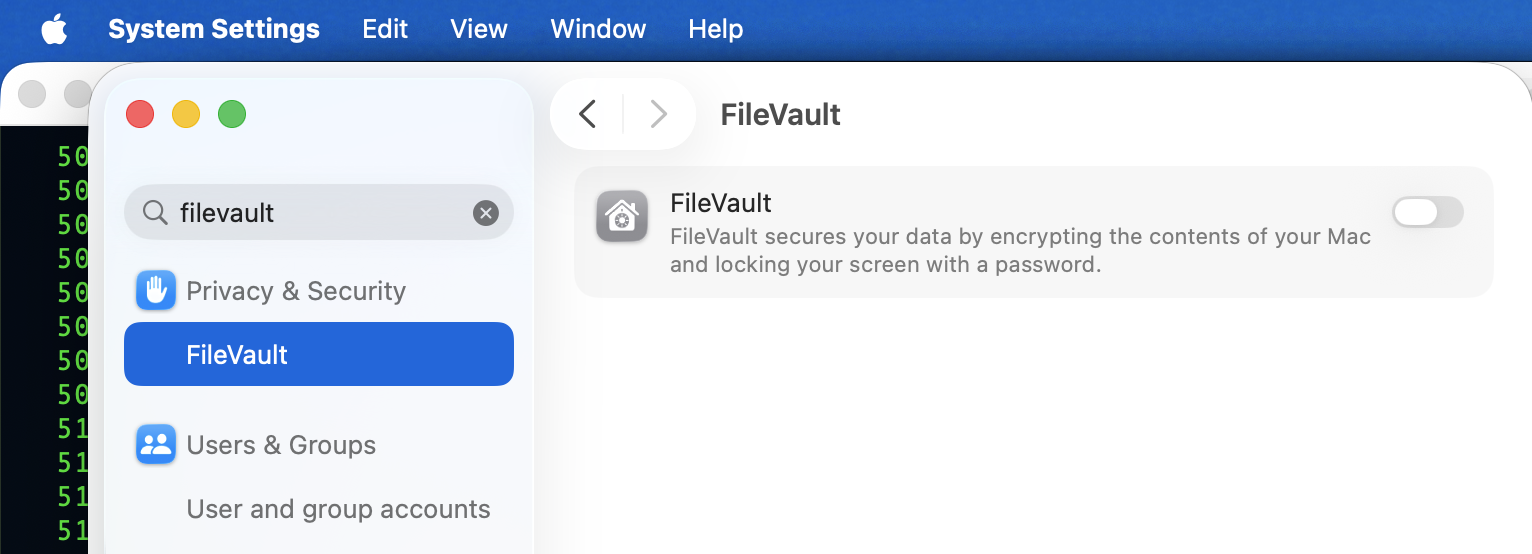


—Not sure if I am remembering correctly for this issue— try turning off Find MY and compare your results or turning it on if it is off(?)


—Also I might suspect if you set up a Firmware password you may have to disable that, if you still have an issue(?)

How to turn off a firmware password: Set a firmware password on your Mac - Apple Support

I see now: Apple Silicon Macs do not have a firmware password option


Verify FileVault status from Terminal.app copy and paste:

fdesetup status


The alternative if you want to disable FileVault :

sudo fdesetup disable


(note: your psswd will not echo on screen, type it in anyway, use the enter\return key to proceed.)


what I see—



Dec 5, 2025 7:20 PM in response to MarydaleEd1

MarydaleEd1 wrote:

Geez, I come across this so often in these posts within this community. People come here, asking questions and provide adequate information for their questions to be answered, but instead of a straightforward answer, they get judgment and other unnecessary questioning from responders. If Dude wants to put his computer on automatic login, that's his business and I'm sure he doesn't care what any of us think of that decision.

It may sometimes sound judgmental, but it is meant to be educational. Many people don't understand the risks for some of their habits & configurations.


Of course people are free to configure their devices as they wish, but I think it is reasonable to point out potential issues with a particular configuration so the user can take the new information into consideration to make a more informed decision, even if they wish to leave things as they are.


I'm having the same problem. I am trying to use Migration Assistant, and I cannot disable the FireVault on my old MacBook Pro. It is grayed out. I came here looking for a straightforward answer, but I find none.

IIRC, in another recent thread, I believe @leroydouglas' suggestion to use the command line to disable Filevault was the solution. Here is a direct link to the post by @leroydouglas earlier in this thread (when sorted by "Oldest"):

Cannot turn Off FileVault -- Post by @leroydouglas to use command line to turn off Filevault - Apple Community


I suggest you try that & report back here.


Nov 21, 2025 7:39 AM in response to Brian Williams2

This note relates to cautions offered in some suggestions. The AutoLogin feature exists within macOS simply because the Mac is much more than a simple personal computer. In many cases, Macs are the core of an automation or security system, and thus should be up at all times. But there are many things that can interrupt that status, such as a power outage and the UPS being depleted, or when updating macOS, some of which is managed remotely, and a restart is necessary. AutoLogin assists in ensuring minimal downtime.

Dec 6, 2025 2:58 AM in response to Brian Williams2

Geez, I come across this so often in these posts within this community. People come here, asking questions and provide adequate information for their questions to be answered, I'm having the same problem. I am trying to use Migration Assistant, and I cannot disable the FireVault on my old MacBook Pro. It is grayed out. I came here looking for a straightforward answer, but I find none. Only the things I mentioned above. Frustrating.


[Edited by Moderator]

Cannot turn Off FileVault so that I can turn on autologin

Welcome to Apple Support Community
A forum where Apple customers help each other with their products. Get started with your Apple Account.




