Application Memory running out with Topaz Video

I have a Mac Studio M4 Max with 36 GB Memory. Using Topaz Video for 3 months with no problem. In the last week every time I try to use the program it starts OK then always ends up failing and states " Run out of Application Memory" I've cleared all caches, ran "sudo purge" in terminal but to no joy. Can anyone help me sort out this problem please?

Thks Nige

Mac Studio, macOS 15.6

Posted on Nov 22, 2025 10:15 PM

Reply
3 replies

Nov 23, 2025 8:25 AM in response to npcxx

Consider downloading and running this little "discovery" utility, Etrecheck. It changes NOTHING. Etrecheck was developed by a senior contributor here, and uses mostly system calls and simple tests to collect often-needed information.


it contains little tests for speeds of devices, CPU utilization, memory usage, energy usage and a digest of recent problems, in one easy to use package. it does not even need to be Installed. Because less can be learned when your Mac is running great, best time to run is when your problems are actually occurring, if possible.


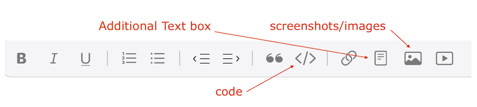
if you follow the directions faithfully, its report (pre-laundered of all personally-identifiable information) can be "Shared" to the System ClipBoard, then Pasted into an ‘Additional Text’ window in a reply on the forums.


Use Etrecheck Pro for free:

http://Etrecheck.com


The amount of data you get can be daunting. If you POST your report, some Readers here are willing to look over those reports, and can provide valuable insights.
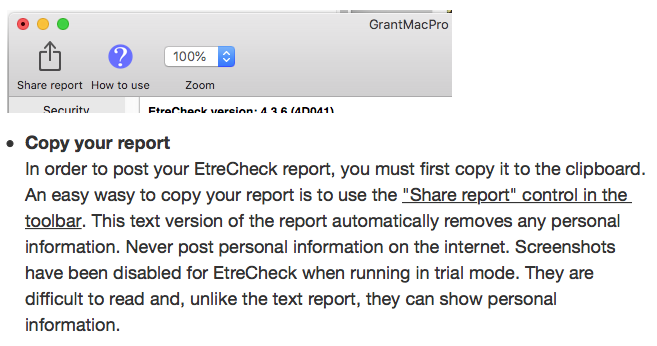


then start a reply on the forums, click the "additional text" icon in the footer, and PASTE

Nov 23, 2025 8:45 AM in response to npcxx

1) That warning sounds more like low Storage Space, than Random Access Memory.

To check for available Storage Space > Free up storage space on Mac - Apple Support

To check Memory (RAM) > Check if your Mac needs more RAM in Activity Monitor - Apple Support


2) There are security and fixes in later macOS versions. If you are still on Sequoia 15.6...

Update to Sequoia 15.7.2 > What's new in the updates for macOS Sequoia - Apple Support

Or.. do the Upgrade to Tahoe 26.1 > What's new in the updates for macOS Tahoe - Apple Support


Late Edit: I didn't see Grant's reply, but also recommend using EtreCheckPro.

Dec 19, 2025 4:05 AM in response to npcxx

This is almost certainly not a system RAM problem and not something sudo purge can fix. On Apple Silicon, “Run out of application memory” usually means the app itself is leaking unified memory or hammering swap until macOS jetsams it. Topaz Video is notorious for this when its AI model cache or Metal pipeline gets corrupted after an update.


What to do? quit Topaz, delete its model and cache folders (~/Library/Application Support/Topaz Labs and ~/Library/Caches/com.topazlabs.*), then reboot before reopening it. While reproducing the crash, keep Activity Monitor open and watch Memory Pressure and Swap Used, if swap shoots up fast, that’s the smoking gun. Also check if Topaz is running under Rosetta instead of native Apple Silicon (Get Info > uncheck “Open using Rosetta” if it’s on).


Finally, Sequoia 15.6 had real memory pressure regressions with heavy Metal workloads, I’ve seen this exact issue disappear after updating to 15.7.x without any other changes. If it still blows up after a clean cache reset and OS update, it’s a Topaz bug, not your Mac, and they’ll need crash logs from Console to fix it.

Application Memory running out with Topaz Video

Welcome to Apple Support Community
A forum where Apple customers help each other with their products. Get started with your Apple Account.

