If the iTunes backup on your Windows PC is larger than the actual used storage on your iPhone, it usually means one of two things: the backup is corrupted, or it belongs to a different device. Since encrypted backups are also compressed, they should never exceed—let alone match—the used storage of the iPhone.
iCloud and iTunes backups use compression to save storage space. This means the actual size of the data on your device is much larger than the backup file. In your case, the 58GB backup could expand to be significantly larger, potentially up to five times the compressed size.See the pic below
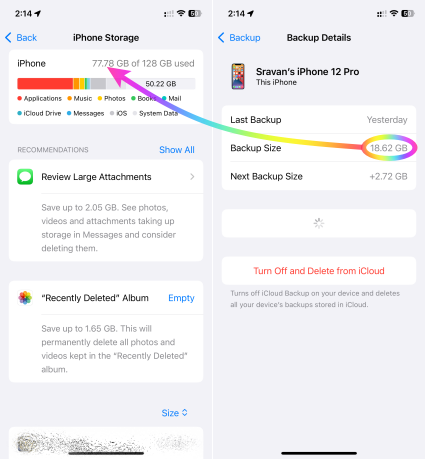
When restoring, you need enough space on the target device for the uncompressed data. If you're seeing an error about insufficient space, it's likely because you're trying to restore a backup that's actually much larger than the available space.
Here's how to troubleshoot:
- Check actual data size: Go to Settings > General > iPhone Storage to see how much space your apps and data are actually using. This is the minimum space you'll need to restore.
- Compare with available space: Ensure the device you're restoring to has at least that much free space, ideally more to allow for temporary files during the restore process.
- Consider alternatives: If the backup is too large, you may need to:
- Restore to a device with more storage: If possible, use a device with sufficient space.
- Reduce backup size: Go to Settings > [Your Name] > iCloud > Manage Storage > Backups and choose which data to include in the backup.
- Start fresh: If necessary, set up the device as new and selectively restore data from the backup later.

