Texts going to wrong iPhone after removing one

I have 2 iphones and want to get rid of one- now all texts go to the wrong phone

MacBook Air 13″, macOS 15.6

Posted on Jan 2, 2026 8:44 PM

Reply
Question marked as Top-ranking reply

Posted on Jan 2, 2026 9:28 PM

I have 2 iphones and want to get rid of one- now all texts go to the wrong phone

If you're referring to iMessage texts (blue bubbles), set up Messages on the correct iPhone:


Set up Messages on iPhone - Apple Support


If you're having problems with iMessage, this article may help:


If you can’t turn on or sign in to iMessage or FaceTime on your iPhone - Apple Support


If you are referring to SMS/MMS text messages (green bubbles), those are handled by your iPhone's carrier service. You might need to contact them. This article contains carrier contact information:


Wireless carrier support and features for iPhone in the United States and Canada - Apple Support


Hope this helps!


-Jack

3 replies
Question marked as Top-ranking reply

Jan 2, 2026 9:28 PM in response to antjefromhonolulu

I have 2 iphones and want to get rid of one- now all texts go to the wrong phone

If you're referring to iMessage texts (blue bubbles), set up Messages on the correct iPhone:


Set up Messages on iPhone - Apple Support


If you're having problems with iMessage, this article may help:


If you can’t turn on or sign in to iMessage or FaceTime on your iPhone - Apple Support


If you are referring to SMS/MMS text messages (green bubbles), those are handled by your iPhone's carrier service. You might need to contact them. This article contains carrier contact information:


Wireless carrier support and features for iPhone in the United States and Canada - Apple Support


Hope this helps!


-Jack

Jan 3, 2026 1:23 AM in response to antjefromhonolulu

If you want to keep two iPhones independent of each other then best would be to have two different Apple IDs.


Otherwise, there are basically three types of sharing

  1. Text Message and
  2. Calls on the other device

iCloud Photos & Messages: iCloud now keeps your entire messages history updated and available on all your devices — even when you set up a new device. Learn how to keep all your messages in iCloud.
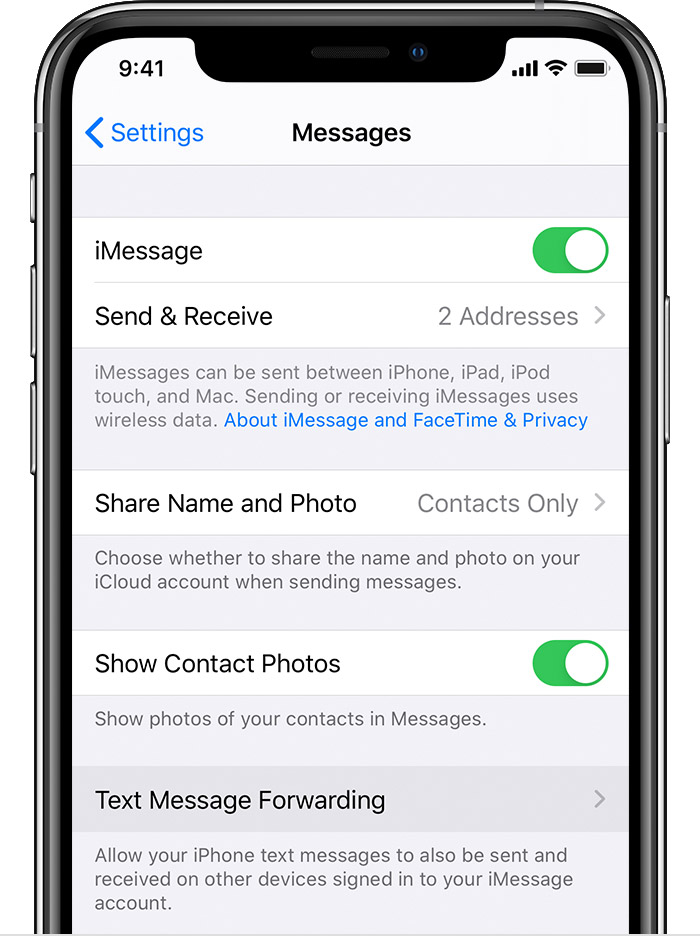


  1. Set up text message forwarding
    1. On your iPhone, iPad, or iPod touch, go to Settings > Messages > Send & Receive. On your Mac, open Messages, choose Messages > Preferences, then click iMessage. Make sure that you're signed in to iMessage with the same Apple ID on all your devices.
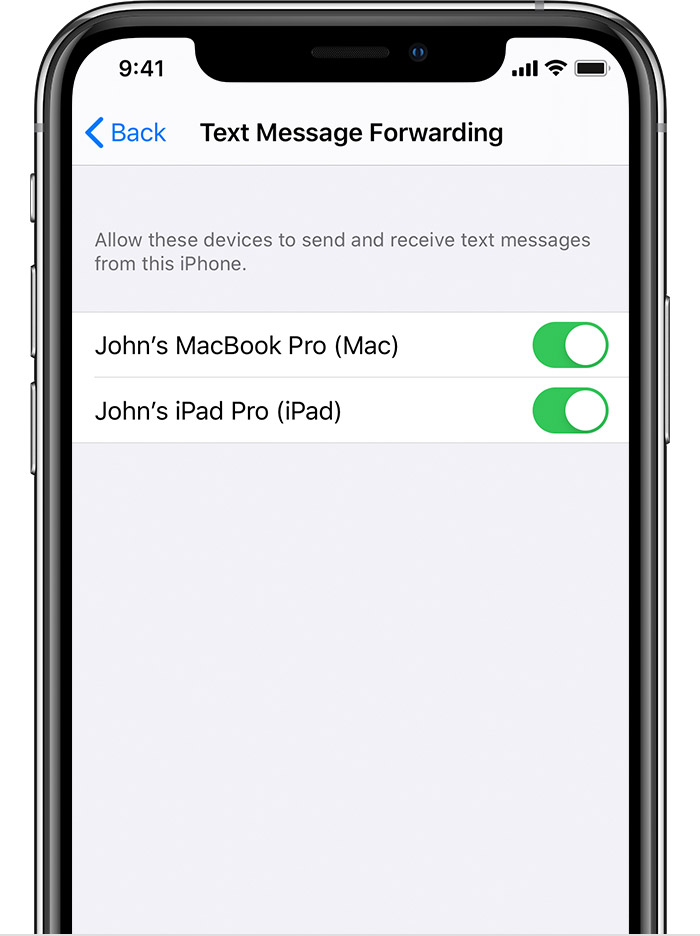
    2. On your iPhone, go to Settings > Messages > Text Message Forwarding.*
    3. Choose which devices can send and receive text messages from your iPhone. If you're not using two-factor authentication for your Apple ID, a verification code appears on each of your other devices: enter that code on your iPhone.
  2. To stop getting calls on one of your devices, just turn off the Calls from iPhone setting on that device. See the setup section above for details.
  3. You can use iPhone Cellular Calls with any Mac, iPhone, iPad or iPod touch that meets the Continuity system requirements. It works when your devices are near each other and set up as follows:
      1. Each device is signed in to iCloud with the same Apple ID.
      2. Each device is signed in to FaceTime with the same Apple ID.
      3. Each device has Wi-Fi turned on.
      4. Each device is connected to the same network using Wi-Fi or Ethernet.
      5. On your iPhone, go to Settings > Phone > Calls on Other Devices, then turn on Allow Calls on Other Devices.
      6. On your iPad or iPod touch, go to Settings > FaceTime, then turn on Calls from iPhone.
  4. On your Mac, open the FaceTime app, then choose FaceTime > Preferences. Click Settings, then select Calls From iPhone.
  5. If your carrier supports Wi-Fi calling on other devices, you can set up those devices to make and receive calls even when your iPhone isn't turned on or nearby. Learn about Wi-Fi calling.


Jan 3, 2026 1:22 AM in response to antjefromhonolulu

On your iPhone, go to Settings > Messages > Text Message Forwarding. If you can't see Text Message Forwarding, go to Settings > Messages. Turn off iMessage, then turn it back on. Tap Send & Receive, tap Use Your Apple ID for iMessage, then sign in with the same Apple ID used on your other devices.


Forward SMS/MMS text messages from your iPhone to your ...

This thread has been closed by the system or the community team. You may vote for any posts you find helpful, or search the Community for additional answers.

Texts going to wrong iPhone after removing one

Welcome to Apple Support Community
A forum where Apple customers help each other with their products. Get started with your Apple Account.