Hi mcorde,
welcome to this Apple (user-to-user) Community.
:Re: "Numbers prints tiny letters on Mac mini after data transfer
I transferred all data from a 2020 MacBook Air to a new Mac Mini using an ethernet cable
and now my sheets in Numbers print in tiny letters and I can't figure out how to fix it. Help"
You may want to first try adjusting the current default text-size for comments in settings for all spreadsheets
In the Numbers app:
Click Numbers in the top menu bar,
Choose Settings from the menu that opens
If it is not already open (highlighted): Click "General" at the top of the Settings Window.
In the General window,
Look right at the bottom to see what font-size is set, and, if you wish: change it to a larger size to suit.
(You can use the tny up (and down) arrow beside the number to change the number to a larger one)

This may or may not help with the already imported spreadsheets.
If not too many of them: You may need to open them one by one and change the text-size in each one
Else: Try importing or transferring one spreadsheet again to check if the text appears / prints / how you want ti to.
If now set as you wish: You may be able to just delete the batch you transferred, and transfer them again.
_________________________________________
Eg: To change the size of letters in a single spreadsheet"
"Change the font or font size in Numbers on Mac
You can change the font and font size of text and replace a font everywhere it occurs in your spreadsheet.
- Go to the Numbers app
 on your Mac.
 - Open a spreadsheet, then select the text you want to change.
- To change all of the text in a text box or table cell, select the text box or table cell.
- In the Format
 sidebar, click the Text tab, then click the Style button near the top of the sidebar.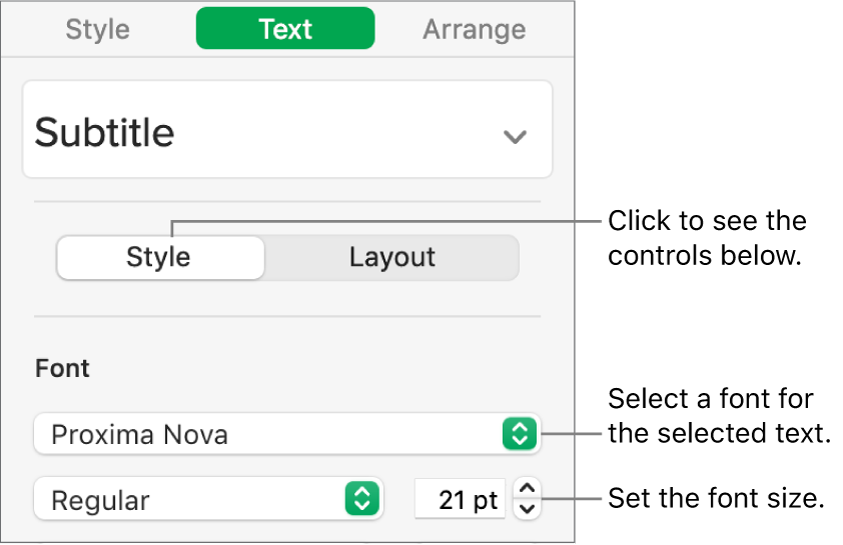
- Click the Font pop-up menu, then select a font.
- Click the small arrows to the right of the font size to make the font larger or smaller.
Tip: You can add buttons to the toolbar for changing the font and making selected text bigger or smaller."
Above method comes from: Change the font or font size in Numbers on Mac - Apple Support
________
Resource: Numbers User Guide for Mac - Apple Support
______________________
Numbers Support website: (info. / support / contact options etc.) : Numbers - Official Apple Support


