You don’t need Wi-Fi to make a standard cellular phone call; it works directly over your mobile network.
However, features like VoLTE, FaceTime Audio, FaceTime Video, and WhatsApp Call rely on an internet connection. That connection can come from either cellular data or Wi-Fi.
To make Wi-Fi calls, the feature must be supported and activated by your mobile carrier.
WiFi calls is a Carrier Specific feature. Contact your Carrier (Cellular Service Provider), the agency that issued the SIM / eSIM to you. Please see the pic below which is self-explanatory...
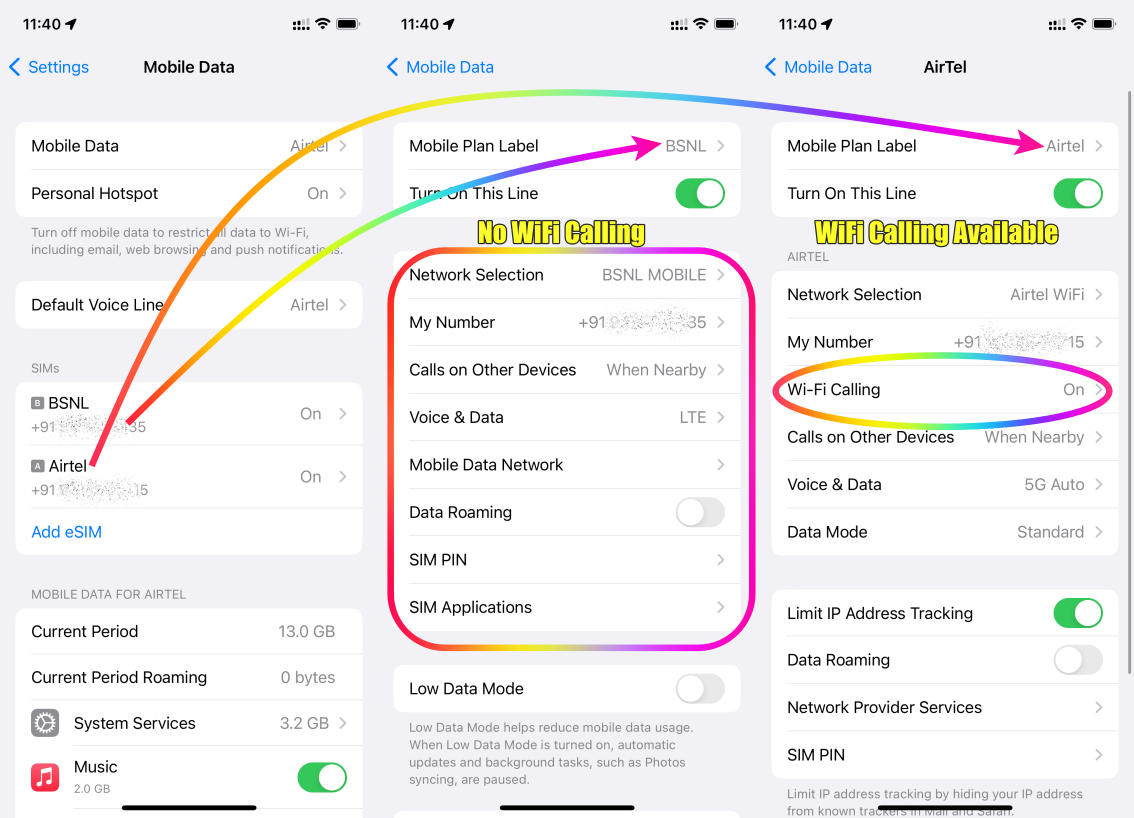
For internet access over the cellular network, contact your carrier to confirm data, VoLTE, and Wi-Fi Calling support. For Wi-Fi connectivity itself, get in touch with your internet service provider (ISP).

Since your cellular service is with Verizon and your Wi-Fi is provided by a different ISP, the issue may stem from how those two networks are interacting. If there’s a routing, peering, or network-level compatibility problem between your cellular carrier and your internet service provider, you can experience connectivity issues—especially when switching between cellular data and Wi-Fi or using services that rely on both.
This is not something Apple or the iPhone controls. The device is simply using the networks it’s given.
The best course of action is to contact both Verizon and your Wi-Fi ISP, explain the symptoms, and have them check for network or routing issues on their end. One of them will likely need to adjust or escalate the configuration.
In short: this is a carrier/ISP handshake problem, not an Apple problem.



