
How do I turn off music with explicit lyrics (swearing) in Apple Music?

I'll start playing an album for my 7 year old, like the Dog Man soundtrack—then, when the album finishes, Apple Music starts playing some rubbish rap song with foul language (marked 'E' for explicit). This isn’t a one off—it happens regularly.


I thought turning off explicit lyrics used to be a simple setting, but now I can’t find anything. I’ve searched the web, Apple docs, and asked various AI chatbots. The AI chatbots all seem to hallucinate and refer to tabs and settings that simply don’t exist.


Music app: In the Music app settings, there are only 4 tabs (General, Playback, Files and Advanced) and none of them even mention explicit content.


System Settings: In System Settings > Screen Time > Content & Privacy > Content Restrictions there is no mention of explicit content either. Under the Music & TV heading, there are only two options: Allow Music Profiles and Allow Music & TV Shared Libraries. Under Content & Privacy > Store Restrictions, the ‘Allow Explicit Music, Podcasts and News’ is turned off (and has been for a long time) but this does not stop Apple Music streaming explicit music—I’m guessing this setting only applies to the old iTunes store, where you could actually purchase songs.


Before anyone does a copy and paste of some irrelevant Apple support doc, please take the time to read what I have already tried and what the actual problem is. This is my Mac and my login. We do not give our young children their own devices, so please don’t tell me how to set up parental controls for a kid’s device.


We have a paid Apple Music subscription streaming via the Apple Music app (version 1.3.6.14) on Mac Ventura 13.7.8.

Posted on Jan 22, 2026 6:54 PM

Reply
9 replies

Jan 23, 2026 1:27 PM in response to Kalsta

Kalsta wrote:

UPDATE: The Autoplay button (infinity icon) just magically reappeared! It was selected (red)—no doubt because I tried pressing it earlier today, just to see what would happen. But before I pressed it today, it was definitely black (unselected)—so why was random (or not so random) music automatically playing after each album finished playing?

Questions about the apparent randomness of the universe are well above my pay grade.


Glad to hear you got it working, though.

Jan 23, 2026 1:18 PM in response to Kalsta

UPDATE: The Autoplay button (infinity icon) just magically reappeared! It was selected (red)—no doubt because I tried pressing it earlier today, just to see what would happen. But before I pressed it today, it was definitely black (unselected)—so why was random (or not so random) music automatically playing after each album finished playing?


What a magical experience Apple software is these days. ☹️

Jan 23, 2026 1:14 PM in response to Kalsta

That is weird. Unfortunately, I don't have access to Ventura.


The only article I could find talks about Family Sharing and child accounts.


Restrict access to items in Music on Mac - Apple Support


Try turning the feature off then restarting Music and turning it back on.


Do you have another user account on the Mac that you can use to test to see if Music behaves the same under a different account? Also, sometimes booting in Safe Mode, then back into regular mode clears out some issues. That might get you the settings to turn off autoplay, at least.


Start up your Mac in safe mode - Apple Support


A little bit of poking about on the internet brought up this tidbit:


If the issue persists, it may be a known bug that requires toggling settings on and off to trigger a refresh, say Apple Support Communities. 


Take it for what it's worth. It's AI.

Jan 23, 2026 6:46 AM in response to Kalsta

What version of iOS are you using? On my phone, using iOS 26.2, the category under Settings>Screen Time>Content & Privacy Restrictions>App Store, Media, Web & Games looks like this:


The setting to turn off explicit is at the very top.


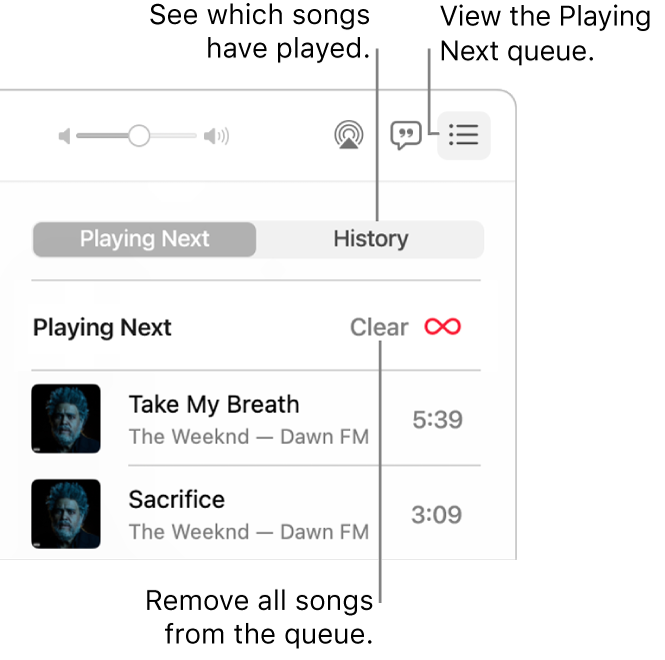
You can also turn off Autoplay in Music. Tap the "Now Playing" bar, opening the "Up Next" queue (three lines icon at bottom right), and tap the infinity symbol icon to disable it, which stops similar songs from being added to the queue.


Jan 23, 2026 11:59 AM in response to IdrisSeabright

> What version of iOS are you using?


Thanks for the detailed reply, but if you read my whole question you’ll see exactly what software version and platform this question is related to. (See the last two paragraphs—and the forum category.)


While we’re on the topic of iOS, I already have that setting set to ‘Clean’ on my iPhone, but evidently it does not sync up across devices. (Yes, I’m logged in to the same Apple ID on both my Mac and iPhone.)


I also tried to find the option to turn off Autoplay in the Mac Music app, but I can’t find it. The exact same list icon on the Mac just brings up an empty History panel that says ‘Playing Apple Music’.

Jan 23, 2026 12:37 PM in response to IdrisSeabright

No worries—thanks for following up.


Okay, well based on that help article, there’s clearly something wrong with my Music app, because it doesn’t look anything like that. Here’s the picture in the article:


And here’s what it looks like on my Mac:


Now, if I try playing different stuff in Apple Music, it sometimes shows me the ‘Playing Next’ tab, but notice there is currently no Autoplay button:


It was there earlier, and did not appear to be selected, but when I clicked it to see what would happen, it simply disappeared! Relaunching the app did not bring it back.


Sigh. Is this just a sign of Apple’s software becoming evermore buggy in recent years? That’s been my experience anyway.


And back to the original question—do you know how to turn off explicit music on the Mac?

How do I turn off music with explicit lyrics (swearing) in Apple Music?

Welcome to Apple Support Community
A forum where Apple customers help each other with their products. Get started with your Apple Account.
