I am unable to replicate the issue that you describe with my iPad (an iPad Pro M1) - which may differ from your model.
Try a forced-restart of your iPad - as this will often clear an isolated software issue:
Force restart iPad (models with Face ID or with Touch ID in the top button)
If your iPad doesn’t have the Home button, do the following:
- Press and quickly release the volume button nearest to the top button.
- Press and quickly release the volume button farthest from the top button.
- Press and hold the top button.
- When the Apple logo appears, release the top button.

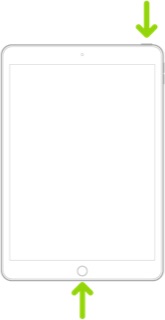
Force restart iPad (models with the Home button)
Press and hold the top button and the Home button at the same time. When the Apple logo appears, release both buttons.
If you have encountered a consistent bug that is not cleared by the restart, you and anyone else that encounter the issue should submit a Bug Report via Apple's Product Feedback portal. For iPad and iPadOS:
Feedback - iPad - Apple
When submitting your Bug Report, please ensure that you include details of your iPad model and installed version of iPadOS within the body-text of your report along with details of the problem. Do not rely upon the pick-list - as this rarely includes the current version of iPadOS.
Every Bug Report counts. Unless reports are submitted (with adequate detail), Apple may not assign resources to investigate and correct the issue.
In addition [i.e., not as a substitute] to submitting a Bug Report, you might also consider seeking assistance directly from Apple Support. You can contact the Support Team using the Support link at top-right or bottom-left of this page; you can initiate and manage your support cases from Apple devices using the excellent Apple Support App. If not already installed, the App can be downloaded from the App Store:
https://apps.apple.com/app/apple-support/id1130498044

