iPhone 12 Pro Max stuck in Find My until March 20th

I have set up an apple iphone 16 pro max and am trying to wipe my old iphone 12 pro max and have half succeeded. I have erased the phone and disabled find my but it says the phone won't be removed from find my until 20th March, as some kind of anti theft setting. I am trying to sell it so don't want to wait a month. Is there anything that can be done? I have my icloud settings etc now on my new phone and a quick look by Apple at my icloud history would show the iphone 12 has not been stolen and is definitely still with me. Can anyone assist?

iPhone 16 Pro Max, iOS 26

Posted on Feb 18, 2026 4:16 AM

Reply
Question marked as Top-ranking reply

Posted on Feb 18, 2026 6:13 AM

Stolen Device Protection is not the problem, it is because you erased the phone through Find My. As stated, set the phone up again and erase it properly using the provided Support Article.

https://support.apple.com/en-us/109511


If you have trouble using the recommended method for erasing the device, then let us know what the trouble is for assistance. Erasing from Find My is going to result in the 30 day delay.

8 replies
Question marked as Top-ranking reply

Feb 18, 2026 6:13 AM in response to Goingmad999

Stolen Device Protection is not the problem, it is because you erased the phone through Find My. As stated, set the phone up again and erase it properly using the provided Support Article.

https://support.apple.com/en-us/109511


If you have trouble using the recommended method for erasing the device, then let us know what the trouble is for assistance. Erasing from Find My is going to result in the 30 day delay.

Feb 18, 2026 4:37 AM in response to Goingmad999

See the pic below which is self-explanatory
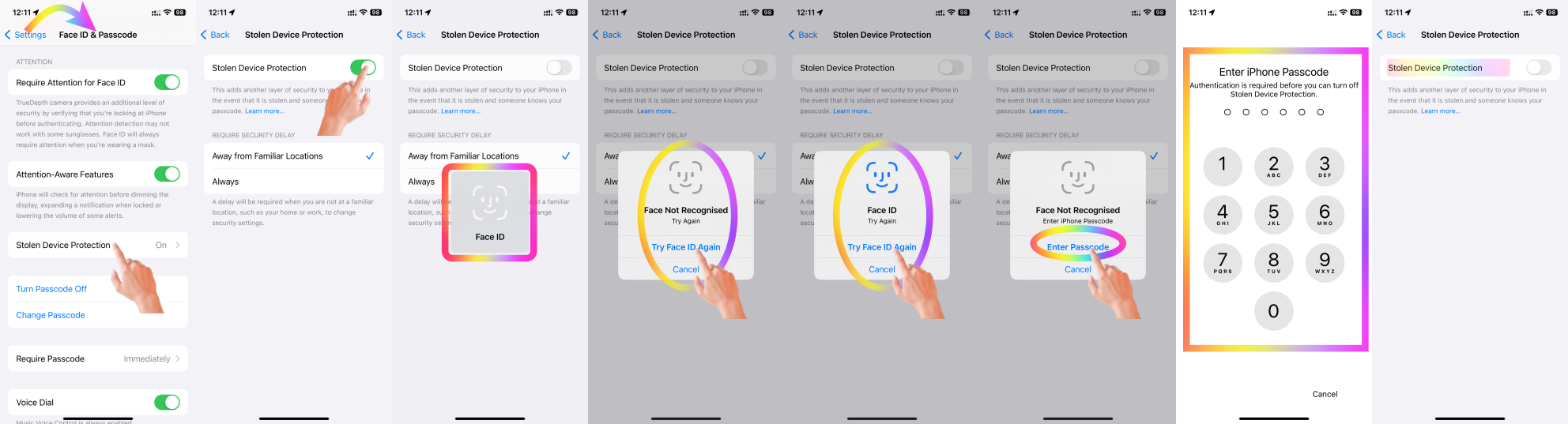


Probably you have "Always" Ticked in place of "Away from Familiar Location"


For enhanced security, there's a one-hour delay when changing your location settings from "Always" to "Away from Familiar Location." This applies even if you use Face ID for authentication.


A delay will be required when you are not at a familiar location, such as your home or work, to change security settings.


Know more --> About Stolen Device Protection for iPhone



Simply adding a location to your contact card (e.g., marking it as "Home") does not automatically make it a "Familiar Location" in the context of iPhone's location-based learning and features.


Why Adding "Home" to the Contact Card Isn't Enough:

  1. Trust and Validation: Adding an address to your contact card can be done manually or by anyone with access to your phone, but the iPhone uses activity-based learning to validate locations it deems "familiar."
  2. Behavior-Based Learning: iPhones utilize machine learning and location tracking (if enabled) to recognize patterns of frequent visits. It identifies "Familiar Locations" based on where the phone spends significant time during specific periods, like overnight stays or long durations.


What You Can Do:

  1. Spend Time at the Location: Use your iPhone at your new address consistently, especially during the hours you'd normally be home (e.g., evening and night). Over time, the iPhone will learn this as a familiar location.
  2. Enable Location Services:
    1. Go to Settings > Privacy & Security > Location Services and ensure it's turned on.
    2. Make sure "Significant Locations" (under System Services) is enabled. This helps the iPhone learn frequently visited locations.
  3. Ensure GPS Accuracy: Poor GPS accuracy can delay location recognition. Make sure your iPhone is connected to Wi-Fi, as this improves location precision indoors.


By doing this, the iPhone will naturally associate the address with your routines, and over time, it will classify it as a "Familiar Location."




Feb 18, 2026 7:47 AM in response to Bob Timmons

Bob Timmons wrote:

There is a good chance that what you find on AI is not really all that "intelligent".


There were at least two cases where lawyers presented AI output to courts of law as "evidence" in their favor.


For instance, in one case, the AI output cited an alleged case whose supposed outcome was highly favorable to the lawyers' client. The lawyers presented the AI output to the judge without bothering to verify it.


As it turned out, the case was a complete hallucination – there was no such case. The Federal court judge was not amused – and read portions of the gibberish out loud in court, to show that the lawyers should have caught this, instead of presenting false statements to a court of law. He also fined the lawyers $5,000 each (my guess would be they got off easy, and that they could very well have been sent to jail for contempt of court).

iPhone 12 Pro Max stuck in Find My until March 20th

Welcome to Apple Support Community
A forum where Apple customers help each other with their products. Get started with your Apple Account.
