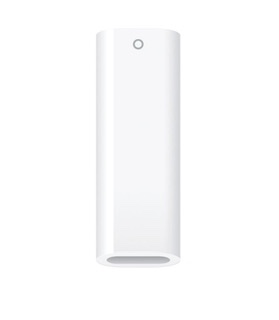
If you have the correct Pencil Adapter, it should fit perfectly. From the iPad User Guide:
Pair and charge Apple Pencil with iPad (10th generation) and iPad (A16)
- Remove the cap and plug Apple Pencil into the USB-C to Apple Pencil Adapter.
- Connect the other end of the adapter to your iPad using the USB-C charge cable that came with your iPad.

- Do any of the following:
- Pair Apple Pencil: When the Pair button appears, tap it.
- After you pair Apple Pencil, unplug it from iPad. Apple Pencil stays paired until you restart your iPad, turn off Bluetooth, or pair with another iPad. Just pair Apple Pencil again when you’re ready to use it.
- Charge Apple Pencil: Apple Pencil charges while it’s plugged into your iPad.
Tip: You can also charge Apple Pencil using the USB-C charge cable and power adapter that came with your iPad.
To be clear, you must use a USB-C to USB-C cable to connect the Pencil, via the Apple USB-C Pencil Adapter, to your iPad. The USB-C charging cable that was supplied with your iPad A16 is ideal. For clarity, you can not use a USB-C to Lightning cable to connect your first generation Apple Pencil to your iPad A16.
---
For the benefit of other readers who may have similar connection difficulties that may encounter this discussion thread...
There are two different (and easily confused) versions of Apple Pencil charging Adapter.

New first generation Pencils now ship with this special adapter in the box along with the Pencil. However, some older stock purchased from retailers may lack the USB-C to Lightning adapter - and may instead have an older Lightning to Lightning Adapter.

For owners of older first generation Pencils, or for “old stock” new Pencils, the new special adapter can be purchased directly from Apple as an accessory.
https://store.apple.com/xc/product/MQLU3ZM/A