Please bring split view back for any future updates, windowed apps is less user friendly

i want Split View on ipad back with the next software update pls🙏🙏🙏 I dont have an immediate issue to solve here i just want apple to take consumer feedback into consideration i dont know if this is the right place for it. Adjusting windows in windowed apps takes way more steps & time, zooming in & out, sliding over, compared to 3 taps on split view. I dont currently use or plan on using my ipad as a substitute for a laptop in the future & prefer the function distinctions between the two

iPad, iPadOS 26

Posted on Feb 22, 2026 12:35 PM

Reply
Question marked as Top-ranking reply

Posted on Feb 22, 2026 3:32 PM

The Apple Support Community is a user-to-user technical forum. Contributors here are all end-user, just like you. Other than the site Moderators, Apple neither monitor nor participate within the Community. As such, you comments posted here are unlikely to be seen or acted upon by Apple.


Apple invites submission of feature requests via its Product Feedback portal. For iPad and iPadOS:

Feedback - iPad - Apple


If you would like to see additional or modified functionality in a future release of iPadOS, this would be the most appropriate channel through which to make your request.


iPadOS 26 has introduced new multitasking capabilities and controls - with, optionally, Apps appearing within their own windows instead of being full-screen or appearing in side-by-side split screen. To better understand the changes, I recommend that you start with the video introduction here - and then read the remaining explanations:

Multitask on iPad with iPadOS 26 - Apple Support


iPadOS multitasking has received a significant makeover from that to which you may be accustomed in iPadOS 18.x and earlier - and may take a little time to learn and adjust your workflows. You would be well advised to review the official iPadOS User Guide and the many available online tutorials (such as YouTube) to become better acquainted with the new multitasking interface and associated gestures and controls.

Work with multiple windows at once on iPad - Apple Support

OS - iPadOS 26 - Apple


The three-dot multitasking button with which you are no doubt familiar from earlier versions of iPadOS has been replaced with the traffic-light button to access and control the revised window-based User Interface.
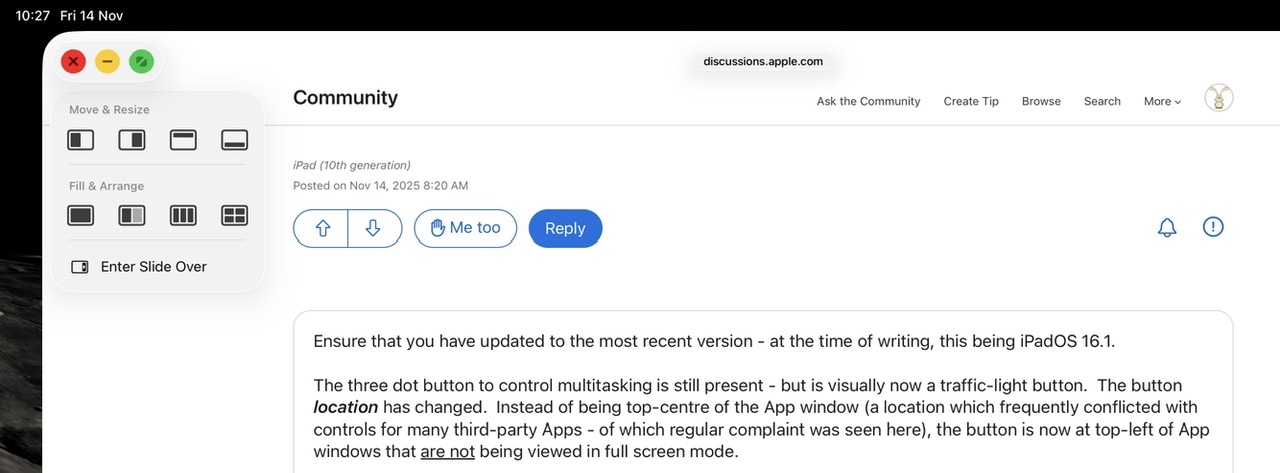


Tapping the traffic-light multitasking button expands the control - whereas touch-and-hold of the button offers the option of arranging open windows side-by-side, as a tripple, arranged into a quad - or slide-over views.


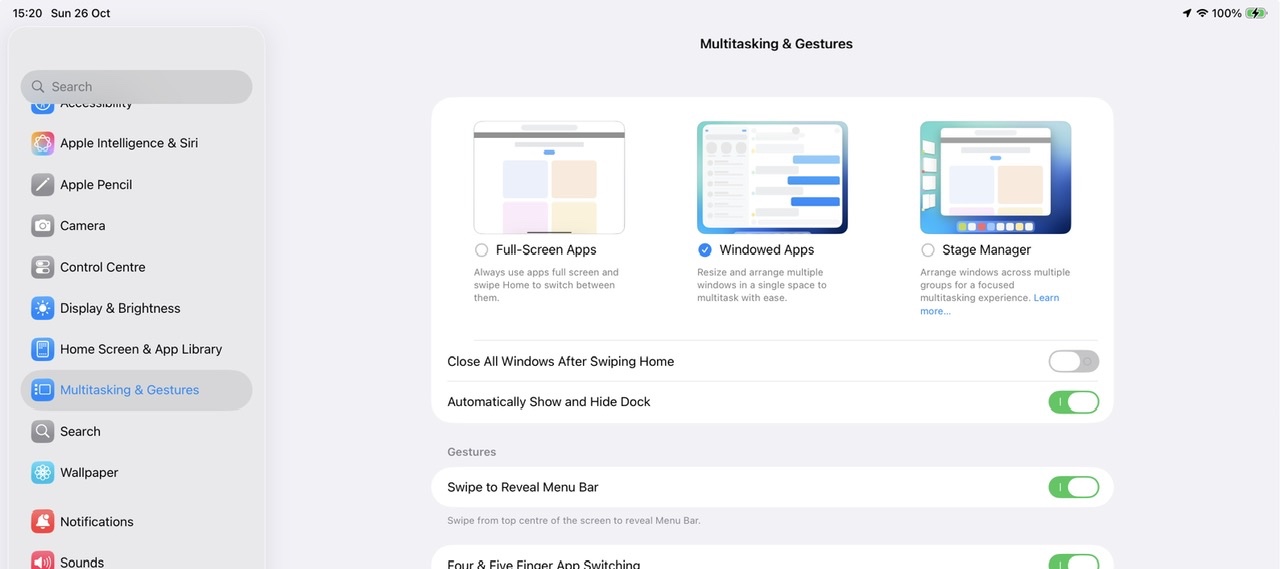
If you dislike the windowed environment, you can switch to using the basic Full-Screen App mode - but this disables all multitasking capabilities and hide the traffic-light controls; you will not be able to use split screen or slide-over modes with which you are likely familiar:

Settings > Multitasking & Gestures - select Full Screen Apps


2 replies
Question marked as Top-ranking reply

Feb 22, 2026 3:32 PM in response to soscarlet

The Apple Support Community is a user-to-user technical forum. Contributors here are all end-user, just like you. Other than the site Moderators, Apple neither monitor nor participate within the Community. As such, you comments posted here are unlikely to be seen or acted upon by Apple.


Apple invites submission of feature requests via its Product Feedback portal. For iPad and iPadOS:

Feedback - iPad - Apple


If you would like to see additional or modified functionality in a future release of iPadOS, this would be the most appropriate channel through which to make your request.


iPadOS 26 has introduced new multitasking capabilities and controls - with, optionally, Apps appearing within their own windows instead of being full-screen or appearing in side-by-side split screen. To better understand the changes, I recommend that you start with the video introduction here - and then read the remaining explanations:

Multitask on iPad with iPadOS 26 - Apple Support


iPadOS multitasking has received a significant makeover from that to which you may be accustomed in iPadOS 18.x and earlier - and may take a little time to learn and adjust your workflows. You would be well advised to review the official iPadOS User Guide and the many available online tutorials (such as YouTube) to become better acquainted with the new multitasking interface and associated gestures and controls.

Work with multiple windows at once on iPad - Apple Support

OS - iPadOS 26 - Apple


The three-dot multitasking button with which you are no doubt familiar from earlier versions of iPadOS has been replaced with the traffic-light button to access and control the revised window-based User Interface.


Tapping the traffic-light multitasking button expands the control - whereas touch-and-hold of the button offers the option of arranging open windows side-by-side, as a tripple, arranged into a quad - or slide-over views.


If you dislike the windowed environment, you can switch to using the basic Full-Screen App mode - but this disables all multitasking capabilities and hide the traffic-light controls; you will not be able to use split screen or slide-over modes with which you are likely familiar:

Settings > Multitasking & Gestures - select Full Screen Apps


Feb 22, 2026 12:45 PM in response to soscarlet

you are not talking to apple here


these forums are user helping other users like yourself, it's sort of going

to a physical apple store and asking other customers their advice


This is a user helping users with tech questions forum, we are not apple

and apple do not read your posts here


you can provide apple with feedback using their feedback channels

Product Feedback - Apple


or reach out to their official support channels

Get Support (apple.com)

And or

Contact - Official Apple Support

And or

https://www.apple.com/contact/

Or

Genius Bar Reservation and Apple Support Options - Apple


Please bring split view back for any future updates, windowed apps is less user friendly

Welcome to Apple Support Community
A forum where Apple customers help each other with their products. Get started with your Apple Account.

