Is there any USB WiFi adapter that can be passed through to a MacOS VM on my new M5 MBP?

Are there any compatible wifi adapters for Apple silicon Mac that I could pass through to a MacOS VM so it can be on a different network than the host?


I use my primary workstation for everyday business use, but need my VM's to be on my lab VLAN. This was trivial on my previous laptops (linux/mac), just pass through a USB wifi adapter. But we have a use case that I needed a Mac VM for, which meant switching to a MacBook. I didn't think something as simple as wireless networking would be a problem.


Surely someone is makes a compatible wifi adapter?

MacBook Pro 16″, macOS 26.4

Posted on Apr 18, 2026 5:43 PM

Reply
Question marked as Top-ranking reply

Posted on Apr 19, 2026 11:10 AM

<< Au contraire, all it takes is to recompile your Driver to 64-bit, and spend "less than a day" [typical] fixing any incompatibilities that causes.. >>


So in the nearly 6 years since the M1 Mac was release not one vendor was willing to spend less than a day compiling their drivers to 64 bit. Not one maker of 3rd party drivers (like chris1111), and other open source drivers have done it.


Apple did more than just change to 64 bit. The entire device driver development process changed. They switched to a microkernel, and drivers are all in userspace now rather than being kernel extensions; which is why many products are no longer supported for recent MacOS versions even on Intel Macs. Then they implemented security measures that make it harder for anyone but the hardware vendor to create 3rd party drivers. These were decisions made by Apple.


I am not saying Apple was wrong to make all these decisions, but these were decisions that were made and from what I can tell, they have not provided industry the support it needs to develop compatible drivers. Drivers exist for ARM64 Windows and Linux, but not MacOS; its more than just a recompile.


25 replies

Apr 18, 2026 8:47 PM in response to Grant Bennet-Alder

Sadly a wired connection is not an option... at least not about 50% of the time.


As far as bridge mode is concerned, I haven't had luck setting that up on this macbook, but even if I could, it would still just appear as a second device on the same VLAN. The entire point of this is that I need the VM on a different VLAN and that means a different wireless SSID.


Its insane to me that of the dozens of wireless chipsets, not one has a working Mac driver. I'm sure it's Apple's fault, the manufactures would happily expand their customer base if Apple provided the API's/framework. Such a beautiful and powerful mobile workstation hamstrung by such a silly limitation.

Apr 22, 2026 2:35 PM in response to Grant Bennet-Alder

Grant Bennet-Alder wrote:

…use an ethernet adapter to create an ethernet cable connection.
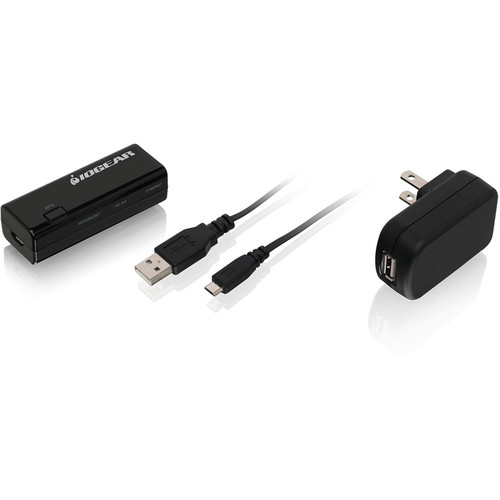
add this Wi-Fi 2.4 GHz (only) adapter with an additional USB cord for power…

Yeah, bridging was mentioned earlier.


OP has several paths to pursue this, including AirWire, device bridge switch ormdevice bridging or AP-based bridging, configuration or technical changes to UTM or to some potential alternative, or changes to the access requirements.


As for Apple enhancements (Wi-Fi driver kit, etc), here is Apple Feedback: Product Feedback - Apple


It’ll be probably two or three replies to the most recent “is it though?” OP posting, to stay within the 5K posting limit. Maybe later.

Apr 19, 2026 10:48 AM in response to 2Confuzed

<< The only logical reason is that it's too difficult to get done, and the only reason that would be is that Apple has made it difficult. >>


Au contraire, all it takes is to recompile your Driver to 64-bit, and spend "less than a day" [typical] fixing any incompatibilities that causes..


It is Not Apple's issue that these drivers have not been re-issued as 64-bit for MacOS 11 and beyond.

Apr 19, 2026 10:51 AM in response to MrHoffman

UTM, when leveraging the MacOS Virtualization Framework, can bridge a wireless adapter. But again, bridging doesn't solve the problem that I now have two Mac addresses on the same VLAN. I want to connect to two different VLANS using two different Wireless SSID's.


I'm sure using 802.1x I could assign the VLAN based on the MAC address, but that would require some major changes on the network to implement radius and all that.

Apr 22, 2026 2:49 PM in response to MrHoffman

<< Yeah, bridging was mentioned earlier. >>


The author was bristling at the complexity, power, and lack of portability of some of the more elegant solutions.


This is the simplest portable instance I was able to put together when I was researching how to get another Wi-Fi connection onto a MacBook.


it was not intended to diminish what you have suggested in any way,

only to say: "Here is the smallest, simplest portable thing that gets you another Wi-Fi, warts and all."

Is there any USB WiFi adapter that can be passed through to a MacOS VM on my new M5 MBP?

Welcome to Apple Support Community
A forum where Apple customers help each other with their products. Get started with your Apple Account.