Aside from VPNs, do you have any security Apps (e.g. Norton or MacAfee) installed on your iPad? If so, these may be interfering with your iPad's internal routing table - and may interfere with AirPrint/AirPlay and other Apple services. It may be necessary to temporarily remove such Apps from your iPad - and then perform a forced-restart of your iPad.
While restarting your iPad, a further restart of your WiFi Router may be helpful.
You’ll need to restart your network devices in the correct order. Assuming that you WiFi Router provides DNS services for your network, restart devices in this order - allowing time for devices to fully boot/restart prior to restarting other devices:
- WiFi Router
- Upstream wired Network Switch(es) (if any)
- WiFi Access Points / Network Extenders
- Other fixed infrastructure devices - such as Printers
- Client devices (your iPad)
Restarting your iPad, after restarting other devices in the correct sequence, is most simply achieved by a forced-restart of the iPad:
Force restart iPad (models with Face ID or with Touch ID in the top button)
If your iPad doesn’t have the Home button, do the following:
- Press and quickly release the volume button nearest to the top button.
- Press and quickly release the volume button farthest from the top button.
- Press and hold the top button.
- When the Apple logo appears, release the top button.

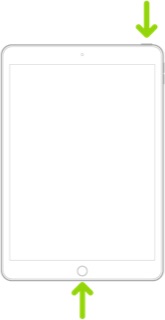
Force restart iPad (models with the Home button)
Press and hold the top button and the Home button at the same time. When the Apple logo appears, release both buttons.
If you continue to have difficulties, check to see if your iPad is using the new WiFi Private Address feature. This feature is intended to provide additional privacy and security when using “public” (untrusted) WiFi networks.
Settings > WiFi > [Your WiFi Network / SSID] - tap the “i” icon - Private Address
The Private Address feature is largely unnecessary for your home WiFi network; if enabled, Private Addressing can interfere with anticipated operation of other devices, such as AirPrint/Airplay. In such circumstances, you may need to disable this feature - and can be enabled or disabled for each individual network.
Use private Wi-Fi addresses in iOS 14, iPadOS 14, and watchOS 7 - Apple Support
If difficulties persist, your WiFi Router may be unexpectedly failing to forward Apple Bonjour traffic on you local network - or your WiFi Router or Network Switch may be blocking this (or other) device discovery protocol(s).
This issue can occur for a number of reasons. Ensure that your wired and wireless network segments are part of the same IP-subnet, are not defined as separate VLANs - or that one or other are defined as “guest” networks, or placed in a DMZ. You may find that your router has a setting that limits/restricts broadcast and network discovery traffic; by example, if your Router has an IGMP Snooping setting, try toggling this or similar settings.
Your Router WiFi settings may also have privacy settings that isolate WiFi clients from each other; if present, ensure these settings are disabled.
The Apple Bonjour protocol uses mDNS (Multicast DNS) UDP port 5353.


