What macOS version is your Mac Studio currently running...?
There are a combination things that can cause the Mac to suffer from a sleep/wake crash.
1) The macOS version. Some are more included to crash during sleep that others.
2) Allowing "Automatic sleep mode" with certain USB devices connected.
3) Allowing "Automatic sleep mode" while some processes are active.
4) Using the default Energy, Lock Screen and Network settings.
As a test
Turn On "Prevent automatic sleeping when display is off"

Set "Turn display off when inactive" to 5 or 10 minutes
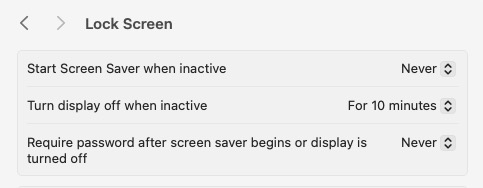
Now then:
Test manually Sleep after making the setting changes, quitting app's and removing some USB devices.
Leave the Mac Studio On 24/7 and only allowing the display(s) to turn Off after 10 min.
Shut Down the Mac Studio when your are going to be away for a day or more.
A solution may come, if enough folks send Feedback.
Feedback - Mac mini - Apple
Feedback - macOS - Apple



