Wake up issues, Mac Studio

My Mac Studio M4, 10 months old, gets stuck over night - it is on but won't wake up from sleep. After I shut it down manually it restarts for 3-4 times. And it takes much longer to load than it used to. Any suggestions? Thanks in advance.

Posted on Aug 13, 2026 12:40 AM

Reply
Question marked as Top-ranking reply

Posted on Aug 13, 2026 12:49 AM

When a mac studio  hangs overnight, fails to wake, takes multiple boot loops to recover, and loads slowly, it usually points to a corrupted power/sleep state (NVRAM/SMC equivalent on Apple Silicon), an incompatible peripheral drawing power or sending bad wake signals via Thunderbolt/USB, or a failing background software process. Because your machine is 10 months old, it is still fully covered under Apple’s standard 1-year limited warranty. 

Immediate Troubleshooting Steps

  1. Disconnect All Non-Essential Peripherals:
    • Unplug all external drives, USB hubs, SD cards, and secondary monitors, leaving only the power cord, a basic keyboard, a mouse, and your primary display.
    • Faulty external docks or drives often prevent Apple Silicon Macs from cycling properly into or out of deep sleep, causing overnight crashes and slow reboots. 
  1. Perform a Proper Power Cycle (Soft Reset):
    • Shut down the Mac completely, unplug the power cable from the back, and wait at least 60 seconds.
    • Plug it back in and turn it on. This forces the internal power management system on the  chip to clear residual fault states. 
  1. Check for Rogue Background Processes:
    • Open Activity Monitor (via Spotlight or Finder under Applications > Utilities) and look for apps or processes utilizing unusual CPU percentages or memory leaks that prevent sleep transitions. 
  1. Boot into Safe Mode:
    • Shut down your Mac Studio, then press and hold the power button until you see "Loading startup options." Select your disk, press and hold the Shift key, and click Continue in Safe Mode.
    • This clears system caches and checks the integrity of your internal SSD. Restart normally afterward.


If this is not working, you might have to have it looked after under warranty, please Contact - Official Apple Support

to set that up


4 replies
Question marked as Top-ranking reply

Aug 13, 2026 12:49 AM in response to igorvranjes

When a mac studio  hangs overnight, fails to wake, takes multiple boot loops to recover, and loads slowly, it usually points to a corrupted power/sleep state (NVRAM/SMC equivalent on Apple Silicon), an incompatible peripheral drawing power or sending bad wake signals via Thunderbolt/USB, or a failing background software process. Because your machine is 10 months old, it is still fully covered under Apple’s standard 1-year limited warranty. 

Immediate Troubleshooting Steps

  1. Disconnect All Non-Essential Peripherals:
    • Unplug all external drives, USB hubs, SD cards, and secondary monitors, leaving only the power cord, a basic keyboard, a mouse, and your primary display.
    • Faulty external docks or drives often prevent Apple Silicon Macs from cycling properly into or out of deep sleep, causing overnight crashes and slow reboots. 
  1. Perform a Proper Power Cycle (Soft Reset):
    • Shut down the Mac completely, unplug the power cable from the back, and wait at least 60 seconds.
    • Plug it back in and turn it on. This forces the internal power management system on the  chip to clear residual fault states. 
  1. Check for Rogue Background Processes:
    • Open Activity Monitor (via Spotlight or Finder under Applications > Utilities) and look for apps or processes utilizing unusual CPU percentages or memory leaks that prevent sleep transitions. 
  1. Boot into Safe Mode:
    • Shut down your Mac Studio, then press and hold the power button until you see "Loading startup options." Select your disk, press and hold the Shift key, and click Continue in Safe Mode.
    • This clears system caches and checks the integrity of your internal SSD. Restart normally afterward.


If this is not working, you might have to have it looked after under warranty, please Contact - Official Apple Support

to set that up


Aug 13, 2026 8:18 AM in response to igorvranjes

What macOS version is your Mac Studio currently running...?


There are a combination things that can cause the Mac to suffer from a sleep/wake crash.

1) The macOS version. Some are more included to crash during sleep that others.

2) Allowing "Automatic sleep mode" with certain USB devices connected.

3) Allowing "Automatic sleep mode" while some processes are active.

4) Using the default Energy, Lock Screen and Network settings.


As a test


Turn On "Prevent automatic sleeping when display is off"


Set "Turn display off when inactive" to 5 or 10 minutes
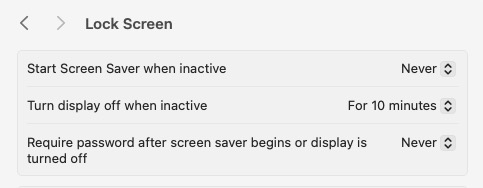


Now then:

Test manually Sleep after making the setting changes, quitting app's and removing some USB devices.

Leave the Mac Studio On 24/7 and only allowing the display(s) to turn Off after 10 min.

Shut Down the Mac Studio when your are going to be away for a day or more.


A solution may come, if enough folks send Feedback.

Feedback - Mac mini - Apple

Feedback - macOS - Apple

Aug 13, 2026 11:50 AM in response to igorvranjes

igorvranjes wrote:
My Mac Studio M4, 10 months old, gets stuck over night - it is on but won't wake up from sleep. After I shut it down manually it restarts for 3-4 times. And it takes much longer to load than it used to. Any suggestions?

That almost sounds like a macOS update patch may be installing. With Tahoe, the system will have about 4 soft restarts while installing the update patch before the last hard restart which will have the startup chime as well.


Wake up issues, Mac Studio

Welcome to Apple Support Community
A forum where Apple customers help each other with their products. Get started with your Apple Account.


