iPad Remote / Home Sharing IP Address Doesn't Match

Hi Guys,

I am trying to set up home sharing on my iPad and iMac, I have checked both devices and although they are on the same wireless network they have slightly different IP addresses, I have tried manually entering the details however this hasn't worked. How can I make the two devices IP address correspond so that they can "talk" with each other and create a home sharing network?

iPad, Mac OS X (10.6.4)

Posted on Nov 23, 2010 1:46 PM

Reply
19 replies

Nov 23, 2010 1:50 PM in response to AHF

Each device on a LAN has its own IP address. If the software requires you to enter an IP address for the device with which you are creating a connection then it will be the IP address of that device. You can get a list of IP addresses by logging onto your Router. Of course at the time of making the connection both devices must be logged onto the LAN and visable to each other.

Nov 23, 2010 1:58 PM in response to AHF

Thanks for your reply, the annoying thing is that in order for the home sharing to work both devices must be on the same IP yet that doesn't seem to be possible. I will happily admit to IP's and that sort of thing being a bit outside of my level of comprehension. Any advice on how I can get these devices to share the same DHCP?

Nov 23, 2010 2:03 PM in response to AHF

I think you have made a wrong assumption but I am happy to be corrected I am unaware that two seperate and distinct devices would share an IP address on a LAN. What you might have to do is log on to the Router and release the IP addresses for each device and have the router [an automatic process]re-allocate them. Dependant upon the configuration of your router the IP address in all likely hood will either start with 10 or a 192 number. My iPhone on the LAN for example is 10.1.1.6 and the iPad 10.1.1.8 and the Mac 10.1.1.10

Nov 23, 2010 2:12 PM in response to AHF

in order for the home sharing to work both devices must be on the same IP

This is incorrect. They must be on the same LAN (Local Area Network). If they are the same IP address, it will mess up the LAN and nothing will work.
I will happily admit to IP's and that sort of thing being a bit outside of my level of comprehension

An IP address is simply a specific, unique address for a device (such as 208.16.231.12)
Any advice on how I can get these devices to share the same DHCP?

DHCP is *Dynamic Host Configuration Protocol*. This is how IP addresses are issued to devices wanting to connect on the LAN.
In this case the router will dole out an IP address to each device connecting to the LAN and keeps track of who is who.

As long as the devices are connecting to the same router, everything should work fine.
I am trying to set up home sharing on my iPad and iMac

You can't Home Share to your iPad.
If you are using Remote on you iPad, you can use your iPad to control iTunes on your iMac which can in turn be home shared with another computer.
You can't stream or transfer songs (using iTunes Home Sharing) to your iPad.

Nov 23, 2010 2:11 PM in response to AHF

Thanks for the reply, I logged on to my router and checked the settings. Both are on their own IP address (iMac is XXX.XXX.X.110 and the iPad is XXX.XXX.X.109), I have played about with the settings but I'm unable to get them on the same address so my guess is that it's not possible.

So I guess my question is - how are you supposed to set up Home Sharing (which requires the same IP address) if your devices are not allowed to share a connection?

Nov 23, 2010 2:20 PM in response to Chris CA

Ah I see, that's where I have been mistaken. Trying to connect the iPad via "Remote" app is still not working however, instead all I have is a message saying "Remote will automatically find the iTunes libraries and Apple TVs that have Home Sharing turned on using the account myemail@myemailaddress.com".

Any ideas?

Nov 23, 2010 2:36 PM in response to AHF

Wifi is connected on the iPad, it's the same wifi connection as my iMac.

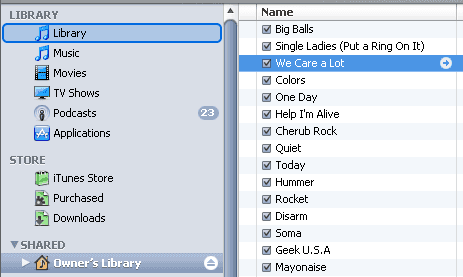
I think it may have something to do with Home Sharing, as the sharing tab does not appear on my iTunes side menu. I followed the advice on this thread ( http://discussions.apple.com/thread.jspa?threadID=2153176&tstart=0) but the problem persists. In short, the iPad is not showing as an shared device on my iMac's iTunes panel because there is no "Shared" tab (like this one - http://www.technipages.com/wp-content/uploads/2009/09/itunes-drag-shared-files.p ng). I don't know what the cause of the issue is, but it's quite annoying that it's not working when it should be so simple!

Nov 23, 2010 3:21 PM in response to AHF

This is likely related to the fact that when I am using my home internet connection I cannot use any of the "use my current location" features on any app (such as Maps etc). I asked at the Apple store about this issue a few months ago but they said I should contact my ISP. I called my ISP and they said I should take it up with Apple.

So frustrating to have such a wonderful device and not be able to use it to its maximum potential.

Nov 23, 2010 6:30 PM in response to AHF

My understanding is that 'my current location' used by an application installed on a iPhone/iPad is based on the triangulation of 3G Transmitters assisted by GPS. So if you have 3G and Location Services aka GPS disabled then my guess is it won't work.
There is also an assumption that you are also subscribed to a iPhone Data Plan rather than just a Mobile Phone Plan. In this part of the world iPad users with 3G and Wi-Fi can subscribe to a 3G Data Plan on its own.

Also in this part of the world my guess is that most iPhone users may be on what we a Cap Plan which includes a number of Phone Calls at an agreed value plus SMS plus MMS plus data for a fix monthly amount. You need to check with your ISP if you have a data plan what your monthly allowance is and how much you have currently used before the next billing cycle.

Nov 23, 2010 6:40 PM in response to adnixon

'my current location' used by an application installed on a iPhone/iPad is based on the triangulation of 3G Transmitters assisted by GPS

actually, it's the other way around. Assisted gps means it gets location data from cell towers first which helps speed up getting the gps coordinates.
And if the iPad is not 3G with gps, it uses the coordinates of the router (based on Skyhook data) to get location data.
There's no need for a 3G signal to get location data.

This thread has been closed by the system or the community team. You may vote for any posts you find helpful, or search the Community for additional answers.

iPad Remote / Home Sharing IP Address Doesn't Match

Welcome to Apple Support Community
A forum where Apple customers help each other with their products. Get started with your Apple Account.