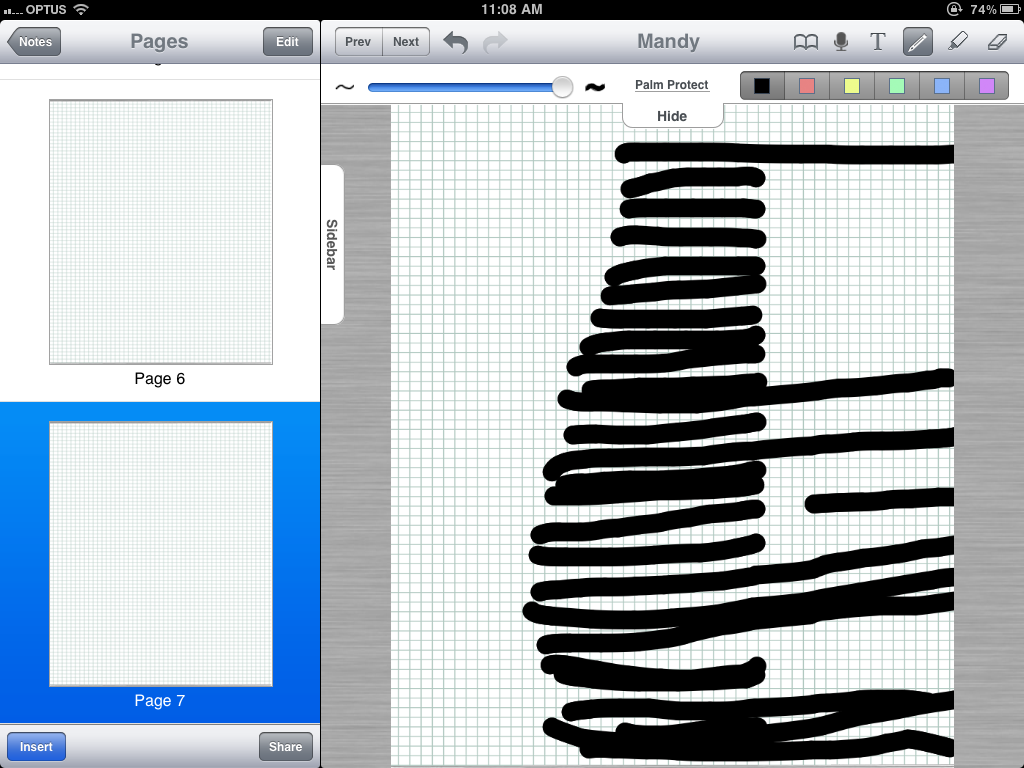
iPad Screen possible "Dead" Area.

I've noticed lately that my iPad may have a possible "dead" area. It seems more like a vertical area. I noticed it because when I drag apps in my home page, whenever I come across this area, it either gets dropped, or reverts back to its original position, as if I let go of the screen.

Also, I came to notice it when I use dragging apps (some games especially). Whenever I drag my finger across the screen (to move something for example), it always gets cut off in that same area even if I continue dragging my finger.

My screen is clean, I always keep it covered and wipe off dust. My iPad hasn't fallen or such either. There's no visible damaged mark around that area either.

What should I do? Should I bring it to the Apple store?

Thanks so much for the help!

Sony VAIO S Series, Windows 7

Posted on Feb 3, 2011 3:20 PM

Reply
14 replies

Feb 3, 2011 3:56 PM in response to EllyIdol

Yeah - I'd have it back asap.

You can make an appointment to take it back by clicking on this link:

http://www.apple.com/au/retail/sydney/

Once it opens the page - on the right side of the screen you'll see the Genius Bar logo and underneath it it says reserve..well, click on that - then > iPad > next >then pick a date and time etc and sign in with your Apple ID. You'll get a confirmation email to your inbox.

Always best to book as they will be busy...especially if it's a long journey.

Best of luck with it.

Ricky

Feb 3, 2011 4:30 PM in response to EllyIdol

Awesome! I didn't know I'd have to book an appointment. Thanks for the tip 🙂

Yup, the one in the city looks pretty nice 🙂 I like the NY one better though.

Btw, if it helps, I took a photo of how it might look and which area in the iPad : http://i365.photobucket.com/albums/oo96/bryantioliu/IMG_0015.png

I went from left to right, and as you can see the shorter lines is where the dead area is. Some were able to go through, most couldn't. It stretches up vertically.

Jan 17, 2012 3:53 PM in response to EllyIdol

Were they able to fix or replace your iPad? I too am having this same issue with my iPad2. I've only had it since August 2011 and just recently developed this problem. After calling Apple (since I dont have a store close by) they assured me they would just send a replacement. Today I get an email telling me that upon inspection they dertermine that its from accidental damage or miuse and they are shipping it back to me unrepaired because this is not covered. No ifs, ands, or buts about it. So now I dont know what to do. And the only way to contact them is to call, its not like you can communicate through email if you have to. I'm so frustrated.

Apr 10, 2012 7:13 AM in response to AmySJ

my ipad 2 microphone stopped working (quite a common fault according to these forums). They wouldnt repair it despite it being less than a year old because of some unrelated cosmetic damage to the dock. So even though dock works perfectly well and they're not actually saying the microphone not working as a result of accidental damage....they still dont have to fix it for me. AWFUL. Overnight they've managed to complete change my view and opinion of this company due to being treated like that....

This thread has been closed by the system or the community team. You may vote for any posts you find helpful, or search the Community for additional answers.

iPad Screen possible "Dead" Area.

Welcome to Apple Support Community
A forum where Apple customers help each other with their products. Get started with your Apple Account.