1 item could not be synced. See iTunes for more information

After syncing my iphone 4 ios 5 with itunes the following message appears ''1 item could not be synced. See iTunes for more information''.

Everything seems to be synced however is there a way to find any information that itunes could not sync?

Posted on Oct 15, 2011 12:07 AM

Reply
100 replies

Oct 15, 2011 9:29 AM in response to SebHartmann

I had the same problem when syncing photos to my iPad 2. the iPad reported 6 items couldn't sync and to check iTunes for info, but iTunes reported no problems. Currently 8 photos aren't syncing to my iPad and I have no idea which ones, though from the folder counts it appears to be ones I took on my iPhone 3GS (all which used to sync fine under iOS 4.3.5)


There doesn't appear to be a way to find out what's not syncing or why.

Oct 16, 2011 1:30 PM in response to SebHartmann

This might not work for everybody, but... I noticed that right before the sync chokes, iTunes is processing photos. Likely, I figured, there's a discrepancy in what iTunes thinks is there and what actually is. An effective way to solve this issue (without obvious help from Apple / iTunes / iOS) is to remove the 'iPod Photo Cache' folder that's within the iPhoto Library on your synching system.


So, on my Mac, I navigated to my Pictures folder, right-clicked (or Control-clicked) the 'iPhoto Library' icon, selected 'Show Package Contents,' then scrolled until I saw the 'iPod Photo Cache' folder, selected that folder and deleted it. I then restarted iTunes to re-initiate a sync.


That seemed to resolve the "[n] tems could not be synced. See iTunes for more information." problem for me (which was occurring on my iPad 2 and iPhone 4S equally). Might work for you, too.

Nov 1, 2011 5:55 AM in response to lironl

I just got the 1 item could not be synced message again.


The following things happened between yesterday and today, any of which may be pre-requisites for the message to appear:


a) An auto backup to iCloud took place

b) Updates to some apps on the iPhone took place


During the sync, the updated apps were transferred from the iPhone to the PC.


Here is a picture of iTunes after the sync. This shows another problem: the iPhone is plugged into the PC and the iPhone displays the green battery screensaver whenever required, but the power icon that should be next to the eject icon (circled) is missing. Also note that there is no additional icon, as mentioned in a previous post, that may indicate the additional details of the error.

User uploaded file

Nov 5, 2011 6:30 AM in response to JuanD

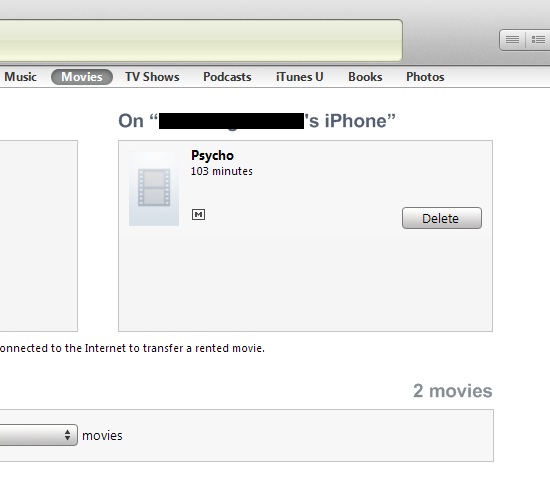
I've found the item that cannot be synced. It's an expired rental movie that still appears on my iPhone. However, every time I delete the movie, and do a sync, it comes back. I've tried differernt things but the deleted movie always comes back.


Here is the deleted movie.

User uploaded file

Note that the movie expired months ago.


If I delete the movie, and click apply, the movie goes away. But if I click Sync, it comes back.


If I select set up iTunes to sync movies, or to not sync movies, this doesn't help. If I set up iTunes to manually manage music and videos on the device, this doesn't help either. No matter what I do, the movie always comes back.


Nov 30, 2011 5:10 PM in response to lironl

Hi lironl,


This is an extremely odd situation! Your guess is as good as mine.


However, I think this might work. First, backup your iphone's content to your itunes/icloud/wherever else you backup your information to. Then, restore your iphone (link on how to do this is here: http://www.apple.com/support/iphone/assistant/phone/#section_5) If this doesnt work, than you need to contact itunes/apple/iphone support.


Hope this helps.

Oct 15, 2011 5:41 PM in response to SebHartmann

I also have the problem on my new 4S. The issue for me was originally a song that would not play on the phone (time scale does not advance and just sits at "0"). I thought perhaps it might be corrupted in memory, so I sync'd once to remove it (plus the whole album), and again to restore. That's when I received the error message. Afterwards, only 5 of the album's 16 songs were on the phone.


Since the album was purchased on the itunes store, I deleted the songs from itunes on my desktop and re-downloaded them from the store. All 16 songs went back on my desktop itunes fine, but once again syncing the whole album to the phone resulted in the error message ("1 item could not be synced. See iTunes for more information''), and only 5 songs transferring to the phone.


Any of this ring true for other folks?

Oct 16, 2011 7:30 AM in response to SebHartmann

120 items for me. I have another iPhone 3GS (my wife's) and an iPad 2 that are fine, but my new iPhone 4S will not fully sync. Also, I have two Apple IDs, one my gmail account (original) and the other my mobileme account (mobileme was a mistake). Anyhow, since I've moved everything to iCloud I'm trying to use the me.com account for everything, but i have had each account on the phone with no luck. This is frustrating... I think I'm going to wipe the phone and start all over!!

Oct 16, 2011 7:33 AM in response to thomaslgregoryjr

This is what I do, right click one of those files, click get info. itunes will then complain that it can't find the file and it will ask if you want to locate it, say yes. navigate to the file, click ok. then itunes will ask if you want to use that location to find you other missing files. provided your other files are in the same location, click yes and it will find them all.

Oct 16, 2011 8:46 AM in response to SebHartmann

I had the same problem but after a while of random clicking I noticed a new "alert" icon on the device titlebar within iTunes (between the charging icon and the eject icon). When i clicked on it I was told the file there was a problem with. In mycase it was a single .MOV file which could not be played on the phone. I was then given the opportunity to "ignore" any future warnings about that file and the problem went away.


David

Oct 16, 2011 1:12 PM in response to SebHartmann

After the iOS 5 install on my iPad2, I received an "8 items not synced" message. Scouring iTunes revealed no further information or warnings. I can't tell which items didn't sync and, with 21 GB of photos, movies, music, apps on my iPad, looking for the non-syncing items would be worse than searching for the proverbial needle in the haystack.


Could this be a conflict-catcher new to iOS 5? Whatever the little glitch, it seems that Apple forgot some documentation. 😮 If Apple can't provide a list of missing files, even a message about why the files didn't sync might give us a clue for where to look....

This thread has been closed by the system or the community team. You may vote for any posts you find helpful, or search the Community for additional answers.

1 item could not be synced. See iTunes for more information

Welcome to Apple Support Community
A forum where Apple customers help each other with their products. Get started with your Apple Account.