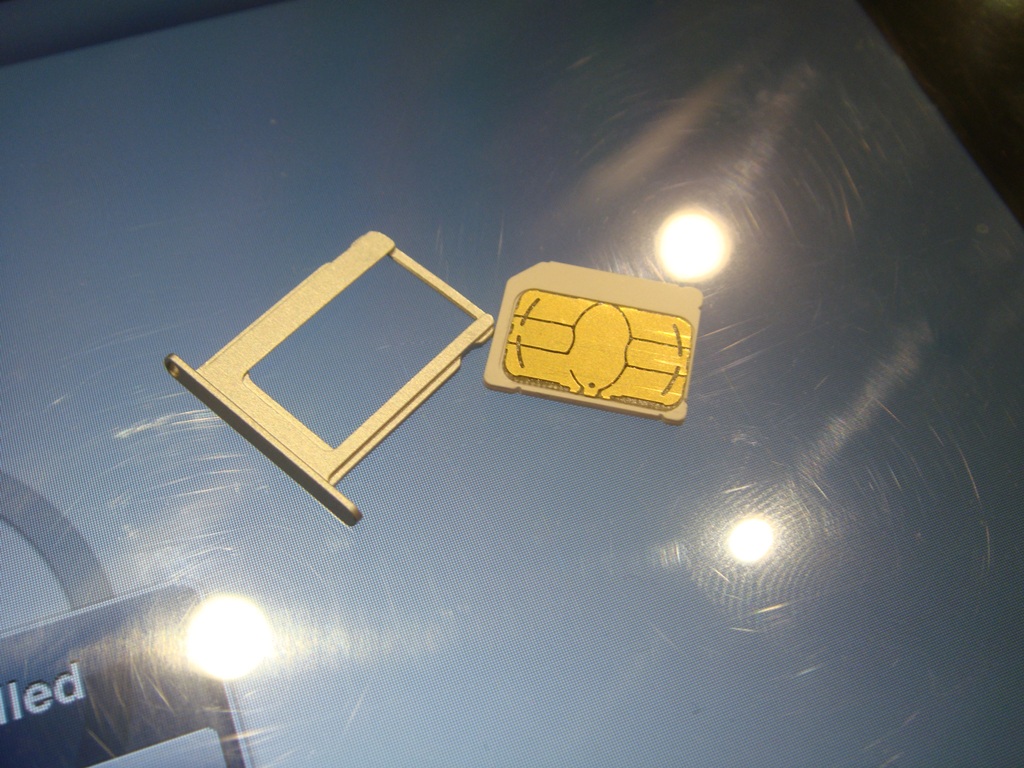
Sim Card Failure No Sim with iPhone 4S Anyone Else?

Got the new 32GB iPhone 4S today from AT&T, activated the phone was working all morning, I started experimenting with Siri and a couple minutes later the phone was hotter than usual and I get Sim Card failure, and Bad SIM messages. The phone now only says No Sim. I get home take out the SIM card and put it in my previous iPhone 4 and it works just fine. I then put in a blank micro SIM into the new iPhone 4S, but it still says NO SIM. Thinking the SIM reader got fried some how already.


Anyone else have this problem maybe a bad batch out there, or I just got an unlucky lemon?


I made an appointment for the genius bar tomorrow, but I seriously doubt they will have replacement stock of the 4S already. Guess I will find out what my next course of action will be tomorrow trying to get a replacement since new orders are taking 30 days to ship I am afraid I will have to wait awhile to enjoy the new features of my already paid for phone 😟

Posted on Oct 15, 2011 1:53 AM

Reply
1,365 replies

Jul 21, 2012 10:19 AM in response to magazan

Hi magazan,


Your situation is unusual.


Unusual because from postings in this forum it is not common to see an iPhone functioning properly through all this mess that started when the iPhone 4S was released last fall and THEN start to show the SIM problem almost 9 months later.


It appears you have tried all the less intrusive stratagies that have given some users relief. The only missing thing you could do (which I do NOT recommend doing right now as it is quite time consuming) is to first backup your iPhone and THEN do a reset. I won't go into the details of this right now b/c, as I said, it would not be my choice for a next step.


As unusual as your situation is, some things are relatively common and I believe help us to chose your next step. For reasons I do not know, Orange has been mentioned in this discussion forum quite a bit with regard to SIM problems. I do not live in the UK and am not familiar enough with Orange to know why this is so. But, those Orange customers who have had SIM problems have frequently found relief by having Orange swap out their current SIM card replacing it with a NEW 128K micro SIM card. I know. I know. You have heard this a 100 times. But, the fact remains that the iPhone 4S is very particular with regard to the state of affairs of the SIM card being used and what type it is. I don't know how old your current SIM card is. Was it brand new when you bought your iPhone 4S? Was it transferred from a previously owned phone? No matter, SIM cards do go bad and it is possible that has happened to yours. I would go to Orange, explain all you've already done to troubleshoot this problem, look exhasperated, explain that other Orange customers have solved their problem by replacing the SIM card (use this forum as proof although hopefully that will be unnecessary) and stand your ground until they replace your SIM card with a brand new 128K micro SIM card. I am sounding a bit defiant and aggressive here and I don't want to imply that you will have problems getting Orange to replace the SIM card. Much more often than not things have gone smoothly with Orange. But, you may get a salesperson on a bad day. Don't take no for an answer.


If that doesn't work, then you really need to start to suspect your iPhone and it would be time to ask Apple for an exchange. You could mess with this problem forever and that is not fair. Take advantage of Apple's reputation for good customer service and get a replacement phone. You are clearly within your 1 year warrantee period.


But, because replacing the SIM card is relatively painless I would absolutely go that route first.


By the way, you mentioned the hope that someone from Apple is monitoring this forum and might post a coherent reply or response. I have never seen that happen. I am sure Apple has their reasons for pursueing this strategy. I am pretty sure I would not like their response! Be that as it may, these forums are for Apple users to share their experiences and for other Apple users to offer assistance if they can. Obvioulsy, someone from Apple is monitoring these posts. I am sure if I unleashed a tirade of ungentlemenly language here, the post would be removed by a moderator from Apple. But, that's the extent of Apple's involvement as far as I can tell.


There is an Apple Feedback site where customers can share concerns with Apple. I don't think that would be of much help to you in this situation since the SIM problem appears to be relatively conquered as of this date. However, for future use, this is the link to the feedback site:


http://www.apple.com/feedback/


Please do let us know how things turned out for you as that would be of help to future users of this forum.


And Good Luck! Mr. Luigi

Nov 23, 2011 6:35 PM in response to robsdoghouse

Hi Everyone,


I finally solved the problem without replacing my 32GB iPhone 4S. I live in Argentina so there's no way to return the phone here. The solution was to get a bigger SIM and cut it. The bigger SIM looks different from the microsim.


The symptoms were:

  • Could make calls for a little while (~1 min).
  • After that, couldn't make or receive calls, send or receive texts but I did have 3G.
  • When people tried calling me the got silence instead of directly going to voicemail.
  • When trying to make a call, I got silence and after a while the call failed. After the call failing, the network went into Searching... and then it re-acquired the network.
  • Locking and unlocking the SIM sometimes failed or took 15 seconds.
  • After ~6 hours without use, I would get the Invalid SIM / SIM failure message.


I tried the following solutions and none worked:

  • 3 different microsims (they all looked the same)
  • isolating different parts with tape
  • resetting network settings
  • restoring the device


The microsims that didn't work looked like this one.


User uploaded file

The new SIM looks similar to this one but without the "parenthesis" on the left and right.


Perhaps we should create a picture database of the microsims or sims that work and the ones that don't to see if there's a pattern.


Hope this post helps!

Jan 5, 2012 9:52 AM in response to robsdoghouse

Hi Adamtha!


Thanks for your idea... i just did a somewhat the same with yours...


What TO DO:

  • REMOVE your SIM
  • Connect your iphone to iTunes

(using your USB cable, it should syncautomatically)

  • DO the FULL RESTORE
  • After the full restore, your iphone will RE-START/ REBOOT
  • Once RE-STARTED, you may notice that it will try to connect to iTunes
  • Your iPhone may ask you to insert your SIM (you iTunes will askyou also)… so you may now INSERT your SIM
  • Then REGISTER your iPhone and do the SET UP as NEW IPHONE
  • Finally DISCONNECT your iPhone from iTunes


Try sendingsms now… I just did this and mine is working now and under observation. If your regular network signal is not so stable, try also to turn your CELLULAR DATA ON….(but try to modify your APN if your not in an unlimited data plan, so that youwill not be charged for your 3G connection)


I hope thisprocess will work also for you


MyLocation: Philippines

SIM USED:Smart


thanks again adamtha!

Oct 15, 2011 4:44 PM in response to robsdoghouse

Yep, mine has done it twice this evening, Sat (day after release day).


I was gonna go to the apple store but if it's happening to a few people i'm guessing it might be a service/software issue.


I'm going to a camping trip so i won't have an apple store near by but I guess a pin will have to do since doing so fixed the No Sim right away..


I feel sorry for verizon/sprint users. :-/


Let's keep an eye on this.. i'm sure there will be a software patch soon.


**** 32GB White 4S for AT&T*****


is this only happening to 32GBs?

Oct 15, 2011 5:57 PM in response to robsdoghouse

This is the original poster, after having it powered off all night as I go to take it to the genius bar this morning, I decided to try the SIM one more time and low and behold it worked again, despite multiple attempts the day before, I don't know whats going on, but for the time being its working, but I am having to keep my spare iphone 4 and a paper clip around me at all times as I am not confident it was a fluke based on how many others are also experiencing this.


My advice for now would be to power it off and let it cool down then try it again, only explanation I can think of for it working this morning. We will see I guess moving forward if this happens again or if there is a way to recreate the problem.

Oct 16, 2011 1:19 AM in response to robsdoghouse

I got issue's with sim card here in UK! I bought 2 handsets one for my other half and hers is fine but my one keeps giving me the no service message and needs reboot! Only reconnects for a short time if at all then goes again. I have checked with the network provider and no problems there so I am suspecting this is some thing to do with the sim contact points though the sim is rock solid in my partners 4s! I should add that I don't think this is a shielding issue like the dreaded Death grip! I will be ordering a replacment sim and if it is no better will be returning the handset!

Oct 16, 2011 2:53 AM in response to robsdoghouse

I am in the UK and got an unlocked iPhone 4S delivered on the release day. I know Virgin Mobile do not support theiPhone family, yet, for over a year, I have been using an iPhone 4 very successfully with my Virgin Mobilesim card. I used a micro sim card cutter to trim it to the required size and it has worked fine until now.


On the iPhone 4s release date I had been waiting, excitedly, for the phone to arrive, having ordered it a week ago. Why? The faster processor and the virtual assistant, Siri.


I followed the instructions to transfer everything from the old iPhone4 to the new iPhone 4S. Took out the old sim and put it in the newphone. For a moment everything worked fine. I made a test call, no problem. After five minutes the message SIM FAILED appeared and then, in the provider space INVALID SIM.


Has anyone else had this issue? There must be others using iPhones on Virgin, here in the UK.


I called Apple. They had no clue what might be wrong. I called Virgin Mobile, who said my sim card may be too old and they will send me a new one.


I tried another Virgin (known to work) sim in the phone and it did the same thing. I wonder if all new iPhone 4S's are going to have this incompatibility or do I just have a duff one?


To recap, the sim still worked perfectly in the old iPhone 4 and I have not jailbroken either one.


Virgin then cancelled my old sim card, so I went out and bought a 'pay as you go sim' until the new one arrives. Latest design and it does the same thing. It did work a bit longer (about 25 minutes) and I had time to make a call and send a couple if SMS messages before the phone said invalid sim.


Took it out and put it in the old 4 and it works fine.


This is too much aggro and taking up so much time, I may just keep using the old one and send the 4S back. Not decided yet.

Oct 16, 2011 3:34 AM in response to R. McPanse

Got my iphone 4s black 32gb on day of release, activated SIM and within 2 hours of setting up phone, I had "SIM failure" message on my screen. Switched phone off and on and worked for a while. I have now reset phone (on Apple's advice) and a replacement sim is on its way from Orange. Will see if another sim causes the same problems and, if so, I am going straight back to the store next weekend. For £600, I do not expect this kind of hassle.


I think this problem is more widespread than we realise and its probably a software issue. Apple needs to act fast on this one.


I would be interested to know if others have taken their phone back to Apple and the explanation given.

This thread has been closed by the system or the community team. You may vote for any posts you find helpful, or search the Community for additional answers.

Sim Card Failure No Sim with iPhone 4S Anyone Else?

Welcome to Apple Support Community
A forum where Apple customers help each other with their products. Get started with your Apple Account.