iPhone 4S 5.0.1 Update Improves Battery w/ Settings Reset

After installing the update make sure you reset all setttings. I have done a few updates now and have had much better sucess after settings reset all. Standby drain has been virtually eliminated from 2-4% hr before update. It is located in settings/reset//reset all settings. You loose some wifi and desktop settings, but data, apps, etc remain intact.

Posted on Nov 11, 2011 5:33 PM

Reply
1,080 replies

Nov 16, 2011 6:54 PM in response to davidch

Thanks Davidch. My battery life seems to have improved alot. For you, here are my stats after my reset and full recharge after a full drain.


Usage: 3 hrs, 24 minutes

Standby: 2 days, 10 hrs

Current battery level: 17%


After thoughts:

Much improved after Davidch's fix, but I am still not impressed by my first iPhone's battery life. Apple people, if you are reading this, my 4th Generation iPod Touch battery life and my old, first-generation iPod Shuffle battery life (and still going) are stellar and is what I am comparing my new iPhone's battery life to. It would be AWESOME if iPhones were designed to have the same great lifespan between charges. I know that this is still better than a lot of other branded smartphones, but still, I expect (and usually get) a lot from Apple. Thanks for not releasing a 4G phone prematurely until battery life improves.


Steve Jobs is the man.

Nov 16, 2011 7:11 PM in response to davidch

davidch wrote:


sfiomenb,


that is probably a good idea. tell them the steps you have gone through. sorry it didn't work out. i am hearing that the are working extremely hard on this and should have annother update shortly that would not require my process. i am not sure that it would fix you issue which maybe the actual battery. good luck

I really wish it worked, and what is even more upsetting is that your method worked for basically everyone else except me.


Thank you, and everyone else who tried to help me, for your aid.


I hope the people at the Apple Store will know what's wrong with my phone. Do you know what would happen if it is a defective battery? Would they just replace the battery on MY phone? Or would I get a whole new phone? Would they be able to do this in the time I am at the store, or would it take a few days?

Nov 16, 2011 7:17 PM in response to sflomenb

sflomenb wrote:


davidch wrote:


sfiomenb,


that is probably a good idea. tell them the steps you have gone through. sorry it didn't work out. i am hearing that the are working extremely hard on this and should have annother update shortly that would not require my process. i am not sure that it would fix you issue which maybe the actual battery. good luck

I really wish it worked, and what is even more upsetting is that your method worked for basically everyone else except me.


Thank you, and everyone else who tried to help me, for your aid.


I hope the people at the Apple Store will know what's wrong with my phone. Do you know what would happen if it is a defective battery? Would they just replace the battery on MY phone? Or would I get a whole new phone? Would they be able to do this in the time I am at the store, or would it take a few days?


it hard to say what they will do for sure if it is a defective battery. the battery is farily easily replaceable with the right tools, but they may just replace the whole phone for you. good luck and let me know how it works out.

Nov 16, 2011 7:23 PM in response to Matt+

Matt+ wrote:


Thanks Davidch. My battery life seems to have improved alot. For you, here are my stats after my reset and full recharge after a full drain.


Usage: 3 hrs, 24 minutes

Standby: 2 days, 10 hrs

Current battery level: 17%


After thoughts:

Much improved after Davidch's fix, but I am still not impressed by my first iPhone's battery life. Apple people, if you are reading this, my 4th Generation iPod Touch battery life and my old, first-generation iPod Shuffle battery life (and still going) are stellar and is what I am comparing my new iPhone's battery life to. It would be AWESOME if iPhones were designed to have the same great lifespan between charges. I know that this is still better than a lot of other branded smartphones, but still, I expect (and usually get) a lot from Apple. Thanks for not releasing a 4G phone prematurely until battery life improves.


Steve Jobs is the man.


your battery results look good to me. it is very difficult to get a iPhone battery to perform like an iPod primarily because of the phone capabilities. the phone portion has to continually communicate with the carrrier network (i.e. waiting for call, etc to come in). the 3G protocal makes it even worse due to the data demands etc and currently 4G is much worse. glad it worked out for you and to your last comment... yes he was something else 🙂

Nov 16, 2011 7:33 PM in response to tylerfrombatavia

tylerfrombatavia wrote:


The update won't even load on iTunes for me it gets all the way to the end and ten says I lost the network connection. Do you or anyone know how to fix this? Please help! It took all te music of my iPod touch 4g and also says that I dont have any room available on my iPod touch whe I barely have anything on it, please help!!!

Are you running Windows with an Anti-Virus program running? Sometimes this can cause that problem. Disable the Anti-Virus or firewall program temporarily and try again. If successfull, be sure to turn it back on afterwards. good luck!

Nov 16, 2011 8:04 PM in response to davidch

Well here's a summary of my day today. I unplugged at 11pm last night and left the phone overnight. When I woke I was at 99% after 6hours. I turned on Time Zone to see if I would notice any difference in battery drain, to my surprise things were normal. Anyway I took the subway to work, listen to a 20 min pod cast while in a no signal area and once I got to work I left my phone on stand by. This was the result by then:
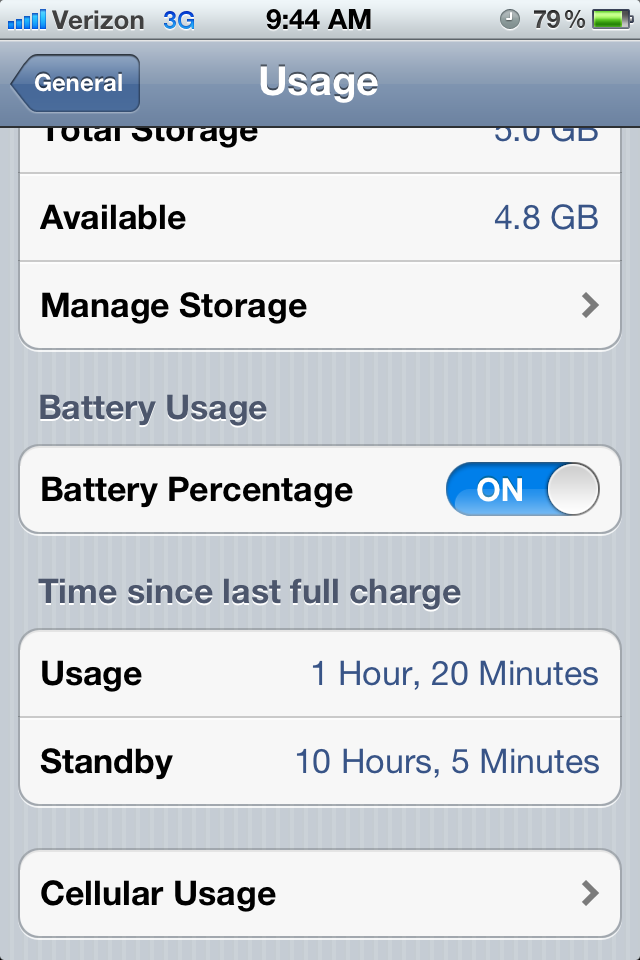

User uploaded file


Moving along, I left work at around 3, for the whole day I was basically texting on and off, around 10 msgs and the rest was stand by. Here is the picture after that:
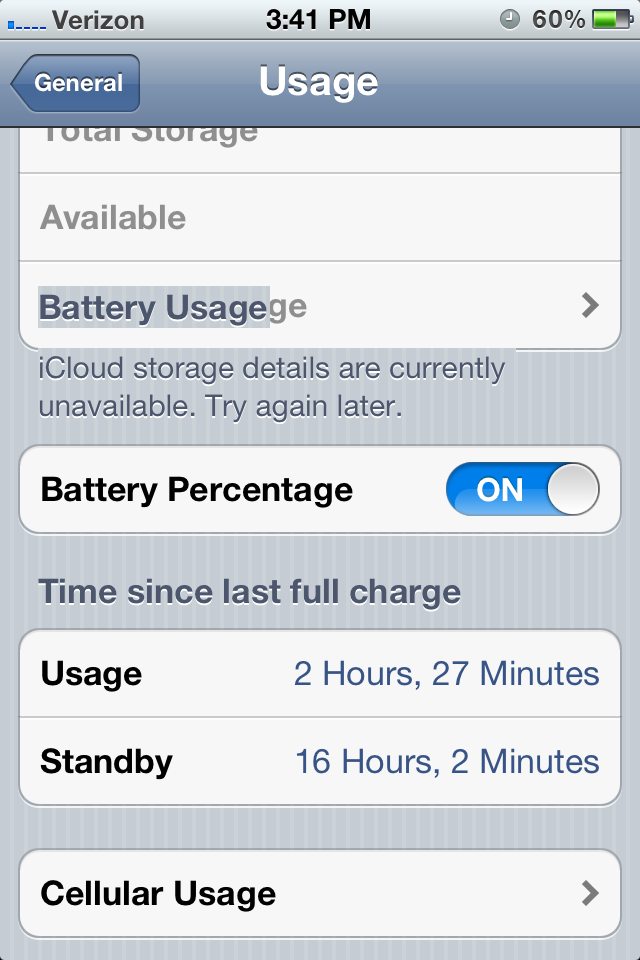

User uploaded file


I was in the basement where signal was patchy and lost a good 5% in 10mins. Anyway I left work on my way to class listening some songs via Bluetooth and catching up on some news:
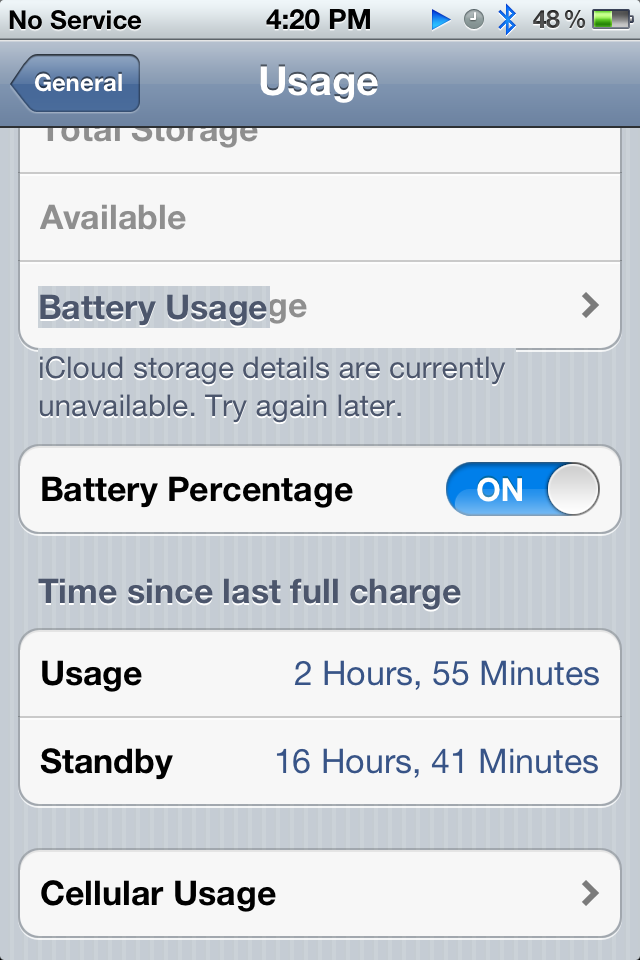

User uploaded file


I thought this was a big drop, considering the radio should be asleep when it says "No Service" ..After class I started to head home, again listening some music via bluetooth only:
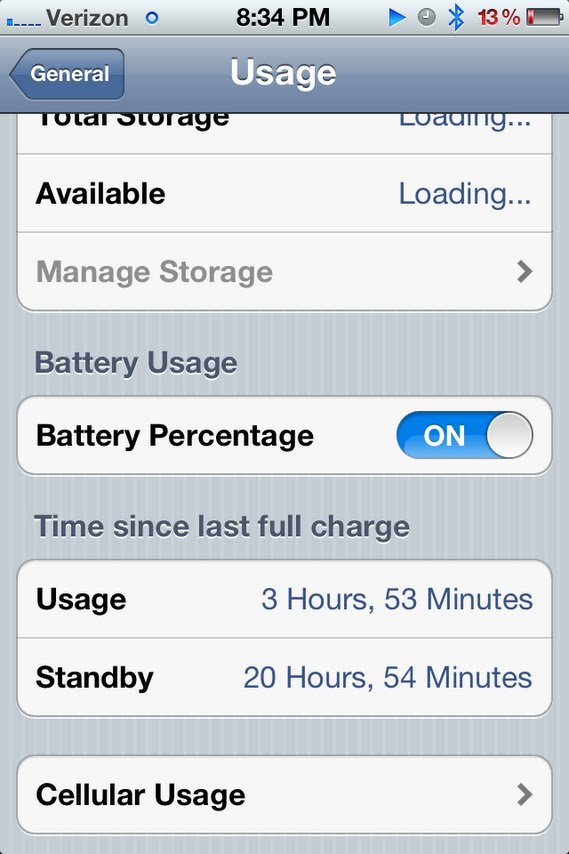
User uploaded file


Battery was now dropping like a rock basically. Not sure why. By the time I reach home I was at 1%..cont to pt2

This thread has been closed by the system or the community team. You may vote for any posts you find helpful, or search the Community for additional answers.

iPhone 4S 5.0.1 Update Improves Battery w/ Settings Reset

Welcome to Apple Support Community
A forum where Apple customers help each other with their products. Get started with your Apple Account.