How to connect Cinema Display A1081 to Mac Mini 2009

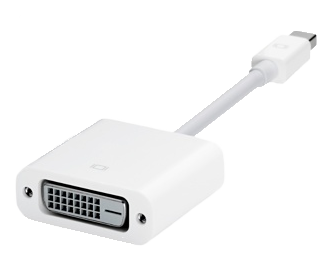
This may seem an obvious question but the problem is that I am currently abroad, having bought a Mac Mini to replace my very old PowerMac G4, so I cant check if the cable that currently connects the old machine to my Cinema Display will also fit into the new Mac Mini.


Any help or suggestions are gratefully received.

Mac mini, Mac OS X (10.7.2), 20 Inch Cinema Display A1081

Posted on Dec 20, 2011 5:35 AM

Reply
3 replies

Dec 24, 2012 12:03 PM in response to FrenchAlain55

Just other users here, no replies from Apple itself. 🙂


Besides the included adapter working, there's a MDP to DVI adapter you can buy...


http://store.apple.com/us/product/MB570Z/B/mini-displayport-to-dvi-adapter


http://km.support.apple.com/library/APPLE/APPLECARE_ALLGEOS/HT3382/HT3382_4-mdp_ dvi_adapter--001-mul.png


Video Card:HD Graphics 4000VRAM Type:Integrated
Details:This model has an Intel HD Graphics 4000 graphics processor that shares memory with the system.


Also see: What type of video system is provided by the Aluminum Mac mini models? Which are integrated and which are dedicated? Can the video be upgraded?
Standard VRAM:512 MB*Maximum VRAM:512 MB*
Details:*Apple quietly reports that with 4 GB of RAM installed, this model uses 512 MB of RAM for graphics. With additional RAM installed, more RAM may be reserved for graphics use.
Display Support:Dual DisplaysResolution Support:1920x1200*
Details:*This model simultaneously supports 1920x1200 on an HDMI display or a DVI display using the included HDMI-to-DVI adapter and 2560x1600 on a Thunderbolt or Mini DisplayPort display or even a VGA display (with an optional Mini DisplayPort-to-VGA adapter, which is compatible with the Thunderbolt port).
2nd Display Support:Dual/Mirroring*2nd Max. Resolution:2560x1600*
Details:*This model simultaneously supports 1920x1200 on an HDMI or a DVI display (using the included HDMI-to-DVI adapter) and 2560x1600 on a Thunderbolt or Mini DisplayPort display or even a VGA display (with an optional Mini DisplayPort-to-VGA adapter, which is compatible with the Thunderbolt port).

http://www.everymac.com/systems/apple/mac_mini/specs/mac-mini-core-i5-2.5-late-2 012-specs.html

This thread has been closed by the system or the community team. You may vote for any posts you find helpful, or search the Community for additional answers.

How to connect Cinema Display A1081 to Mac Mini 2009

Welcome to Apple Support Community
A forum where Apple customers help each other with their products. Get started with your Apple Account.