Hello Fruhulda
Trying to replace Carriage Return or Paragraph Break doesn't matter here.
The app behave the same in both cases except that if we apply [ Replace ] with a Carriage return selected when we ask to Find & Replace Paragraph Break, it will be replaced.
Don't worry but I wish to repeat that what is really odd is that :
the button is named [ Find & Replace ]
the related menu items are all named Find…
the dialog is entitled Find & Replace
and when we trigger [ Find & Replace ], it replace the selection before searching
CAUTION, I write using the litteral translation of the French items.
The English User Guide use :
Replace All
Replace
Replace & Find
Checking in the French User Guide, I discover that it use also Replacer et Rechercher
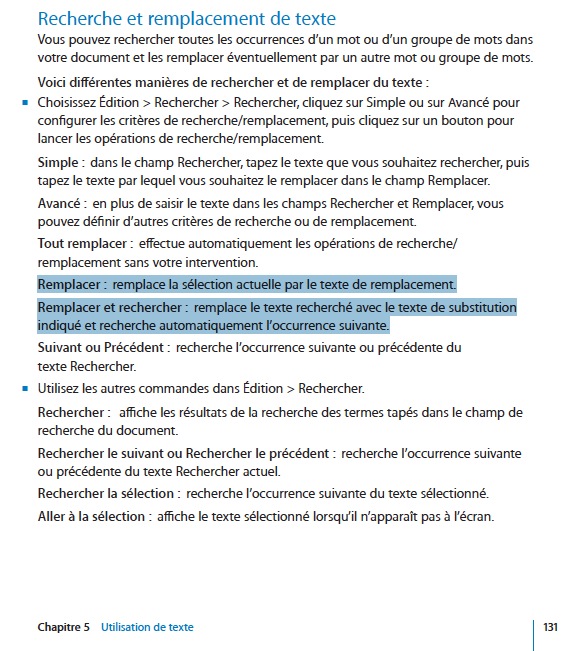
But in the application, the button is named [ Rechercher et remplacer ]
It's odd.
I'm a bit anxious because, even if I don't retrieve it, I remember that I wrote a report about an inconsistency. Pages.
In iWork '08, the Find/Replace French dialogs were :
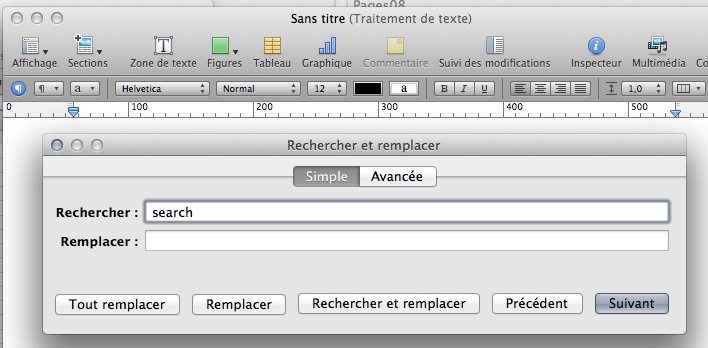
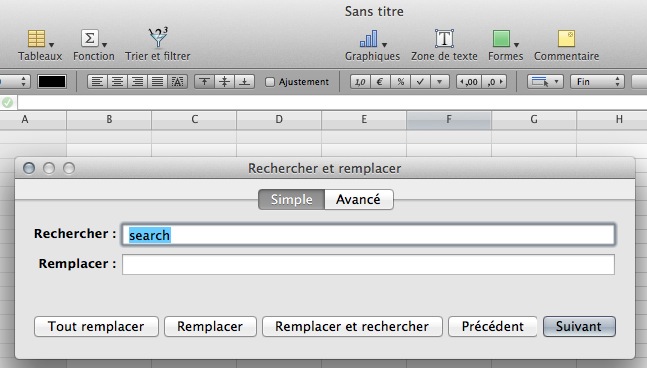
As you see, one used Rechercher et remplacer while the other use Remplacer et rechercher.
My memory tell me that I wrote something like "change in the first or change in the second doesn't matter but change in one" which was really a bad idea.
As I don't retrieve such report in my archives, I'm not sure that I really filed it.
I will go to the radar area.
If I really made this error, I will send apologies and ask them to move back in iWork '12 !
Yvan KOENIG (VALLAURIS, France) lundi 26 décembre 2011 12:03:51
iMac 21”5, i7, 2.8 GHz, 12 Gbytes, 1 Tbytes, mac OS X 10.6.8 and 10.7.2
My iDisk is : http://public.me.com/koenigyvan
Please : Search for questions similar to your own before submitting them to the community
For iWork's applications dedicated to iOS, go to :
https://discussions.apple.com/community/app_store/iwork_for_ios


