Is there a way to remove all carriage returns from a selection of text?

Hi all,


I have a selection of text that I have copied in from Google Translate. The problem is that the text has inserted carriage returns at the end of every line from Google Translate which makes reading somewhat cumbersome.


Is there a way to select a section of text and then apply a command to remove all carriage returns from the selection?


Thanks in advance!

iMac, Mac OS X (10.7.2)

Posted on Dec 28, 2011 5:08 AM

Reply
17 replies

Dec 28, 2011 10:00 AM in response to fruhulda

fruhulda wrote:


Yvan, you are mixing apples and pears. I didn't say anything about that the application would behave differently if using paragraph break instead of carriage return. It was a tip to the OP because the two characters look the same and it might be that the OP doesn't get desired result wen using carriage return in Find and Replace.

It seems that I understood wrongly but I really doubt that the OP's problem was linked to the nature of the character. Return or Paragraph Break in the "Find" field then click [ Replace ] or [Replace & Find ] delete the selected block in both cases.


What is the behavior of the french Rechercher et remplacer? Does it Find first and then replace or vice versa? Can't it just be a typo?


It does what is written in the User Guide : it Replace then Search/Find as it does in other versions.

It seems that I didn't file the report described in my late message. Not only it's not in my archives but I didn't find it in my reports in Apple's radar area. Ouf 😉


Yvan KOENIG (VALLAURIS, France) lundi 26 décembre 2011 12:03:51

iMac 21”5, i7, 2.8 GHz, 12 Gbytes, 1 Tbytes, mac OS X 10.6.8 and 10.7.2

My iDisk is : http://public.me.com/koenigyvan

Please : Search for questions similar to your own before submitting them to the community


For iWork's applications dedicated to iOS, go to :

https://discussions.apple.com/community/app_store/iwork_for_ios

Dec 29, 2011 7:03 AM in response to KOENIG Yvan

Hello


(1) To be sure, I reinstalled iWork from the original trial version.

The button is really named [ Rechercher et remplacer ].


(2)
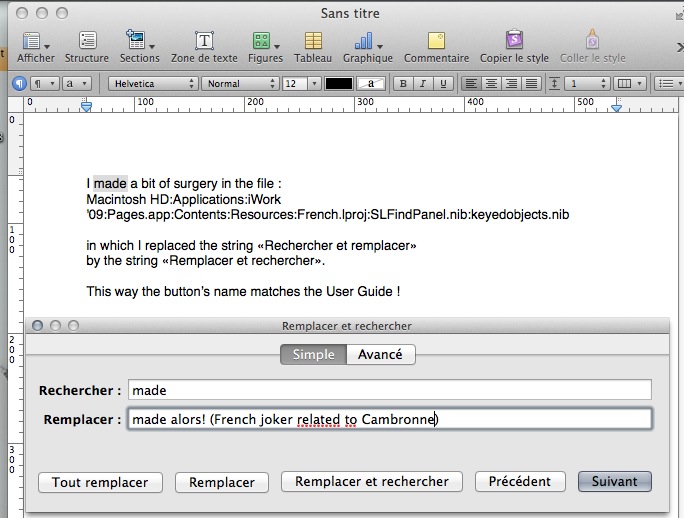
User uploaded file

Now I have a button matching the user guide.

If you look carefully at the screenshot, you may see an interesting detail.

The spell checker doesn't apply to the text body (it mix French and English so the spell checker ruled by Pages would be underlining some words) but it strikes in the dialog.

It's because, as was pointed some times ago, the main code of the dialog is a system one so, it's the System which rule the checker so, it apply in the text fields.

For those whose memory failed, the fact that the main code opf this dialog belong to the System was stated to explain why we retrieve the text firlds contents when we switch between several applications.

It's a bit surprising the first time we face this behavior but, as it's logical, with practice we become accustomed to it.


As you may see, the string is the same in the dialog's title and in the button. It's a bit annoying.

Now, it's time to apply the same surgery in the Numbers and the Keynote dialogs.


Yvan KOENIG (VALLAURIS, France) jeudi 29 décembre 2011 12:03:51

iMac 21”5, i7, 2.8 GHz, 12 Gbytes, 1 Tbytes, mac OS X 10.6.8 and 10.7.2

My iDisk is : http://public.me.com/koenigyvan

Please : Search for questions similar to your own before submitting them to the community


For iWork's applications dedicated to iOS, go to :

https://discussions.apple.com/community/app_store/iwork_for_ios

This thread has been closed by the system or the community team. You may vote for any posts you find helpful, or search the Community for additional answers.

Is there a way to remove all carriage returns from a selection of text?

Welcome to Apple Support Community
A forum where Apple customers help each other with their products. Get started with your Apple Account.