kurt188 wrote:
That is the only one; there are no incoming and no outgoing ports to be able to set a number into a box: I don't see SMTP ports, nor SMTP-SSL ports.
Yes, you do. But you can't access them until after you first setup the account; then you get to select Mail's Preferences->Accounts->Account Information tab and use the 'Server Settings…' button to set those options. Here's a screen shot of that window:
It is sort of a vicious circle as I cannot actually setup the account completely. Nevertheless, I insisted and these are screenshots of what mail shows:
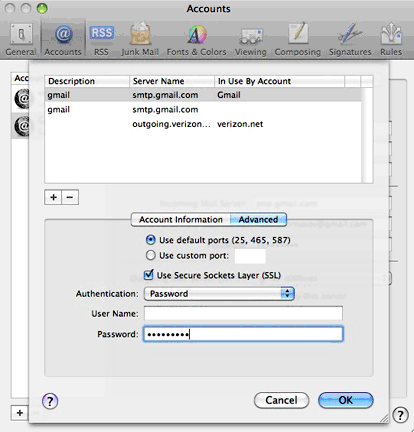
Account information is the same as shown on my previous response screenshots: POP
As you can see, I used the default ports, but the final result was exactly the same: gmail does not go online.
(BTW, I don't know why 2 gmail accounts are shown when there is only one I want to activate: I keep deleting those which do not work.)
When I try to send a message using gmail, I get the "Enter password for account...", I check "Remember this password in my keychain", click OK, and get the same again and agin; gmail stays offline.
This I read on Mail Help:
If the mail server rejects your user name and password
There can be several reasons why your user name and password aren’t accepted by a mail server.
Try these solutions:
Make sure you’re typing your mail account password, and not your Mac OS X user account password or email service provider password (if these passwords are different).
Passwords are case-sensitive. Make sure you’re entering uppercase and lowercase characters where needed.
Verify your account name and password in Mail preferences (choose Mail > Preferences and click Accounts). If your email service provider offers web mail (email access via a web browser), try using your account name and password to access web mail. If your account name and password look correct but you can’t access web mail using them, or you don’t have web mail, contact your provider to confirm the information.
I can access gmail from a browser with the same password I use in trying to set up gmail on mail, so this is not the problem.
What about the cerrtificate whose identity mail cannot verify?
Could it possibly be related to a problem with the OS in my computer?
Possibly, but without knowing what those problems were, I couldn't say with any degree of accuracy.
- computer boot time too long: over 50 seconds for the apple logo to show up, then another 10 seconds for the wheel to spin; total time about 1 minute 50 seconds; this doesn't happen when booting from an external FW HD
- sleep does not start when i click it; must click up to 3 times for the computer to go to sleep
- mail notifications, and other default actions set by me —such as ignore when a blank CD is inserted— do not respond
- beach ball spin in many applications, sometimes even in Finder; I've installed more memory a bout a week ago to a total of 8GB but beachball still happens as if nothing had changed
- fonts settings keep changing; followed Kurt Lang's recommendations for keeping fonts to the minimum OS X requires, plus some that I want to use; I get them all back on
- some folders disappeared
- I get "recovered file folders" after starting a new session
- these conditions happen with my account and with a guest account
- an over 50GB folder that I had to copy from the internal to the external FW HD on one occasion (because a back up of the internal HD would have replicated the problems on the external) gave me a totally empty folder after about one hour spent "copying" nothing at all.
I removed Mail and all its associated files, and reinstalled it from the install DVD.
Don't do that. It will not solve any problem, but it will take lots of time.
OK, in the future.
I don't have any further information you may need.
Again, thank you so much.