🙂 Many thanks. We've got damaged installation configuration information for ASU then.
Download the Windows Installer CleanUp utility from the following page (use one of the links under the "DOWNLOAD LOCATIONS"  thingy on the Major Geeks page):
http://majorgeeks.com/download.php?det=4459
To install the utility, doubleclick the msicuu2.exe file you downloaded.
Now run the utility ("Start > All Programs > Windows Install Clean Up"). In the list of programs that appears in CleanUp, select any Apple Software Update entries and click "Remove", as per the following screenshot:
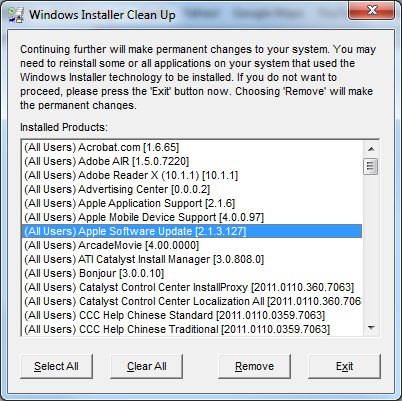
Quit out of CleanUp, restart the PC and try another iTunes install. Because your ASU won't be functional again until we get a fresh copy installed, you'll need to get the iTunes installer from the Apple Website (the install using the iTunesSetup.exe from there should reinstall ASU):
http://www.apple.com/itunes/download/
Does the iTunes install go through properly this time?

