apple tv ethernet connection not working
Connected my new Apple TV to the ethernet cable and it doesn´t show the network available to connect to internet.
Am I missing some step ?
Thanks
AppleTV 2, iOS 5
Connected my new Apple TV to the ethernet cable and it doesn´t show the network available to connect to internet.
Am I missing some step ?
Thanks
AppleTV 2, iOS 5
I have the exact same issue as others have listed here with an ATV3 purchased about a month ago. I also am using a brand new Airport Extreme. MacBook Pro hooked up to the Ethernet is great, but ATV thinks its connected to the Ethernet whether it is or isn't, and all cases it says it's cant connect to the Internet. I have tried and researched everything short of going to the Apple store. IS THERE A FIX FOR THIS?
Not that I've seen. I posed this months ago and Apple hasn't lifted more than a finger other than to give me some home router 101 stuff which has nothing to do with my issue. I won't buy another one of their hobbies. Only the real money maker devices that they actually support.
this is a JOKE. i have Apple TV and my Ethernet port has stopped working...right after the update. i cannot stay connected to Netflix or any internet for more than a few minutes. WiFi works, but not as fast obviously.
Help!!!
Mind was still under warranty so I took it to the genius bar. Their best tech - who I've seen do great stuff before - was baffled. The odd thing was that it wouldn't draw power through a USB connection as it should. He thought it meant the bridge had gone bad and so the unit thought the Ethernet was always plugged in and power wasn't transferring. They replaced it. So, not very satisfying for this forum since it doesn't sound like a broad sort of fix.
"mine," not "mind."
Same exact problem down to the tee. And I'm going nuts trying to figure out what went wrong. This all happened when Time Warner came out to replace my modem and found that it was a static IP issue with my wireless router. He fixed that but then simultaneously, Apple TV couldn't connect. So I thought it was a TCP/IP issue but after restarting, restoring, re-configuring and jacking straight into the modem, no luck. I'm begging to think it's a hardware failure.
I have this exact same problem on an Apple TV 2, never had a single days worth of problem. Out of the blue it would not work on Ethernet, even now, I can force the device to get a WiFi configuration by plugging an ethernet cable in and restarting the device, but it has degraded to the point that it will only hold the config for about 10 minutes then its back to 169.x.x.x network settings. Very frustrating indeed.
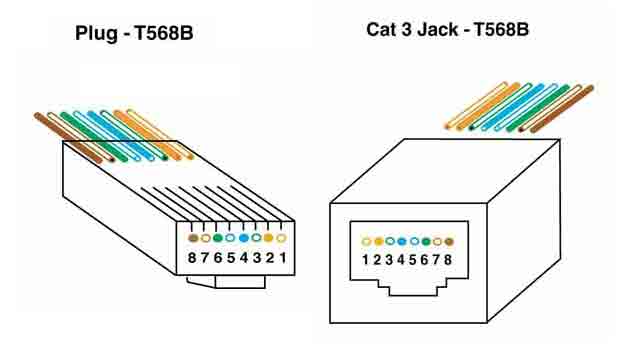
Maybe a solutions you can use: today I discovered my ATV2 refuses to work with UTP unless I use a *broken* UTP cable. At first I thought my original cable was broken untill I discovered one particular cable was working.
That cable is a plain T568-B UTP cable with wire 5 broken. My ATV2 works fine if I use that cable.
http://www.thefoa.org/tech/ref/premises/plug-jack.jpg
Edit: wire 5, not 4.
Message was edited by: Pastinakel
I had the same problem. Make sure ethernet is fully plugged in.
Did you fix the problem?? I have the same problem with my apple tv 3
Yes. The ethernet plug was not seating all the way in. Once I made sure of that, it was just the issue of re-setting the device. Everything works fine now.
i cannot fix mi apple tv yet.
ISSUE
After the latest software update, my Apple TV2 has stopped recognizing any form of network connectivity and appears to believe that it's connected to the network via an ethernet connection, whether or not there is one actually plugged into the back of the device.
BACKGROUND
I echo many of the previous posts... I've had Apple TV2 for over a year with no difficulties. Ethernet and wireless connections have always worked. For the last 6 months the Apple TV2 has been hardwired via my ethernet connection with stellar results. However, after the recent software upgrade, I've lost all network connectivity. Apple TV2 will no longer recognize the same ethernet connection it's always been attached to. This is the same connection that has always allowed me to watch iTune movies, Netflix and download/install all previous software updates. Worse yet, when the ethernet connection is unplugged from the back of the device, Apple TV2 believes it is still connected to the ethernet cord, as if it's stuck, and WiFi functionality does not kick in.
TROUBLESHOOTING
This specific issue has nothing to do with the actual "network" so I am kindly asking people to stop recommending that we check our network/router settings and ethernet cords. Apple TV2 is designed to automatically activate its wireless function when an ethernet connection is not recognized. It's should be pretty obvious to anyone who is tech savvy that there is something wrong with the device and not the network, with respect to the specific aforementioned symptoms.
STEPS
I'm sure the latest software update worked for the majority of all Apple TV2 owners. Anything could have gone arwy during the update that could have caused this specific issue to present itself. Either way, there are enough folks with the same complaint to warrant a deeper dive of the issue. My next step will be to jailbreak the device since I have nothing to lose at this stage... it's a simple paperweight until I find a solution.
SOMEONE COULD FIX THIS PROBLEM ???? I have an apple tv 3G and i can't fix it
Change your DNS settings to 8.8.8.8 worked for me.
Exactly the same fault with mine (ATV 2) as described by MartinARG31 above.
Only says Ethernet connectivity - even when no cable is in. Don't get a choice of WiFi.
Changed my DNS to 8.8.8.8 and restarted but no difference.
Must be some problem in the machine opposed to all of us being stupid....
apple tv ethernet connection not working