Welcome to Apple Support Communities.
"Simple"? Not exactly...
This older discussion details the steps to use Unicode entry.
https://discussions.apple.com/thread/1899290?start=0&tstart=0
Open , System Preferences, Hardware, Keyboard allows you to check the box, 'Show Keyboard and Character Viewer in menu bar'. This step gives you quick access to your chosen Keyboard defaults in the menubar.
Open , System Preferences, Personal, Language & Text, to checkmark the Unicode Hex Input box. This permits you to use Unicode for quick(er) special character entry, provided you know the hex equivalent of the desired character(s), listed in the character tables.

With the Unicode Hex Input enabled, hold down the alt/option key and type 2032 (the Unicode decimal number) for the prime symbol ′.
Within the Characters table, save your favorites by clicking the 'gear' button at the bottom left of the Character table, then you can quickly find them and press the 'insert' button in the lower right. 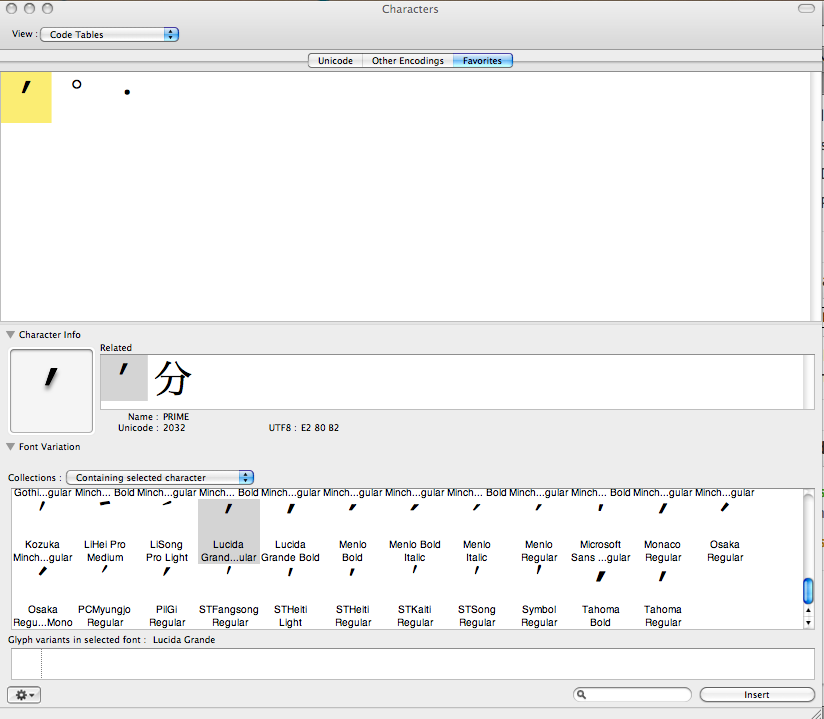
Note that the prime character appearance changes with the font in use, and probably is not available in every font.


