Is there any way to hide certain artists/albums in my iTunes library from Home Sharing?

Is there any way I can hide some of my music from other people, like my sister, while they are accessing my iTunes library with Home Sharing?


I have a few personal recordings that I don't want anyone but me to have access to.


Is deleting them from my library the only option?

Windows XP

Posted on Apr 23, 2012 9:42 PM

Reply
2 replies

Apr 24, 2012 2:43 PM in response to Neverlanddreamer

It's not an ideal solution ... but have you considered creating a second library (called, say, "Private Library") containing just the personal recordings?


To create the private library, hold down the shift key while launching iTunes. Click "Create Library" in the dialog that comes up.


Once you've created and opened the "Private library", don't activate home sharing for it. Now go "Edit > Preferences". In the "Advanced" tab, select "Copy files to iTunes media folder when adding to library", as per the following screenshot:


User uploaded file


... and click OK.


Now add the personal recordings to the Private Library.


To get back to your original library, quit iTunes. Hold down the Shift key while launching iTunes ... but this time click the "Choose library" button. Browse to the iTunes library file for your original library and doubleclick that. You should now be seeing your original library.


Delete the personal items from your original library.


Now, in order to see those recordings in iTunes, all you have to do is do a "Choose library" when launching iTunes, and open Private library. Because Home sharing isn't activated for Private library, your sister won't be able to access those recordings. (She won't be able to access your original library either, though, when you have Private library running.)


Sep 20, 2016 7:27 PM in response to Neverlanddreamer

late reply but I had this question myself and found the answer on Apple's website:


https://support.apple.com/en-us/HT201779


Music Sharing

Music Sharing allows you to stream music with little to no setup. If you don't put a password on your shared iTunes library, anyone on your network can see your iTunes library, the library name, and its contents.

You must have iTunes open on your computer for other people to see your shared library and playlists. Sharing is intended for personal use and works only with computers on the same home network.

  1. Open iTunes.
  2. Mac: From the menu bar at the top of your computer screen, choose iTunes > Preferences.
    Windows: Press the Control and B keys on your keyboard to open the iTunes menu bar. Then choose Edit > Preferences. Learn more about menus in iTunes for Windows.
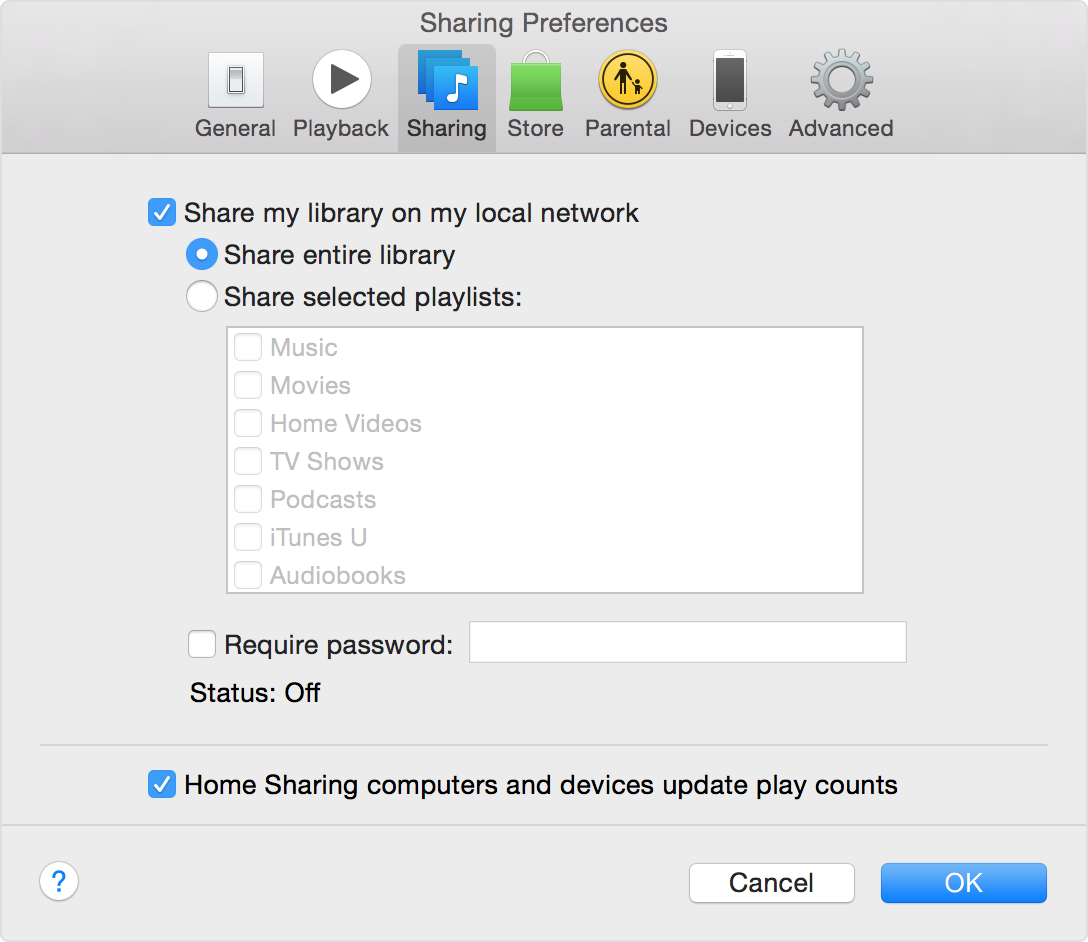
  3. Click the Sharing tab.
  4. Select “Share my library on my local network."
    User uploaded file
  5. If you want to restrict access to your library, you can password protect it. Select “Require password” and then enter a password in the box.
  6. Click OK.

Your shared iTunes library appears in the Shared section in the upper-right corner of iTunes. Anyone on the same home network can see and access your music. If you selected "Require password," but didn't enter a password, only your library name can be seen.


Very easy.

This thread has been closed by the system or the community team. You may vote for any posts you find helpful, or search the Community for additional answers.

Is there any way to hide certain artists/albums in my iTunes library from Home Sharing?

Welcome to Apple Support Community
A forum where Apple customers help each other with their products. Get started with your Apple Account.